

Edits, an Instagram app
Instagram (Meta Platforms, Inc.) · Video
Edits is a free video editing app from Instagram for creators who shoot vertical video. It handles 4K export, AI animation, green screen and an AI assistant that reads your Reels performance.
About Edits, an Instagram app
What Is Edits
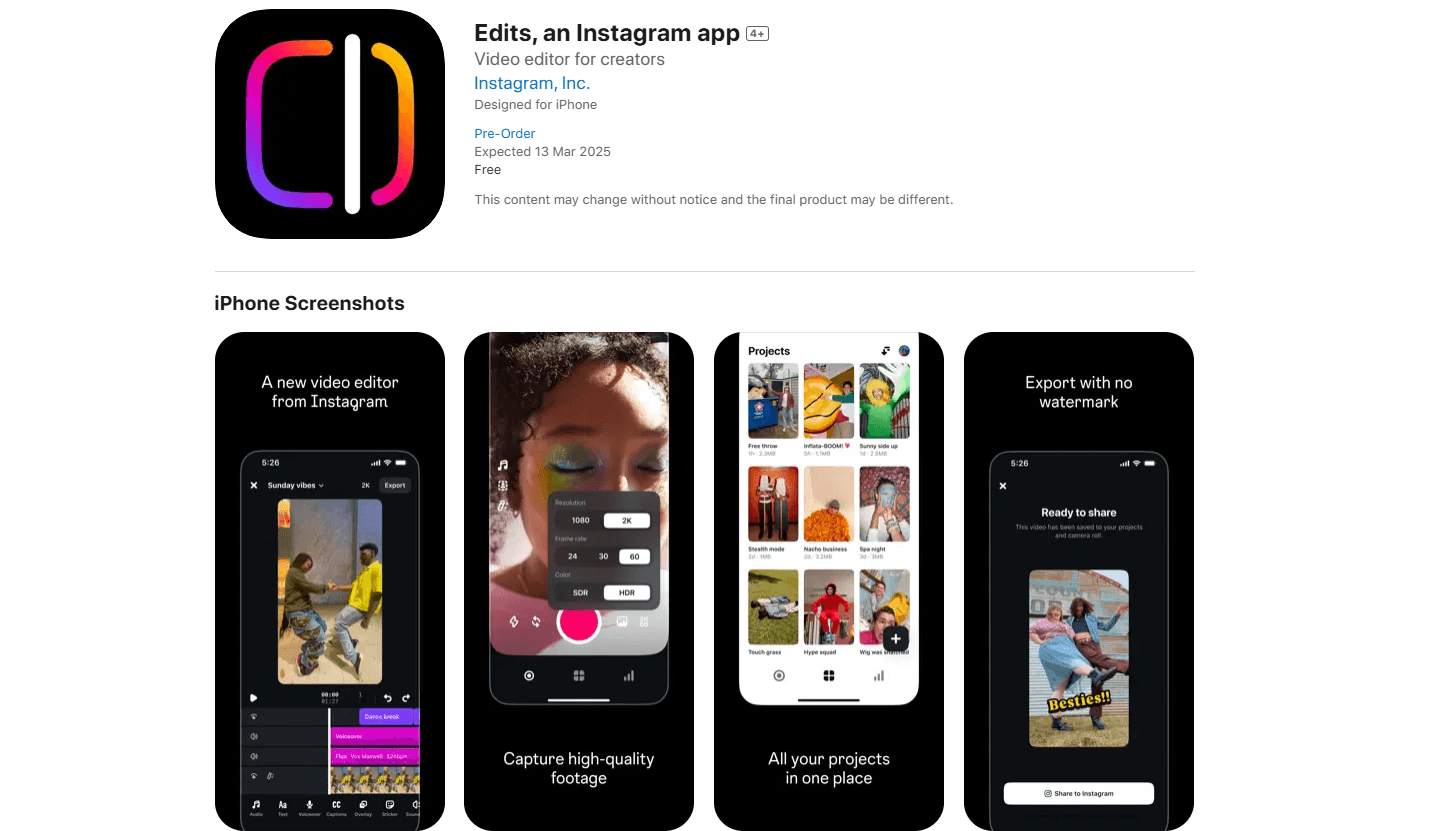
Edits is Instagram's own mobile video editor, built for people who make vertical video for Reels and other social apps. It comes from Meta, the company behind Instagram, and it launched in 2025 as a direct answer to TikTok's CapCut. The pitch is simple: shoot, edit and post from a phone without leaving Instagram, then see how the clip performs without guessing.
The app covers the whole loop. You capture footage inside the editor, cut it frame by frame, add captions and effects, and export a watermark-free file up to 4K to edit videos for Instagram or anywhere else. A projects tab keeps every draft in one place, and a Reels inspiration feed shows what audio and formats are working right now. In September 2026 Instagram added an AI assistant that studies your account data and tells you why one video landed and another did not.
The limits matter too. Edits is built for portrait, vertical video, so it is a poor fit if you cut horizontal or long-form footage. The AI assistant gives out a limited number of free questions a day, and going past that means a Meta One subscription. Some features also lean on your Instagram account, so the experience is thinner if you post to TikTok or YouTube and not to Instagram.
Getting Started
- Download Edits from the App Store on iOS, or from Google Play on Android
- Sign in with your Instagram account so the app can pull in your drafts, saved audio and performance data
- Import a clip or record one inside the app, then trim it on the timeline with single-frame precision
- Add captions, filters and effects, then export a watermark-free video up to 4K and post it straight to Instagram
Product Information
A quick look at Edits, an Instagram app's pricing, supported platforms, and performance.
Best for
The users, tasks, and scenarios where this tool fits best.
Users
- Reels and short-form creators
- Solo creators on a budget
- Social media managers
- Creators moving off CapCut
Tasks
- Cutting vertical video
- Auto-captioning talking-head clips
- Adding motion to stills
- Swapping backgrounds
- Reading performance
Scenarios
- A creator posts daily to Reels
- A small business shoots a product demo
- A creator tests a new format
- A team edits on the go
Key features
Single-frame precision editing
Edits cuts video at the frame level, so you can land a transition on the exact moment you want instead of nudging a slider until it looks close enough. The timeline handles long clips and short ones alike, and every edit stays reversible while you work. For people used to trimming on a phone, that precision is the difference between an edit that looks deliberate and one that looks rushed.
AI animation
The AI animation tool brings a still image to life as a moving clip. You feed it a photo and the app generates motion, which saves you from shooting extra footage when you only have a picture to work with. It is aimed at creators who want a bit of movement in a post without breaking out a camera or a second app.
Green screen and background removal
Green screen lets you replace a background, cut a subject out of a clip or layer text over video. Once the subject is isolated, you can drop in a new scene or a plain backdrop without a studio setup. For product clips and reaction videos, it is the fastest way to make a phone shoot look intentional.
Auto captions and audio cleanup
The app generates captions automatically and lets you customize how they appear on screen, which matters for viewers who watch with the sound off. An audio cleanup tool sharpens voice and pulls down background noise, so a clip recorded in a noisy room still sounds clear. Both tools run inside the same editor as the cut, so you are not bouncing files between apps.
Reels inspiration and performance insights
Edits shows a feed of Reels using popular audio so you can see what is trending before you commit to a track. A performance panel tracks how your Reels are doing and points to the factors behind engagement, not just a flat view count. The goal is to make the next creative decision with something to go on.
AI creative assistant
Launched in September 2026, the assistant reads your Instagram data, including likes, views, retention and shares, and answers questions about your account. You can ask what is trending, why one video outperformed another, or which content your audience responds to, and it returns feedback on hooks, captions, audio and scripting. It flags long-term patterns that a single metric would hide, but the free daily question limit is tight for heavy users.
Pros and cons
Pros
- Free to download and use the core editor, with 4K watermark-free exports included
- Built by Instagram, so it syncs with your account, drafts and Reels performance data
- Handles the full loop in one app: shoot, edit, caption, clean up audio and post
- AI animation and green screen cover common edits without extra tools
- The AI assistant ties advice to your own audience instead of generic tips
Cons
- Designed for vertical video, so horizontal and long-form editing are not the point
- The AI assistant caps free questions per day, and more usage needs a Meta One plan
- Some features lean on Instagram account data, so the value drops if you do not post there
- Performance insights are shallow if you run a brand-new account with little history
Frequently asked questions
Yes. Edits is free to download and the core editor is free, including 4K exports without a watermark. Some AI features and higher usage limits sit behind a Meta One subscription, so you can start for nothing and pay only if you want more.
Related content
Explore related tools, skills, and articles for Edits, an Instagram app.
Edits, an Instagram app Alternatives

ngram 2.0
ngram · Video · Marketingngram 2.0 is an AI video generator for teams. It turns a prompt, a screen recording, or a product URL into a narrated explainer, product demo, or AI avatar video, and every scene stays editable.

OpenScreen 2
OpenScreen (open-source project) · Video · ProductivityOpenScreen 2 is a free, open-source screen recorder and demo video editor for Windows, macOS, and Linux, with automatic zooms, styled frames, local captions, and agent edits.

Skreno
Skreno · Video · ProductivitySkreno is a browser screen recorder that captures a tab, a window or your whole display, then attaches AI transcripts, summaries and console logs to one share link.