

Emochi: Chat With Character
Emochi · Chatbot
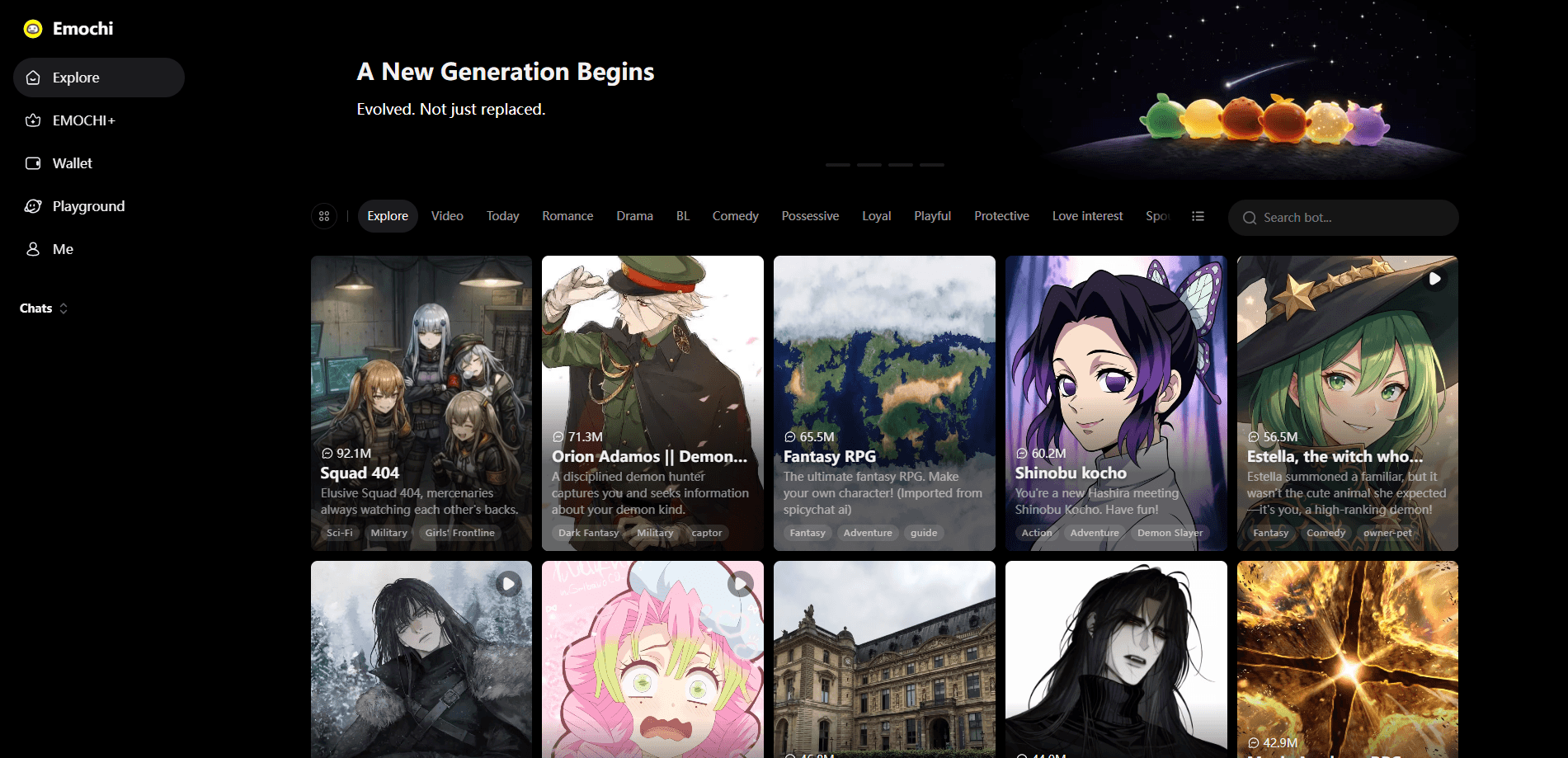
Emochi is an AI character chat and roleplay platform where you pick from more than a million ready-made bots or design your own companions and talk with them in free-flowing conversations. It leans into storytelling rather than quick answers. You get long replies, saved history, and character cards with art, so the chat feels like building a scene with someone instead of querying a search box. The app is free to start, runs on Android and iOS, and needs an account before you can save anything.
About Emochi: Chat With Character
What Is Emochi
Emochi is a free AI chat app built around characters, not tasks. Want to chat with AI characters instead of querying a search box? That's the whole idea. It works as an AI roleplay app first. You choose a persona, read their backstory, and start a scene. The catalog spans romance, fantasy, horror, comedy, and slice-of-life. Each listing shows a short description plus tags like "Drama" or "Conflict", so you can judge the tone before you commit.
The draw here is volume and control. A library of over a million public characters means you rarely land on the same bot twice. The creation tools let you create your own AI character when nothing in the catalog fits, setting a name, personality, background, and speaking style. That second half matters more than it sounds. Most free chat apps stop at browsing. Emochi expects you to build.
The tradeoff is simple. This is an AI companion app, not a productivity tool. Characters can drift off-script, and long, emotional scenes sometimes hit a response limit. If you want a tool to draft an email, look elsewhere. If you want to fall into a story for an hour, you're in the right place.
Getting Started
- Download the Emochi app from Google Play or the App Store, or open the web version in a browser.
- Create an account with your email so your characters and chat history sync across devices.
- Browse the character catalog, or tap create to define your own character's name, traits, background, and greeting.
- Open a chat and send an opening message, or let the character deliver the first line to set the scene.
- Save the chats worth returning to and keep building your story over multiple sessions.
Product Information
A quick look at Emochi: Chat With Character's pricing, supported platforms, and performance.
Best for
The users, tasks, and scenarios where this tool fits best.
Users
- Roleplay fans
- Writers and daydreamers
- Casual entertainers
Tasks
- Exploring a new genre
- Building a custom companion
- Continuing a long story
Scenarios
- Late-night storytelling
- Creative warm-ups
- Fandom play
Key features
A Library of a Million-Plus Characters
The catalog is the front door. You browse by genre and tags, see a preview card with a short scenario, and jump into a chat that's already set up with a personality and opening situation. Popular characters show view counts in the tens of millions. That makes it easy to spot the ones people actually keep talking to.
Character Creation Tools
When nothing in the catalog fits, you build from scratch. You set the name, define traits and background, describe how the character talks, and write a greeting message that kicks off the scene. The result is a bot that responds in the voice you intended. This is where the platform earns its keep for anyone with a specific story in mind.
Long-Form, In-Character Replies
Emochi favors longer responses that stay in the scene. Characters hold a persona across a conversation and pull details from earlier messages back into the chat. A story that spans many turns keeps its thread instead of resetting every few lines. That continuity is what separates a roleplay app from a plain chatbot.
Visual Character Cards
Every character comes with art and a profile card rather than a bare text prompt. The visuals do more than decorate. They set expectations for tone and genre, which helps you pick a character quickly and step into the scene with the right frame of mind.
Cross-Device Chat History
Conversations save to your account and sync across the app and web version. Start a story on your phone and pick it up later without losing context. The characters keep responding as if the session never paused. It's a small detail that makes long-running stories practical, especially when you're someone who starts scenes on a phone during a commute and finishes them on a laptop at night.
Free Access With Optional Upgrades
The core experience, including browsing and chatting with public characters, doesn't cost anything. A subscription unlocks extras such as faster responses and more room to create custom characters. You can use Emochi for a long time without paying. That free floor is why it competes with paid-only companion apps.
Pros and cons
Pros
- The character library is genuinely huge, so you can keep finding new personas without repeating the same few bots.
- Creation tools are deep enough to build a specific companion with a distinct voice and backstory.
- Free tier covers browsing and chatting, making it easy to test before spending anything.
- Replies stay in character and remember earlier messages, which holds longer stories together.
- Available on Android, iOS, and the web with synced history.
Cons
- Characters can drift off-script during long or emotionally complex scenes, which breaks immersion when it happens.
- The free tier caps some features, so heavy users will hit a paywall for faster responses and more custom slots.
- The catalog skews toward romance and mature themes, so it's not the best fit if you want strictly family-friendly content.
- No public API, which rules it out for developers who want to build on top of it.
Frequently asked questions
Emochi is built for AI character chat and roleplay. You talk with fictional characters in ongoing scenes, either from the public catalog or ones you create. The focus is immersive storytelling, not factual answers.
Related content
Explore related tools, skills, and articles for Emochi: Chat With Character.
Emochi: Chat With Character Alternatives

Knocket
Knocket (Tencent RTC team) · Productivity · Business · ChatbotKnocket is a free live chat and contact page tool that lets visitors message you from your website, app, or a shareable link, with every reply handled from Telegram or one inbox.
Agibot
Agibot · Productivity · AI Assistant · ChatbotAgibot is a personal AI agent for Mac that keeps running after you close the window, runs routines on a schedule, and works from Telegram or Slack with your own API keys.

Melete
Melete · Productivity · AI Assistant · ChatbotMelete is an AI workspace for teams where agents research, draft, and act in Slack, Notion, Linear, and GitHub. Shared memory and approval gates keep people in control.