
FacelessVideos
FacelessVideos.ai · Video
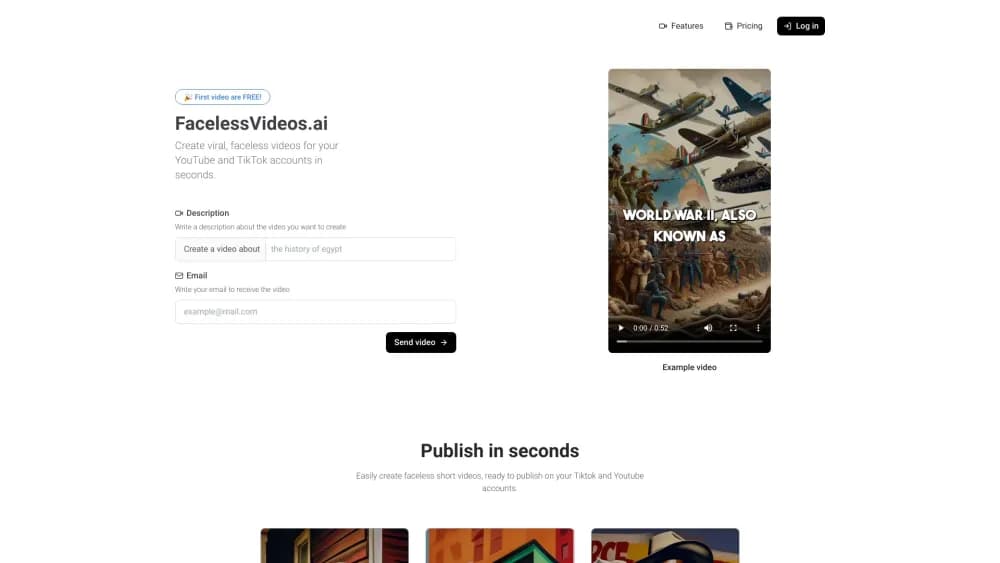
FacelessVideos.ai turns a written prompt into a short faceless video with AI visuals, voiceover and transitions, built for TikTok and YouTube creators who stay off camera.
About FacelessVideos
What Is FacelessVideos.ai
FacelessVideos.ai is a web app that makes short vertical videos from a text description. You type what the video should cover, the system writes the narration, generates a set of images to match it, and stitches the result together with a synthetic voice and transitions. There's no camera, no timeline, and no editing software to install.
The product targets a specific kind of creator: someone running a faceless YouTube channel or posting daily TikTok videos who needs volume more than polish. A small editing job that would take an afternoon becomes a prompt and a wait. If you already own a niche and post on a schedule, that trade is the whole point.
The limits are just as specific. Output is short-form, so a 20 minute explainer is out of scope. Creative control sits at the prompt level, which means small fixes like swapping one image or trimming a pause usually mean regenerating the whole clip. There's no public API, so bulk automation beyond the monthly video allowance isn't an option.
Getting Started
- Open facelessvideos.ai and create an account with an email address. The first video is free, so you can test the output before choosing a plan.
- Write a short description of the video you want. A topic, an angle, and a rough tone work better than a long script.
- Choose a plan if the sample holds up: Starter covers 15 videos a month, and the higher plans raise that ceiling.
- Let the generator build the clip, then preview it and publish to your connected TikTok or YouTube account. The finished file also arrives by email.
Product Information
A quick look at FacelessVideos's pricing, supported platforms, and performance.
Best for
The users, tasks, and scenarios where this tool fits best.
Users
- Faceless channel owners
- Solo marketers
- Educators and explainer creators
Tasks
- Producing daily short-form posts
- Testing a niche before committing
- Repurposing written material
Scenarios
- Keeping a channel alive during a busy week
- Launching an anonymous brand account
- Filling gaps in a content calendar
Key features
Prompt to Finished Video
The core loop is one text box. You describe the subject and the tone, and the system returns a complete clip with narration, images, and cuts already assembled. There's no storyboard step, so the first version arrives fast and you judge it as a viewer would.
AI Voiceover Narration
Every clip gets a synthetic voice reading the script. That removes the need to record audio, hire a voice actor, or worry about background noise. The narration also sets the pacing, since scenes are timed to the spoken lines rather than the other way around.
AI Generated Visuals
Images come from the model, not a stock library, so two creators covering the same topic don't end up with identical footage. This matters for a faceless YouTube channel that needs to look distinct without a photographer. Visual consistency depends on how specifically you write the prompt.
Automatic Transitions and Pacing
The generator handles cuts and transitions between scenes. You aren't dragging clips on a timeline, and you aren't matching music beats by hand. The trade is control: the rhythm is the system's choice, not yours.
Publishing to TikTok and YouTube
Finished videos can go straight to a connected TikTok or YouTube account from inside the app, which shortens the gap between idea and post. Each platform gets a vertical clip, the format both feeds reward.
Volume Plans and Storage
Plans are priced by output: 15, 30, 75, or 200 videos a month, with a per-second rate that drops as you move up. Storage is unlimited on every tier, so old projects don't disappear when the month turns.
Pros and cons
Pros
- No camera and no editing software: the entire production step is a written prompt, which lowers the skill floor for a faceless YouTube channel.
- Clear cost per video: the quota and per-second pricing make it easy to compare against a freelance editor or a stock footage subscription.
- Direct publishing: connecting TikTok and YouTube removes a download and upload cycle from every post.
- Free first video: you can judge the visual quality before paying, which matters because output style is the main variable between tools in this category.
Cons
- Short-form only: there's no path to long videos, so documentary or course-length content needs a different tool.
- Prompt-level control: changing one image or one sentence usually means regenerating the clip, and repeated attempts eat into the monthly allowance.
- No public API: teams that want to script bulk production, or plug an AI video generator into an existing pipeline, have to work through the web app by hand.
Frequently asked questions
It's a web based AI video generator that turns a text prompt into a short faceless video with AI images, a synthetic voiceover, and transitions, aimed at TikTok and YouTube Shorts publishing.
Related content
Explore related tools, skills, and articles for FacelessVideos.
FacelessVideos Alternatives

Vadu AI
Vadu AI · Image · VideoVadu AI is a web-based AI video generator that turns written prompts or still images into short clips, and it can also generate images on its own. You type what you want, pick a model and style, and the platform renders the result in minutes. A free plan covers light testing, while paid tiers run from $9 to $77.40 per month based on how many credits you burn.

Mykaraoke Video
MyKaraoke Video · VideoMykaraoke Video is an online karaoke video maker and lyric video maker that turns any song into a finished, lyrics-synced video right in your browser. It handles the slow part for you. The AI pulls vocals out of the mix and locks the lyrics to the beat, then lets you customize background, fonts, and colors before exporting in 1080p MP4. If you make lyric videos for social media, party nights, or music promotion, it skips the software installs and manual timing work entirely. Want a karaoke video generator that doesn't eat your whole evening? That's the pitch here.

Finalframe
Finalframe · VideoFinalframe is a set of free, browser-based tools for grabbing exact frames out of a video clip. Its best-known feature, the Final Frame Extractor, lets you extract the last frame of any video so you can use it as the starting image for AI video tools like Luma Dream Machine, Runway, or Kling. Want to keep a clip going? That last frame is your starting point. The tool runs locally in your browser, needs no sign-up, and costs nothing. A separate paid AI video-generation app from the same team is currently offline while it's rebuilt.