

FeedPal
Mutacore · Coding
FeedPal is a free Chrome extension that turns your bookmarked blogs into RSS subscriptions and notifies you when they publish new posts, with everything stored locally on your device.
About FeedPal
What Is FeedPal
FeedPal is a Chrome extension that reads the blogs you already bookmark and watches them for new posts. Instead of asking you to hunt down RSS feed URLs and paste them into a separate app, it treats your existing bookmarks as the starting point. You bookmark a blog, and FeedPal quietly checks it in the background.
The tool exists because high-quality blogs publish slowly. A writer you like might post once a month, or once a quarter. Checking their site by hand is a chore, and a full inbox of low-value alerts is just as bad. FeedPal watches the sources you care about and raises its hand only when something new lands.
Its main constraint is scope. FeedPal is a notification and update tool, not a full reading app. It does not give you a unified reading pane with saved articles and folders the way a dedicated RSS reader does. It also leans on the browser being open and running for its background checks to happen. Everything else about it is deliberately small, and it says so: the extension is still in an early alpha iteration.
Getting Started
- Install FeedPal from the Chrome Web Store and pin it to your toolbar.
- Bookmark the blogs you want to follow, using your normal Chrome bookmark folders.
- To add a feed that FeedPal cannot find on its own, create a bookmark folder whose name contains
[sources]and drop the feed's XML URL inside it. - Check the extension popup to see recent posts. FeedPal handles the fetching schedule for you.
- Adjust notification settings if the default alerts feel too frequent or too quiet.
Product Information
A quick look at FeedPal's pricing, supported platforms, and performance.
Best for
The users, tasks, and scenarios where this tool fits best.
Users
- Blog readers who follow a handful of slow-publishing writers and want a nudge when they post, provided they keep Chrome open.
- Privacy-minded readers who dislike handing their reading habits to a cloud service, since FeedPal keeps all data on the local machine.
- People who already live in bookmarks and do not want to maintain a second reading app alongside them.
Tasks
- Turning a scattered bookmark list into a working set of subscriptions
- Following independent writers and niche blogs that update rarely
- Browsing recent posts from many sources at once
Scenarios
- Keeping tabs on a personal blogroll you have built up over years without opening each site by hand.
- Following documentation or changelog pages that publish releases on an unpredictable schedule.
- Staying current with a small circle of industry writers when you would rather not add another subscription to your inbox.
Key features
Zero-Configuration Bookmark Subscriptions
FeedPal works from the bookmarks you already have. Add a blog to a folder, and the extension starts treating it like a feed. There is no import step, no OPML file to drag in, and no manual feed URL to find first. For someone who has never touched RSS, this removes the biggest hurdle before it appears.
Adaptive Fetch Intervals
Not every blog deserves an hourly check. FeedPal watches how often each source actually publishes and then scales its checking rhythm to match, from as often as once an hour to as rarely as once every 45 days. A daily news site gets looked at often; a quarterly essayist barely gets pinged. The result is fewer wasted checks and fewer pointless alerts.
Smart Notifications
The extension decides how loud to be based on how much a source posts. Sites that update constantly get quieter treatment, while a blog that suddenly breaks a long silence triggers a clear alert. You can dial the whole system up or down, but the default is aimed at cutting the noise that makes people abandon update tools.
Local-Only Data Storage
FeedPal runs its fetching and storing inside your browser's local storage. Your bookmark list, your subscriptions, and the fetch history stay on your computer and are never uploaded to a server. The developer states plainly that it does not collect or sell your data, which matters for anyone who uses an RSS reader to track sensitive or work-related sources.
Manual Feed Support
Automatic discovery does not always work, especially on sites with unusual markup. When FeedPal cannot parse a homepage, you can still add the feed by hand. Put the XML URL into a bookmark folder named with [sources], and the extension picks it up on its next pass. This gives you a fallback path for the awkward sites.
Recent Content Digest
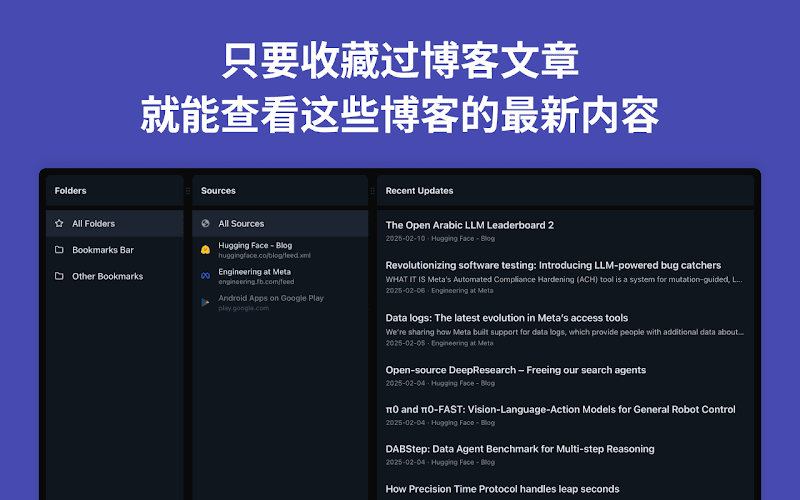
The popup collects what is new across your saved sources, so a quick click replaces a tour of a dozen tabs. It is a glance, not a full reader, but it answers the one question you actually have: did anything I follow post since I last checked?
Pros and cons
Pros
- Requires no setup beyond your existing bookmarks, so there is nothing to configure before it starts working.
- Keeps every piece of data on your own machine, with no account and no server upload.
- Adjusts check frequency per source, from hourly to every 45 days, which suits slow blogs as much as busy ones.
- Free to install, with no paid tier or feature paywall in the version listed on the Chrome Web Store.
- Handles both automatic feed discovery and a manual `[sources]` folder for sites that resist parsing.
Cons
- It is a notifier rather than a reader, so you cannot read full articles in a tidy in-app view with saved folders inside the extension.
- Background checks depend on Chrome being open, so closed-browser periods mean missed timely alerts until you return.
- The extension is still labeled an early alpha, so expect rough edges and features that may shift between updates.
Frequently asked questions
It watches the blogs you bookmark and alerts you when they publish new posts. You bookmark a site, FeedPal figures out its feed, and it keeps checking in the background so you do not have to visit each blog to see if anything changed.
Related content
Explore related tools, skills, and articles for FeedPal.
FeedPal Alternatives
Forefront
Forefront · CodingForefront is a web platform for building with open-source AI. It lets you fine-tune leading open-source language models on your own data, evaluate how they perform, and run them through an API or export them to host yourself. Developers who want the convenience of a closed-source platform but insist on owning their models and data are the target audience here.

Startkit
StartKit.AI · CodingStartkit is a boilerplate for building AI SaaS and AI wrapper products. Think of it as an AI startup boilerplate with the boring parts already wired up: authentication, Stripe and Lemon Squeezy payments, usage limits, transactional email, and an AI API starter that talks to OpenAI, Anthropic, Groq, or Llama. You clone the repo, set your price, and start on the part of your product that people actually pay for. It's Next.js under React and Tailwind, so most of the boilerplate code already feels familiar.
Testim
Tricentis · CodingTestim is an AI-powered test automation platform for building and running end-to-end tests across web, mobile, and Salesforce applications. It leans on machine learning to keep tests stable when an interface changes, so teams spend less time fixing broken selectors. Not bad for an automated testing tool you can start using today. You create tests by recording actions in a browser, then optionally add JavaScript when you need more control. It's a solid pick for busy QA teams.