

FitHub - AI Calorie Tracker
FitHub · Image · AI Assistant
FitHub is an AI calorie tracker that logs meals from a photo, a barcode or a short text description. It calculates calories, macros and ingredients in seconds.
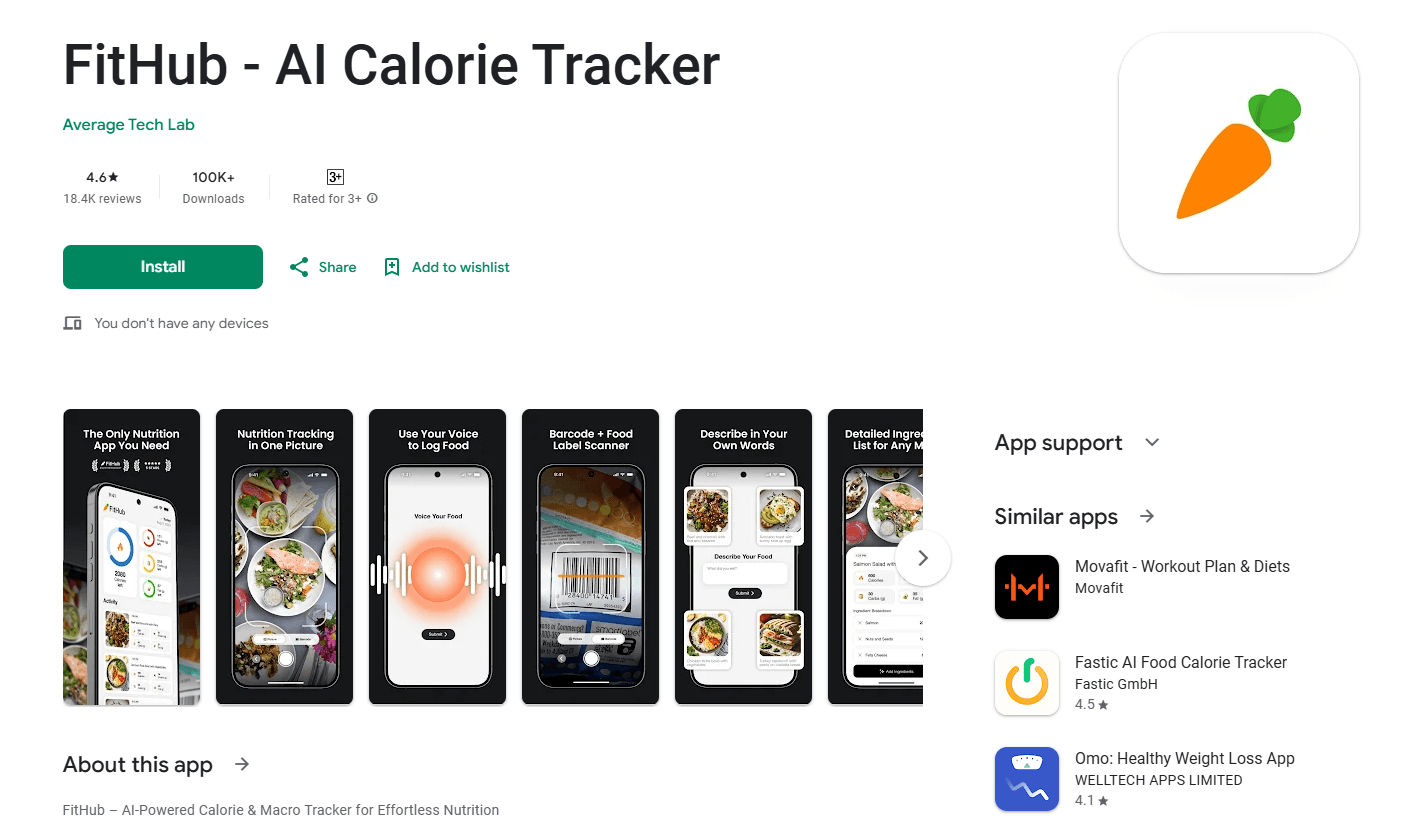
About FitHub - AI Calorie Tracker
What Is FitHub
FitHub is a nutrition tracking app that turns meal logging into a couple of taps. Instead of searching a database and weighing food by hand, you point your camera at a plate, scan a barcode or type something like "two eggs and toast," and the app estimates calories, macros and an ingredient-level breakdown. The company says the average log takes under five seconds.
The pitch fits a specific frustration. Most calorie counter apps fail not because people can't count, but because logging everything is tedious enough that they quit within weeks. FitHub bets that if logging costs five seconds instead of two minutes, people actually stick with it. That's where the AI comes in: photo recognition, barcode scanning and natural-language text search all feed the same verified food database.
A few limits are worth knowing before you sign up. It's a mobile app, so there's no web dashboard to track from a desktop. There's no free tier in the traditional sense, only a paid subscription that starts with a trial. And like every AI food scanner, accuracy on mixed home-cooked dishes depends on how clear your photo is, so you should expect to correct a portion now and then.
Getting Started
- Download FitHub for iPhone or Android and run through the short onboarding, where you set your goal (cut, bulk or maintain) and enter your body stats
- Let the app calculate a daily calorie target and macro split from that data
- Log your first meal by snapping a photo, scanning a barcode or typing a short description
- Review the breakdown, adjust any portion that looks off, then watch your daily totals update in real time
Product Information
A quick look at FitHub - AI Calorie Tracker's pricing, supported platforms, and performance.
Best for
The users, tasks, and scenarios where this tool fits best.
Users
- Busy professionals
- Gym regulars tracking macros
- Weight loss beginners
- Home cooks and restaurant diners
Tasks
- Photo food logging
- Barcode scanning
- Macro tracking
- Micronutrient tracking
- Goal setting
Scenarios
- A quick lunch between meetings
- Meal prep on a Sunday
- A home-cooked dinner
- Tracking a bulk or cut
- Eating out with friends
Key features
AI Photo Food Recognition
Point your camera at a meal and FitHub identifies the food, estimates the portion and returns a calorie and macro breakdown. It goes a step further than most scanners by splitting the plate into ingredients, so a mixed dish shows what's actually in it rather than one lumped number. You can correct any item you disagree with, and the totals update right away.
Barcode and Nutrition Label Scanning
For packaged food and groceries, this barcode food scanner pulls the nutrition straight from the database, no typing needed. The app also reads nutrition labels, which covers items that don't have a clean barcode match. It's the fastest path for anyone who eats a lot of the same branded products.
AI-Powered Text Search
Sometimes a photo isn't practical, and that's where text logging comes in. Type a plain description like what you ate and roughly how much, and the AI turns it into a logged meal with calories and macros. It works for restaurant dishes, multi-item meals and anything you'd rather describe than photograph.
Personalized Calorie and Macro Goals
FitHub builds a daily target from your body stats, goal and eating habits, covering protein, carbs and fat rather than calories alone. The targets shift as your progress changes, so a cut doesn't run on the same numbers for months. The company says it learns your preferences over time, which is what keeps the plan usable instead of generic.
Verified Food Database and Micronutrients
Behind the AI sits a food database the company says is verified against USDA and other trusted sources, and it claims 95% tracking accuracy. Beyond the headline macros, FitHub tracks micronutrients as well, so you can see vitamins and minerals, not just energy. That extra layer matters if you're tracking more than weight.
Real-Time Analytics
Your daily dashboard updates as you log, showing calories in, remaining budget and macro progress in one view. The analytics focus on the feedback loop that keeps tracking worth doing: see the number move, adjust the next meal, repeat. It's less about deep reporting and more about making the daily habit visible.
Pros and cons
Pros
- Logging takes seconds from a photo, barcode or a few words, which is the main reason tracking apps get abandoned
- Ingredient-level breakdown from the food scanner app gives more detail than a single calorie estimate
- Macro and micronutrient tracking go beyond basic calorie counting in one app
- The single plan costs $2.90 a month billed yearly, which is cheap next to many rival trackers
- Verified database and stated 95% accuracy back up the convenience claims
Cons
- No free tier, so you have to start a paid subscription to try it past any trial
- Mobile only, which means no desktop dashboard for planning or reviewing your history
- Photo accuracy on mixed home-cooked dishes depends on image quality, so you'll correct portions sometimes
- The company's headline stats come from its own marketing, with no independent breakdown by dish type
Frequently asked questions
FitHub is an AI calorie tracker for iPhone and Android. It logs your meals from a photo, a barcode scan or a short text description, then estimates calories, macros and ingredients so you can track nutrition without manual searching.
Related content
Explore related tools, skills, and articles for FitHub - AI Calorie Tracker.
FitHub - AI Calorie Tracker Alternatives

Tractionwave
TractionWave · Image · MarketingTractionWave is an AI attention heatmap tool for static ads. Upload a PNG or JPG and it returns predicted attention, ranked hotspots, and fixes before you spend budget.

Imejis.io
Imejis.io · Image · MarketingImejis.io is an AI design studio for agents and marketing teams. Describe an image in plain words, and it writes the copy, builds the layout, reflows it to every size, then exports a finished file.

Layoutr
Van Dijk Ontwikkeling · Image · China AILayoutr is a browser floor plan tool that scales your own plan, places furniture at true size, shows the room in 3D and renders it with AI.