
Flux Video AI
Flux Video AI · Video
Flux Video AI is an AI video generator that turns images and text prompts into short cinematic clips for marketers, creators, and storytellers.
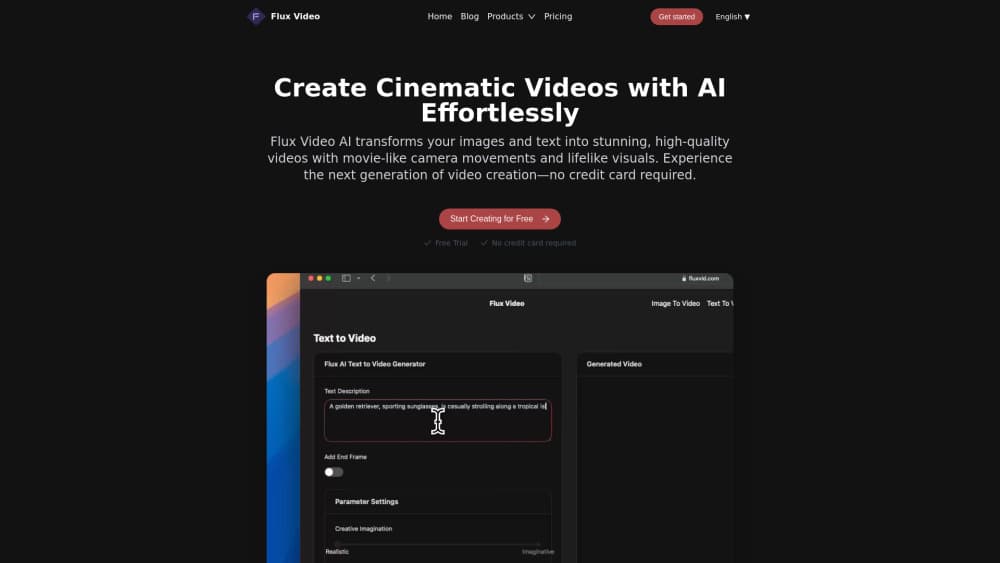
About Flux Video AI
What Is Flux Video AI
Flux Video AI is a web-based tool for making short videos without a camera or an editing suite. You bring a still image or a written description, and it builds motion around what you gave it, adding camera movement and a sense of depth that a slideshow simply can't match. That's the whole pitch, and it's aimed at people who need finished-looking video but don't have a production team behind them.
The draw is the gap it fills. Plenty of creators can write a good prompt. Far fewer can shoot and cut footage on deadline. Flux Video AI leans into image to video and text to video. A single product photo becomes a few seconds of usable footage. Same for a paragraph of scene description. Clips run up to 15 seconds. That's the right length for ads, social posts, and teaser shots, and it also keeps the results tight enough to drop straight into a feed without any extra trimming on your end.
It isn't a full studio. Don't expect long-form editing, voice-over, or scene stitching in one pass. Text prompts work across multiple languages. A description written in one language can steer a video without translation. Treat it as a shot-maker, not a film-maker.
The team behind the product keeps a low public profile. I couldn't confirm firm details on the company or a stable public pricing page, and the live site has been unavailable in recent checks. Treat the pricing and platform notes below as the model most tools in this category follow rather than a locked-in contract.
Getting Started
- Open fluxvid.com and create an account, or start a trial clip if one is offered without signup.
- Pick a mode: upload a still image for image to video, or type a scene description for text to video.
- Write the prompt, naming the subject, setting, and the camera movement you want.
- Choose a clip length up to 15 seconds and generate.
- Preview the result, download it, and drop it into your ad, post, or project.
Product Information
A quick look at Flux Video AI's pricing, supported platforms, and performance.
Best for
The users, tasks, and scenarios where this tool fits best.
Users
- Social media managers
- Small-business owners
- Storytellers and writers
- Marketers testing concepts
Tasks
- Making a product video from a still image
- Turning a written scene into footage
- Producing ad or social snippets
- Previsualizing an idea
Scenarios
- Launching a new product on a tight deadline
- Filling a content calendar with fresh visuals
- Pitching a concept to a client
- Working across languages
Key features
Image to Video
Upload a still and Flux Video AI builds motion around it, adding camera movement and depth that make a flat photo feel like footage. It's the feature most people reach for first, since product shots and portraits they already own are sitting on the drive, and clips stay short at up to 15 seconds.
Text to Video
Describe a scene in writing and the tool turns it into a clip. Flux Video AI reads the description and generates visuals that follow your intent, so a paragraph about a sunrise over a city becomes exactly that shot in a few seconds. This is where the tool earns its keep for people who can write but can't shoot.
Cinematic Camera Moves
The videos lean on professional-style camera movement rather than a static frame. Panning, pushing in, and tracked motion give a clip the feel of a real shoot, and for ads and social content that movement is often the difference between something that looks generated and something that looks made.
Multi-Language Prompts
Text prompts work across multiple languages, so you don't have to translate your idea into English before generating anything at all. Write the prompt in the language you think in, and the tool still interprets the scene. That matters for creators and teams working outside English.
Short-Form Clip Output
Output is aimed squarely at short-form video: up to 15 seconds, sized for ads, social posts, and teasers. Long clips aren't the point, and that's fine, because most social and ad formats reward tight, punchy footage that a 15-second ceiling happens to keep you squarely in the lane.
Web-Based Workflow
Everything runs in the browser, so there's nothing to install and no render farm to manage at home. You upload or type, generate, and download, and for freelancers and small teams that removes the hardware barrier which used to sit in front of almost every kind of video work.
Pros and cons
Pros
- Turns existing images and written ideas into video, so you don't need footage to start.
- Short clips up to 15 seconds fit ads and social formats without extra trimming.
- Cinematic camera moves make output look more produced than a basic slideshow.
- Multi-language prompts let you work in the language you're most comfortable with.
- Runs in the browser with no software install or local rendering setup.
Cons
- Clips top out at 15 seconds, so anything longer means stitching several together yourself.
- No confirmation of a public API, which rules it out for automated pipelines until that's clear.
- Pricing and company details aren't easy to verify while the live site is down, so check before you commit.
- Generated motion can drift off your intent on complex scenes, which means re-running prompts to get a usable take.
Frequently asked questions
It's an AI video creation tool that makes short videos from images and text. You upload a photo or write a scene description, and it generates a clip of up to 15 seconds with camera movement. People use it for ads, social content, and concept mock-ups.
Related content
Explore related tools, skills, and articles for Flux Video AI.
Flux Video AI Alternatives

ngram 2.0
ngram · Video · Marketingngram 2.0 is an AI video generator for teams. It turns a prompt, a screen recording, or a product URL into a narrated explainer, product demo, or AI avatar video, and every scene stays editable.

OpenScreen 2
OpenScreen (open-source project) · Video · ProductivityOpenScreen 2 is a free, open-source screen recorder and demo video editor for Windows, macOS, and Linux, with automatic zooms, styled frames, local captions, and agent edits.

Skreno
Skreno · Video · ProductivitySkreno is a browser screen recorder that captures a tab, a window or your whole display, then attaches AI transcripts, summaries and console logs to one share link.