
Flux AI
Black Forest Labs · Image
Flux AI is a text-to-image generator by Black Forest Labs that turns plain prompts into photorealistic images for designers, marketers, and hobbyists.
About Flux AI
What Is Flux AI
Flux AI is an AI image generator built on the FLUX family of models from Black Forest Labs. You type a description, and it returns a finished image in seconds. Fast. The selling point isn't novelty. It's prompt adherence and detail, which means the picture usually matches what you actually asked for instead of drifting somewhere close, and that consistency is what keeps people from abandoning a generation mid-way after three failed attempts at the same scene.
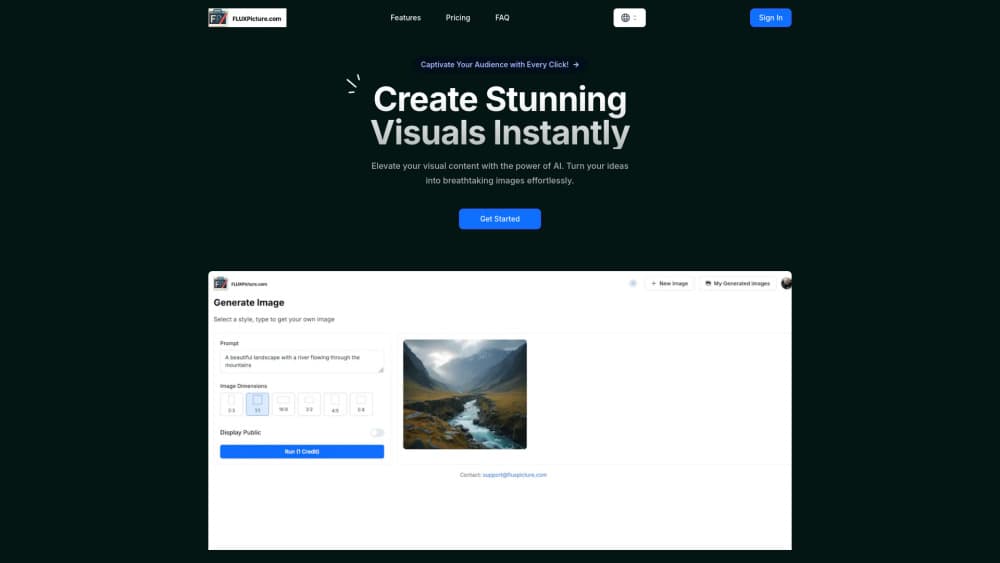
The website FluxPicture wraps those models in a simple create page, so you don't need to install anything or write code to get started. According to the company, the underlying tech is a 12B parameter transformer-based flow model, and the biggest thing it solves is the gap between a rough idea and a usable visual.
The main limit is resolution. Images top out around 2.0 megapixels, so this isn't the tool for large print work. Credit plans also cap how many generations you get each month, and the open-weight versions are licensed for non-commercial use only.
Getting Started
- Open the Flux AI create page on FluxPicture and sign in.
- Type a text prompt describing the image you want, including style and mood.
- Pick a model variant and aspect ratio, then start the generation.
- Review the result, regenerate if needed, and download the image you like.
Product Information
A quick look at Flux AI's pricing, supported platforms, and performance.
Best for
The users, tasks, and scenarios where this tool fits best.
Users
- Designers who need quick concept art
- Marketers producing social visuals
- Hobbyists exploring AI art
Tasks
- Turning a written brief into a first-draft image
- Generating style variations of one idea
- Building a small batch of visuals for a landing page
Scenarios
- Late-night idea testing before a pitch
- Filling gaps in a content calendar
- Prototyping a mood board for a client
Key features
Strong Prompt Adherence
Flux AI is built to follow your description closely, including composition, style, and small details. That matters when a vague output means another round of tweaking. It cuts the trial-and-error loop most image models force you into, and for anyone producing a batch of similar visuals, that saved time adds up quickly across a whole afternoon of iterations.
Three Model Variants
You can choose between FLUX [pro], [dev], and [schnell], each aimed at a different balance of quality and speed. Pro targets professional work, dev suits general projects, and schnell favors fast turnaround. Picking the right one is mostly about how much polish you need versus how quickly. Not a hard call. Most people start on dev and move up only when a job demands it.
High-Resolution Output
Images render at up to 2.0 megapixels across several aspect ratios, so you can get square, portrait, or widescreen without cropping later. It's enough for web and social use. Print at large sizes is where the ceiling starts to show. You'll notice it fast.
Multiple Image Styles
Flux AI handles many styles instead of locking into one house look. Move from photorealistic to illustrative in the same session. Anyone building a varied feed gets that flexibility without switching tools.
API and Replicate Access
Beyond the website, you can reach FLUX AI through its API or Replicate, which fits teams wiring image generation into their own products. Open-weight versions are also available for non-commercial use, useful for testing before you commit to a paid plan.
Simple Four-Step Workflow
The create page keeps things short: open it, enter a prompt, generate, download. There's no setup or config file to manage. That low friction is the main reason it works for people who just want an image, not a pipeline. No learning curve.
Pros and cons
Pros
- Prompt adherence is genuinely strong, so you spend less time fighting the model.
- Three variants let you trade quality against speed per job.
- Web access needs no install, and the API covers developer use.
- Monthly credits work out to roughly $0.02-0.03 per generation on higher tiers.
- Open-weight versions let you test the models before paying.
Cons
- Images top out near 2.0 megapixels, which rules out large-format print.
- Open-weight versions are licensed for non-commercial use only.
- Credit caps mean heavy users can burn through a plan before month-end.
Frequently asked questions
You use it to generate images from text prompts. Common uses are concept art, marketing visuals, and quick prototypes when you need a picture fast.
Related content
Explore related tools, skills, and articles for Flux AI.
Flux AI Alternatives

X Ray Interpreter
X-ray Interpreter · ImageX Ray Interpreter is a web-based AI radiology tool that turns X-rays, CT scans, MRI, ultrasound, and PET images into plain-language reports. You upload a scan, get a preliminary X-ray interpretation in moments, then ask follow-up questions if something needs explaining. It works as a second opinion and a learning aid, not as a medical diagnosis.

Aieasypic
AIEasyPic · ImageAIEasyPic is an AI image generator that turns plain text prompts into finished artwork in seconds. You can also train custom models on your own photos, swap faces in existing images, and create short video clips from text, all from a browser. It suits casual creators who want quick visuals and hobbyists who want to build a personal model without touching any code.

Chargen
Chargen · ImageChargen is an AI character generator and worldbuilding toolkit built for Dungeons & Dragons and other tabletop RPGs. It turns a one-line idea into a painted character portrait, spins up NPCs, monsters, maps and encounters from the same session, and keeps every creature's details close at hand. The tabletop RPG art side runs on a credit system called Gold, while the text generators stay free for everyone.