

Form2Agent AI
Freeport Metrics · Chatbot
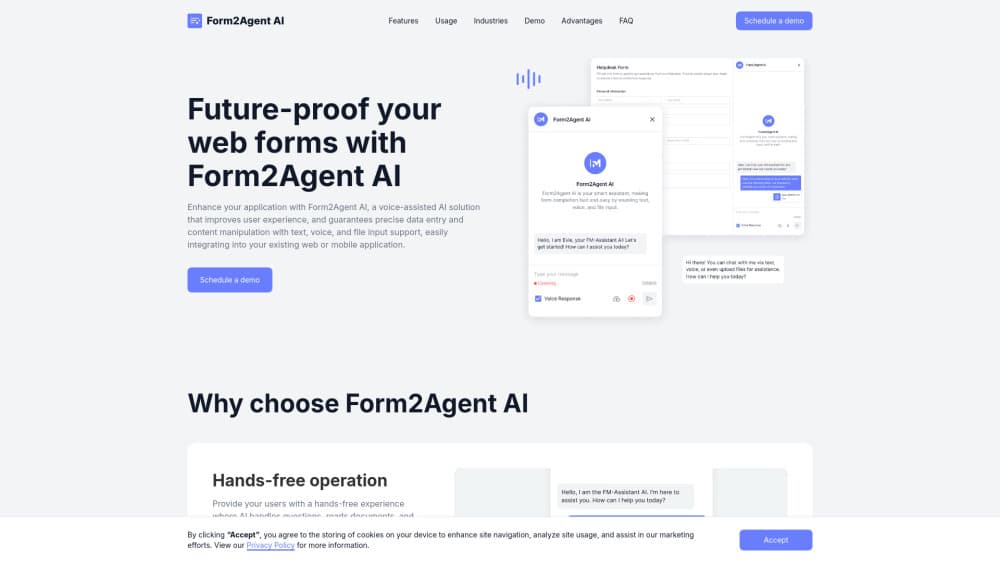
Form2Agent AI is a chat and voice assistant that fills web forms for people, turning long field lists into a short conversation and writing answers in as they talk.
About Form2Agent AI
What Is Form2Agent AI
Form2Agent AI is a form assistant from Freeport Metrics that sits on top of a web form your team already runs. Instead of scrolling through dozens of inputs, a user types or speaks, the assistant asks follow-up questions, reads uploaded documents, and drops the answers into the right fields. Think of it as form completion software that rides on top of the page, not a new form builder.
The pitch is simple. Long forms lose people. That's true for a patient intake sheet, a loan application, or an expense report. Conversational forms keep the user moving with plain answers instead of field-by-field typing, and the assistant corrects grammar and translates on the fly for people working in a second language.
It is a business product, not a consumer app. There's no self-serve signup, no public price list, and no free tier. The company opens demos by appointment. The React demo app is open source under the MIT License, and it needs your own OpenAI API key to run, so the free part is the code, not the hosted service.
Getting Started
- Book a 30-minute call with Freeport Metrics and bring one real form you want to convert.
- Map your fields. Your team documents field IDs, validation rules, and any conditional logic the assistant must respect.
- Drop the chat widget into your React front end, or wrap your web app in a WebView for the iOS build, then point it at the Form2Agent AI backend.
- Run a pilot with live submissions and check filled values against the source conversation before you open it to all users.
Product Information
A quick look at Form2Agent AI's pricing, supported platforms, and performance.
Best for
The users, tasks, and scenarios where this tool fits best.
Users
- Product teams with long intake forms
- Support and back-office staff
- Frontline and field workers
Tasks
- Patient registration and medical history forms
- Invoice processing and expense reports
- Order lookup and updates in e-commerce
- IT support and customer feedback submissions
Scenarios
- Serving customers in several languages
- Accessibility needs
- High-volume customer onboarding
Key features
Conversational form filling
The form filling AI runs the form as a dialogue. It asks a question, takes the answer, and moves to the next empty field, so users never see a wall of inputs at once. Behind the scenes, client-side scripts write each answer into the form based on what the AI returns. Your validation rules still apply, which means the form stays the source of truth.
Voice input with spoken replies
Speech-to-text takes the answer, and text-to-speech reads the assistant's questions back. That pairing is what makes hands-free use real rather than partial. It also helps anyone who finds reading a dense form on a phone screen a chore.
Document and file uploads
Users can attach a document instead of retyping it. The assistant reads the file, pulls the relevant details, and proposes values for the fields it can fill. For clinics and finance departments, this is the difference between a two-minute task and a fifteen-minute one. In practice it behaves like an AI data entry assistant, not a chat window.
Live translation and text cleanup
Answers get corrected for grammar, rephrased when they're vague, and translated in real time. A customer writing in Portuguese can finish an English form without switching tools. The same layer filters inappropriate language, which matters for public-facing feedback forms.
Fits forms you already have
Form2Agent AI doesn't ask you to rebuild your form in a new builder. It attaches to the UI you ship today and drives the existing fields. AI form automation here only writes into fields you've mapped, so nothing lands in an unexpected box. Teams keep their current backend, their current validation, and their current analytics. The work sits in mapping fields and tuning prompts, not in a migration.
iOS launch through WebView, Shortcuts, and Siri
The iOS build wraps the web form in a WebView, so the same assistant runs inside a native app. iOS Shortcuts and Siri can start a specific workflow by voice, which suits field staff who need to log something without unlocking and tapping through screens.
Pros and cons
Pros
- Cuts the typing burden on long forms, and the effect is largest exactly where abandonment hurts most.
- Handles text, audio, and file input in one interface, so users pick whichever is easiest at that moment.
- Translation and grammar correction come built in, which removes a second tool from multilingual support.
- Works on top of existing web forms, so there's no rebuild and no new form builder to learn.
- The React demo is open source under MIT, which lets your developers inspect the approach before a sales call.
Cons
- No published pricing and no self-serve tier. You can't evaluate cost without booking a demo, which slows down small teams.
- The open-source demo needs your own OpenAI API key, so model usage is a separate bill on top of any license.
- The project README tells users not to enter sensitive data in the demo, which means regulated deployments need your own review before going live.
- The reference client is React only, so other front ends need integration work from your developers.
Frequently asked questions
It turns a web form into a conversation. A user answers by typing, speaking, or uploading a file, and the assistant fills the matching fields for them.
Related content
Explore related tools, skills, and articles for Form2Agent AI.
Form2Agent AI Alternatives

Knocket
Knocket (Tencent RTC team) · Productivity · Business · ChatbotKnocket is a free live chat and contact page tool that lets visitors message you from your website, app, or a shareable link, with every reply handled from Telegram or one inbox.
Agibot
Agibot · Productivity · AI Assistant · ChatbotAgibot is a personal AI agent for Mac that keeps running after you close the window, runs routines on a schedule, and works from Telegram or Slack with your own API keys.

Melete
Melete · Productivity · AI Assistant · ChatbotMelete is an AI workspace for teams where agents research, draft, and act in Slack, Notion, Linear, and GitHub. Shared memory and approval gates keep people in control.