

Formbot
Formbot · Image · Productivity
Formbot is an AI form builder that lets you describe a form in plain English and get a working one in seconds. Think of it as a form generator you talk to. Instead of forcing people through rigid field boxes, it serves questions as a natural conversation people answer like they're texting a friend. You can also fall back to a classic form layout or a guided one-question-at-a-time mode when that fits the job better. Same form, three ways.
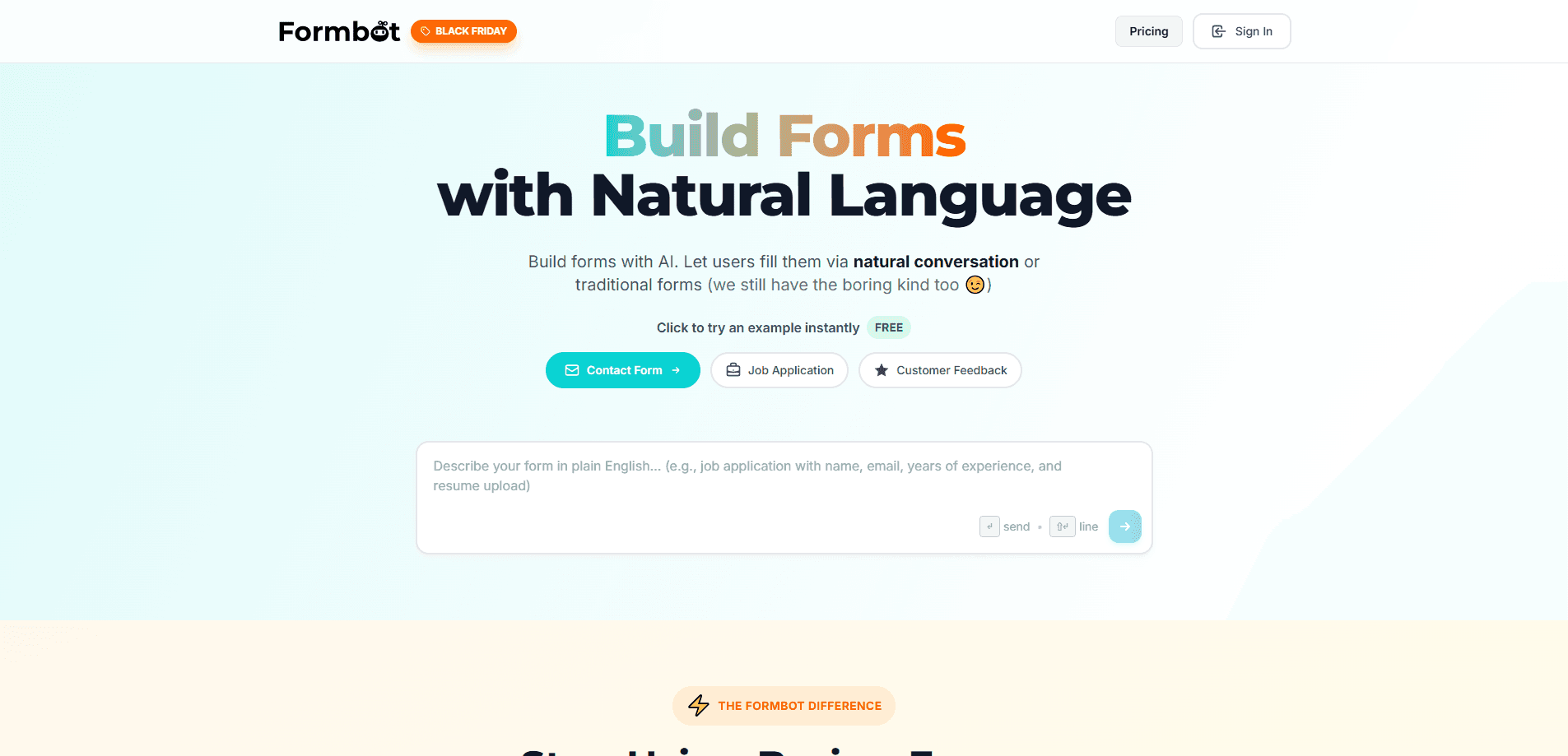
About Formbot
What Is Formbot
Formbot is a web-based form builder built around a simple bet: people finish conversations, not questionnaires. You write a prompt, the AI drafts the fields, and respondents can answer in their own words. The software pulls the details it needs out of those free-form replies and only asks again for whatever's still missing, which keeps the exchange short and saves the respondent from a wall of empty boxes.
The people this suits best are marketers, founders, and teams who lose signups to long static forms. Sound familiar? A contact form, a job application, or a customer feedback survey all come out shorter on the respondent's side, which is where abandonment usually happens. Fewer boxes. Fewer drop-offs. Formbot reports that conversational delivery gets roughly 2.5x higher completion and cuts filling time by about 40%. Those are the company's own numbers, so treat them as marketing until you test them yourself.
The catch is scope. Formbot focuses on collection, not on the downstream plumbing some teams expect. So what happens when you need more? That's a real gap. If you need deep conditional logic trees, payment collection, or a large integration library out of the box, you may hit limits and end up exporting data elsewhere. It's also entirely browser-based, so there's nothing to install and nothing to use offline.
One more thing worth knowing: as a no-code form builder, Formbot won't ask you to touch HTML or CSS. That's the point.
Getting Started
- Sign up for a free account at tryformbot.com and open the builder.
- Type a plain-English prompt describing the form you want, such as "a job application for a barista role."
- Review the AI-generated fields, then edit labels, required fields, and answer types.
- Pick a mode: conversational chat, a traditional form, or one question at a time.
- Publish and share the link, then watch responses arrive in your dashboard.
Product Information
A quick look at Formbot's pricing, supported platforms, and performance.
Best for
The users, tasks, and scenarios where this tool fits best.
Users
- Marketers running lead-gen pages
- Small business owners collecting inquiries
- HR and recruiting teams
- Researchers and product teams
Tasks
- Building a contact or inquiry form fast
- Running customer feedback surveys
- Collecting job applications
- Testing form ideas before committing
Scenarios
- Launching a landing page under time pressure
- Mobile-heavy audiences
- Replacing an underperforming static form
- Early-stage customer discovery
Key features
AI-Powered Form Generation
You describe the form in everyday language and Formbot builds it. The AI picks field types, writes the question copy, and lays out a draft you can edit. No drag-and-drop. No coding. A non-technical person can go from idea to published form in a single sitting.
Conversational Chat Mode
This is the piece Formbot leads with. Respondents see a chat window instead of a form, and they reply the way they'd text someone. No matching a format. The AI reads those replies and pulls out the answers it needs, so a person typing "next Tuesday around noon" gets a date field filled in without ever being told how to format it.
Natural Language Extraction
Behind the chat mode sits an extraction layer. Formbot shows required fields up front, then gathers as much as it can from whatever the person writes in their own words. Anything still missing gets asked again as a follow-up, so the process stays short instead of becoming a checklist. Simple idea. Big difference.
Traditional and One-Question Modes
Not every audience wants to chat, and Formbot doesn't force it. You can publish a standard form with labeled fields, or a guided mode that shows one question at a time to keep people moving. Same underlying form, three ways to present it. Pick what fits your crowd.
Mobile-First Layout
Chat interfaces fit narrow screens better than wide, multi-column forms. Formbot's conversational mode is built with that in mind, which matters when most of your traffic arrives on a phone and long forms get abandoned before they're finished. Real problem. Easy fix.
Completion Analytics
The dashboard tracks how people move through your form, so you can see where they stop and adjust. That feedback loop is the practical reason to run a conversational version next to a traditional one, and then let the completion numbers rather than your gut decide which format earns the permanent spot on your page.
Pros and cons
Pros
- Turns a plain-language prompt into a working form, no coding or design skills needed.
- Chat mode extracts answers from natural replies, cutting the questions people actually have to answer.
- Offers three presentation modes from one form, so you can match the format to the audience.
- Browser-based with a free tier, so you can test the conversational approach before paying.
- Mobile-friendly chat layout handles the device most traffic actually comes from.
Cons
- The 2.5x completion and 40% time-saved figures come from Formbot itself, so you'll want your own test data before relying on them.
- API availability isn't clearly documented, which matters if you need to push responses into other tools programmatically.
- Deep conditional logic and payment collection aren't the focus, so complex workflows may need another tool.
- Web only, with no offline access or native apps.
Frequently asked questions
It's an AI form builder that turns a written prompt into a working form and lets people fill it in through a chat conversation instead of a static layout. The AI reads natural replies and extracts the answers it needs.
Related content
Explore related tools, skills, and articles for Formbot.
Formbot Alternatives

X Ray Interpreter
X-ray Interpreter · ImageX Ray Interpreter is a web-based AI radiology tool that turns X-rays, CT scans, MRI, ultrasound, and PET images into plain-language reports. You upload a scan, get a preliminary X-ray interpretation in moments, then ask follow-up questions if something needs explaining. It works as a second opinion and a learning aid, not as a medical diagnosis.

Aieasypic
AIEasyPic · ImageAIEasyPic is an AI image generator that turns plain text prompts into finished artwork in seconds. You can also train custom models on your own photos, swap faces in existing images, and create short video clips from text, all from a browser. It suits casual creators who want quick visuals and hobbyists who want to build a personal model without touching any code.

Chargen
Chargen · ImageChargen is an AI character generator and worldbuilding toolkit built for Dungeons & Dragons and other tabletop RPGs. It turns a one-line idea into a painted character portrait, spins up NPCs, monsters, maps and encounters from the same session, and keeps every creature's details close at hand. The tabletop RPG art side runs on a credit system called Gold, while the text generators stay free for everyone.