

Fotographer.ai
Fotographer AI, Inc. · Image
Fotographer.ai is an AI product photography tool for ecommerce teams. It keeps the real product pixels intact while generating new scenes, backgrounds, and campaign variations.
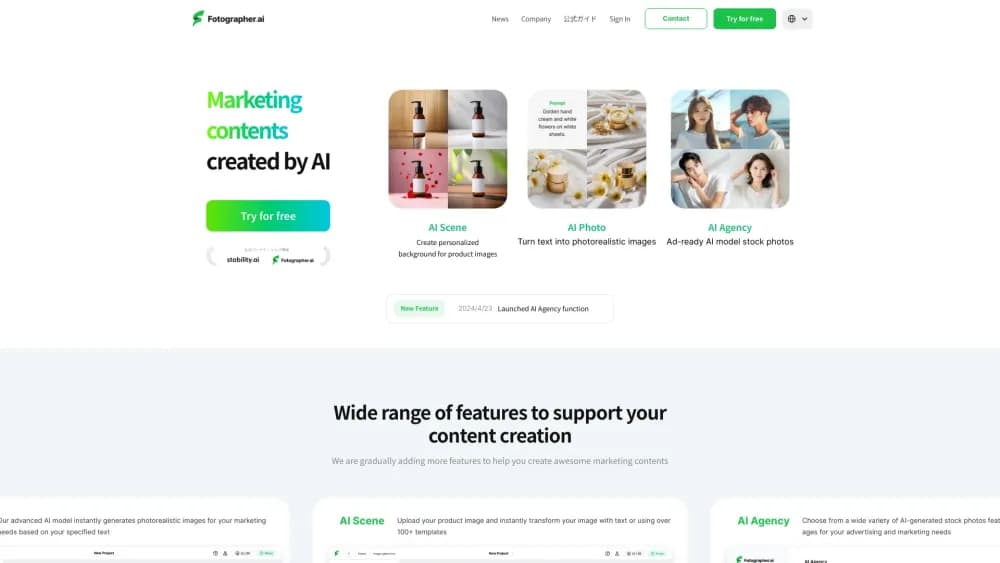
About Fotographer.ai
What Is Fotographer.ai
Fotographer.ai is a web app and API for making commercial product images without a photo studio. You upload a shot of a real product, the tool cuts out the background, and you place the item on a canvas to build a new scene around it.
The product comes from Fotographer AI, Inc., a Tokyo company founded in 2020 and backed by Japanese venture funds. Its pitch is narrower than a general image generator: the product itself is never redrawn, so packaging, logos, and color stay exactly as they were shot while the room, lighting, and set change.
That focus cuts both ways. A team selling furniture, cosmetics, or packaged goods gets a repeatable pipeline for hundreds of SKUs. Someone hoping to invent a character or paint a fantasy illustration should look elsewhere, because the tool is built around existing physical objects.
Getting Started
- Create an account at app.fotographer.ai and pick a subscription or a credit pack.
- Upload a product photo. The background is removed and the item is prepared for generation.
- Place and scale the product on the canvas, then choose a background template or describe the scene you want.
- Generate the image, review the variations, and download the files you plan to publish.
Product Information
A quick look at Fotographer.ai's pricing, supported platforms, and performance.
Best for
The users, tasks, and scenarios where this tool fits best.
Users
- Ecommerce operators
- In-house marketing teams
- Agencies and studios
Tasks
- Replacing a plain white background
- Combining several items in one image
- Turning rough 3D work into marketing assets
- Producing social and banner crops
Scenarios
- Seasonal catalog refreshes
- Marketplace listings
- Pre-production pitches
Key features
Canvas Compositing for Product Placement
The web app puts your product on a canvas where you drag it into position and adjust the scale by hand. That removes the usual guessing game of writing a prompt that describes where an object should sit, and it keeps the result close to what you pictured.
ZenInpaint for Multi-Product Scenes
ZenInpaint inserts one or more real product images into an existing or generated scene. Each item keeps its original shape, while lighting and spatial context are adjusted around it. You can iterate on the scene later without redoing the product cutout.
Non-Destructive Product Handling
The model does not repaint or stylize your product. Only the surrounding environment is generated, which is why a cosmetics bottle keeps its label and a chair keeps its exact proportions across dozens of images. For brands, that consistency is the main reason to use this tool over a general AI product image generator.
Scene Generation from Depth Maps and Wireframes
You can drive scene creation with a Canny edge map, a depth map, or a rough Three.js render. The tool fills in materials, light, and atmosphere, which shortens the gap between a 3D blockout and a marketing-ready visual.
Background Generation and Removal
The AI background generator changes only the context and blends the new set with the lighting and perspective of the subject. A separate remover strips backgrounds from uploaded shots, so you can prepare transparent assets for listings or ads.
Templates, AI Director, and ZenCtrl
Ready-made background templates cover common studio and lifestyle looks, and the AI Director writes prompts for you when you have a rough idea but no wording. ZenCtrl adds character training and multi-view generation for recurring subjects, while the same account also handles short video clips and image upscaling.
Pros and cons
Pros
- Product fidelity: packaging, logos, and geometry survive every generation because the item is never redrawn.
- API access: Python SDK, REST calls, and sample code for cURL, Node.js, Java, Go, PHP, Ruby, and .NET.
- Catalog scale: one approved product image can feed dozens of scenes, regions, and campaign variants.
- Enterprise footing: ISO/IEC 27001 certification, SSO, dedicated servers, and a named account manager on the top plan.
- Low prompt burden: canvas placement and templates do most of the work, so junior staff can produce usable shots.
Cons
- No free tier: the cheapest plan starts at $15 per month, and every generation draws from a metered credit balance.
- Narrow scope: portraits, characters, and abstract art fall outside what the product photo generator is tuned for.
- Source quality matters: a small, blurry, or badly lit upload limits how realistic the final scene looks.
- Browser only: there is no mobile app, and high-volume work is routed through sales rather than self-serve checkout.
Frequently asked questions
Fotographer.ai creates commercial product images from photos you already have. It removes the background, places the product in a generated scene, and adjusts lighting and context without altering the item itself.
Related content
Explore related tools, skills, and articles for Fotographer.ai.
Fotographer.ai Alternatives

Tractionwave
TractionWave · Image · MarketingTractionWave is an AI attention heatmap tool for static ads. Upload a PNG or JPG and it returns predicted attention, ranked hotspots, and fixes before you spend budget.

Imejis.io
Imejis.io · Image · MarketingImejis.io is an AI design studio for agents and marketing teams. Describe an image in plain words, and it writes the copy, builds the layout, reflows it to every size, then exports a finished file.

Layoutr
Van Dijk Ontwikkeling · Image · China AILayoutr is a browser floor plan tool that scales your own plan, places furniture at true size, shows the room in 3D and renders it with AI.