
Free AI Image Generator
Imagefree.org · Image
Free AI Image Generator is a browser-based text to image AI tool from Imagefree.org that turns a written prompt into finished artwork in seconds. It skips accounts, credits, and daily caps, so anyone can make unlimited AI generated images without a sign-up. No install, no waitlist. People use it as a free AI art generator for backgrounds, headshots, product mockups, and social posts.
About Free AI Image Generator
What Is Free AI Image Generator
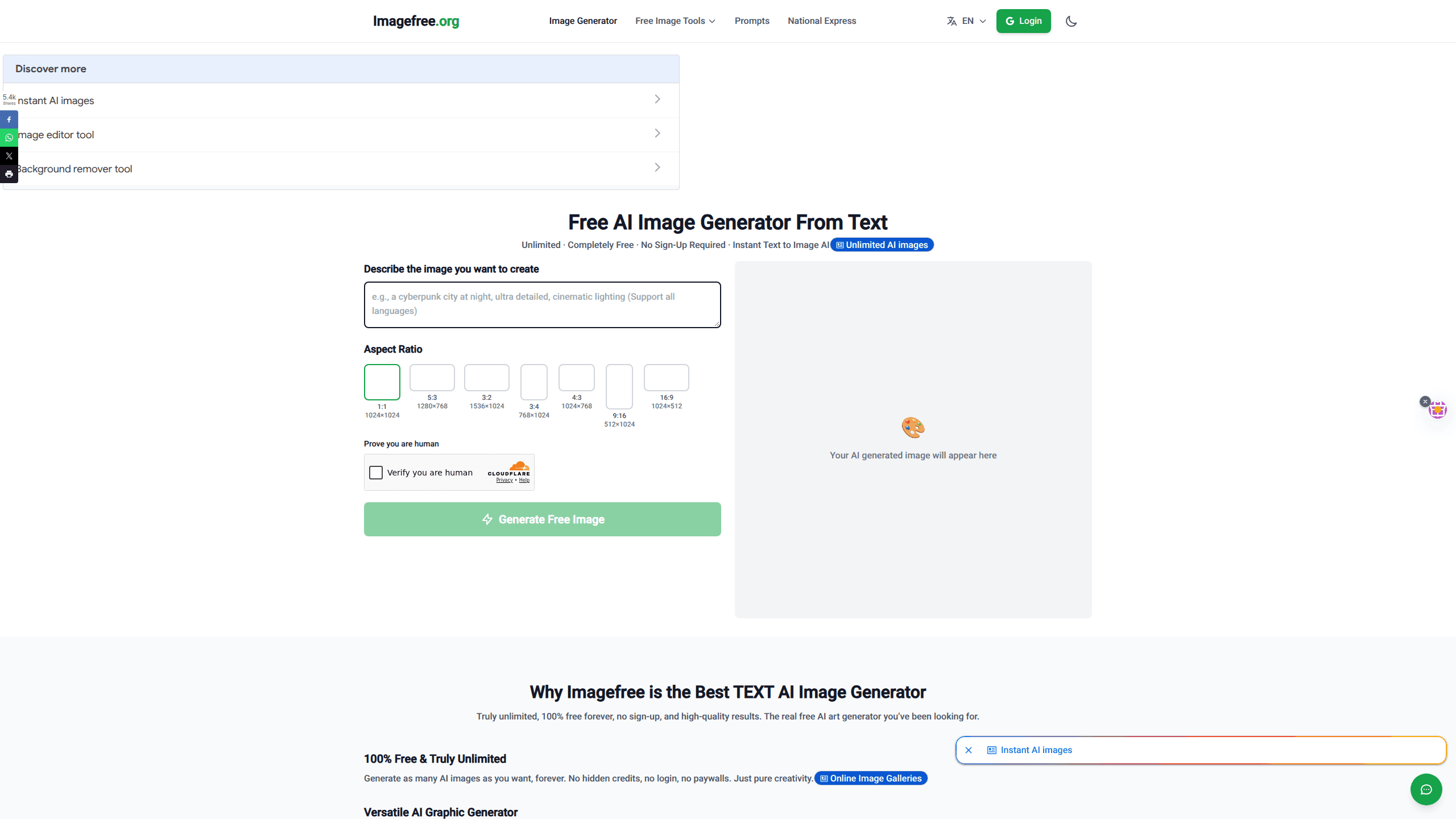
Free AI Image Generator is a web tool that converts written descriptions into pictures. You type a prompt like "a cyberpunk city at night, cinematic lighting," pick an aspect ratio, and the AI renders an image in roughly 5 to 15 seconds. There's nothing to install, and the site works on desktop and mobile browsers alike.
What sets it apart is how little it asks of you. Most image generators push you into an account, a credit balance, or a daily limit. This one opens straight to the prompt box. No email, no card, no queue.
The trade-off is control. You get aspect ratios and style keywords, not fine-grained settings like seeds, negative prompts, or model switching. If you need precise, reproducible output, this isn't the tool for that.
Getting Started
- Open imagefree.org in your browser. There's no account to create.
- Type a description of the image you want into the prompt box. The site accepts prompts in any language.
- Pick an aspect ratio, from 1:1 square to 16:9 widescreen, that fits your target.
- Solve the quick human check and click Generate Free Image.
- Preview the result, tweak your wording if needed, then download it as PNG or JPG.
Product Information
A quick look at Free AI Image Generator's pricing, supported platforms, and performance.
Best for
The users, tasks, and scenarios where this tool fits best.
Users
- Everyday creators
- Social media managers
- Small business owners
Tasks
- Making AI generated images from a short text prompt
- Generating AI headshots and portraits
- Producing AI art in a chosen style
Scenarios
- Filling a blog post or thumbnail with original art when you can't source a photo.
- Brainstorming visual concepts for a pitch before committing to paid design work.
- Creating background images and simple graphics for personal projects on a zero budget.
Key features
Unlimited Free Image Generation
There are no credits, daily caps, or paywalls here. You can run as many generations as you want, in a single sitting, forever. That's the main reason people reach for this over freemium rivals, since a comparison tool that meters your output stops being useful the moment you need a batch. Think about it. A cap turns every good idea into a budget decision.
Text to Image AI Engine
Type a description and the engine reads it as a creative brief, not a keyword match. The site says it supports prompts in any language, so you don't need perfect English to get a usable result, which matters if English is your second language and you'd rather describe the scene in the words that come naturally. It's a straightforward AI picture generator that trades deep controls for speed.
Multiple Aspect Ratios
You get seven preset sizes, ranging from 1024×1024 square to 1536×1024 and 16:9 widescreen, plus portrait and vertical options that fit phone screens and story formats without extra cropping work on your end. That range covers most real jobs: an Instagram square, a YouTube thumbnail, a phone wallpaper. It's a small thing that saves a lot of awkward cropping.
No Sign-Up, Instant Access
The tool never asks for an email, account, or card. Creation happens in the browser tab. The only gate is a quick human check before each generation, which keeps bots from hammering the servers and, in practice, costs you a couple of seconds every time you want to render something new.
Style and Prompt Control
Add style keywords to push the output toward photorealism, anime, oil painting, or 3D render. Lighting and mood words work too. The free AI art generator responds well to specific, layered prompts, so a little description goes a long way.
Companion Image Tools
The same site bundles a background remover, an image upscaler, and an editor beside the generator, plus a prompt library of ready-made examples for when you're stuck staring at an empty box. You can build an image, clean it up, and scale it without leaving the tab.
Pros and cons
Pros
- Genuinely free with no account, credits, or daily limits, which removes the friction most generators add.
- Fast output, typically 5 to 15 seconds, so you can iterate on a prompt without waiting around.
- Seven aspect ratios cover the common social and design formats out of the box.
- Prompt support across languages makes it usable well beyond English speakers.
Cons
- No API means you can't wire it into an app or automate a batch job.
- Style control is keyword-based, with no seeds, negative prompts, or model choice, so results vary and aren't fully reproducible. Want the exact same image twice? You can't get it.
- A human check before every generation adds a step when you're producing many images in a row.
- No saved history or account library, so images live only in your browser session until you download them.
Frequently asked questions
Yes. The site states there's no cost, no credit system, and no daily limit. You generate as many images as you like without paying or creating an account.
Related content
Explore related tools, skills, and articles for Free AI Image Generator.
Free AI Image Generator Alternatives

X Ray Interpreter
X-ray Interpreter · ImageX Ray Interpreter is a web-based AI radiology tool that turns X-rays, CT scans, MRI, ultrasound, and PET images into plain-language reports. You upload a scan, get a preliminary X-ray interpretation in moments, then ask follow-up questions if something needs explaining. It works as a second opinion and a learning aid, not as a medical diagnosis.

Aieasypic
AIEasyPic · ImageAIEasyPic is an AI image generator that turns plain text prompts into finished artwork in seconds. You can also train custom models on your own photos, swap faces in existing images, and create short video clips from text, all from a browser. It suits casual creators who want quick visuals and hobbyists who want to build a personal model without touching any code.

Chargen
Chargen · ImageChargen is an AI character generator and worldbuilding toolkit built for Dungeons & Dragons and other tabletop RPGs. It turns a one-line idea into a painted character portrait, spins up NPCs, monsters, maps and encounters from the same session, and keeps every creature's details close at hand. The tabletop RPG art side runs on a credit system called Gold, while the text generators stay free for everyone.