

Gazouya (がぞうや)
Gazouya (がぞうや) · Image
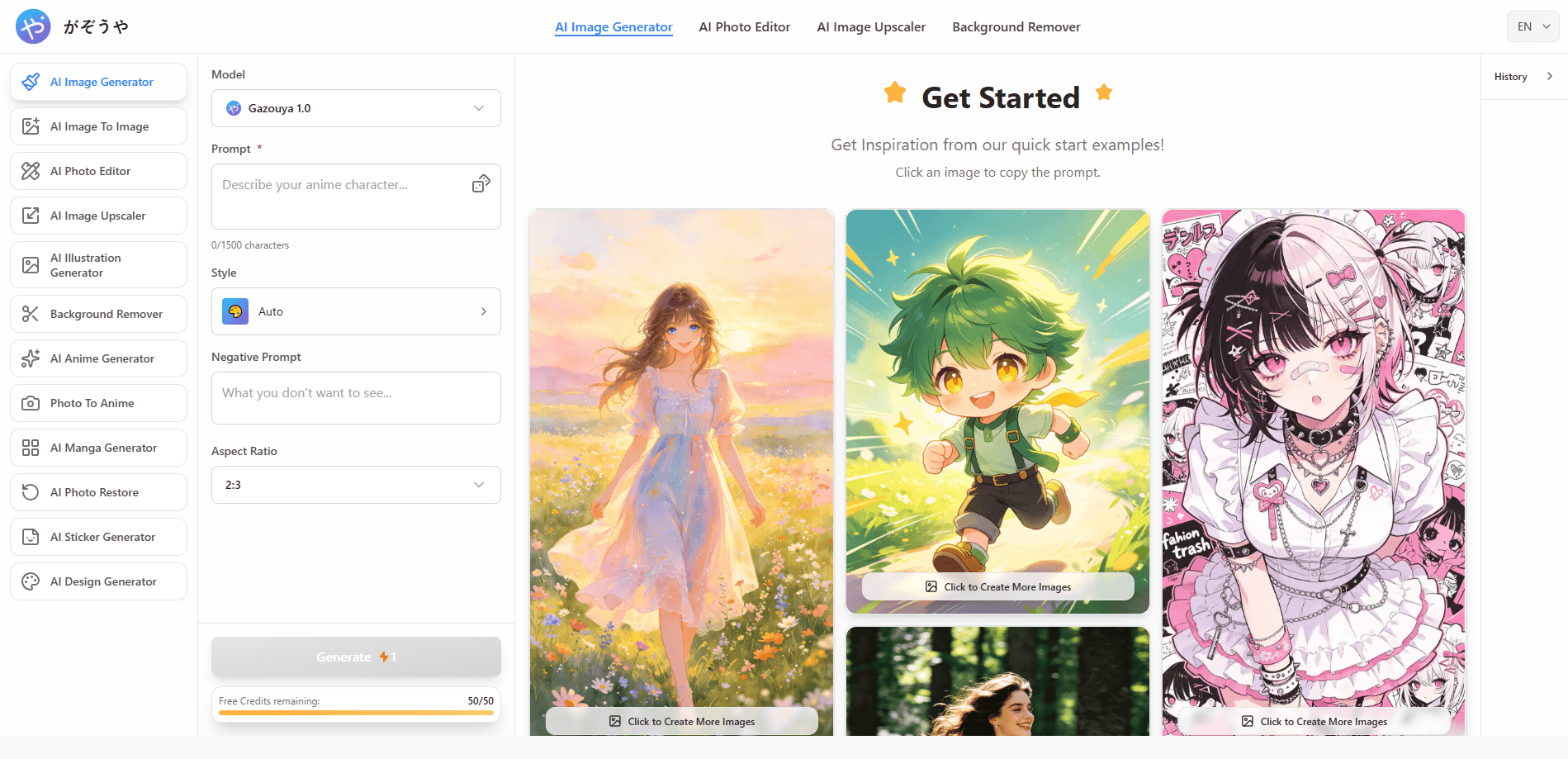
Gazouya is a free AI image generator and editor that runs in the browser, turning Japanese or English prompts into artwork, photo edits, and upscaled images without an account.
About Gazouya (がぞうや)
What Is Gazouya
Gazouya is a browser-based AI image tool built by a Japanese team. You open the site, type what you want, and get a picture back. There's no download, no login screen, and no credit card form between you and the first result.
The tool set stretches well past generation. One menu holds text to image, image to image, an AI photo editor, a background remover, a magic eraser, photo restoration, and an image upscaler. Smaller single-purpose pages cover anime, manga, tachie character art, headshots, icons, emoji, stickers, and hairstyle previews. The Japanese site and the English site share the same tools, and prompts work in either language.
Sixty seconds of testing tells you where it fits. This is a fast sketchpad for people who need visuals now, not a studio suite with layers, version history, and a shared asset library. The site runs on daily free credits, and its homepage doesn't publish a pricing table or API documentation, so teams that need invoices or automation should ask through the contact form before planning around it.
Getting Started
- Open gazouya.com. The Japanese version loads by default, and gazouya.com/en/ switches the interface to English. Neither asks for an account.
- Pick a tool from the menu: AI image generation, image to image, the AI photo editor, or the image upscaler, among others.
- Type a prompt in Japanese or English, then set the aspect ratio and pick from the style options.
- Press generate, wait a few seconds, and download the file to your device.
Product Information
A quick look at Gazouya (がぞうや)'s pricing, supported platforms, and performance.
Best for
The users, tasks, and scenarios where this tool fits best.
Users
- Social media marketers
- Web designers and indie creators
- Small business owners
- Hobbyists and fan artists
Tasks
- Drafting an ad banner or article thumbnail from a written prompt, then downloading the version that works.
- Turning an existing photo into anime, illustration, watercolor, or another style with the image to image tool.
- Repairing a blurry or damaged photo with restoration and upscaling, then cutting out the background for a clean PNG.
Scenarios
- A concept round the day before a client meeting, when you need three rough visual directions in under ten minutes.
- Posting from a phone
- Preparing transparent cutouts for layouts, merchandise mockups, or print files, where a clean edge matters more than artistic flair.
Key features
Text to image generation with no account
Type a description and Gazouya returns a finished image in seconds. The prompt box accepts Japanese and English, and the generator reads context rather than matching keywords one by one, which helps with scene descriptions like "a rainy alley in Kyoto at dusk, shallow depth of field." You pick an aspect ratio and a style before generating, and the result lands as a downloadable file.
Image to image conversion
Upload a photo and Gazouya redraws it in another style while keeping the composition. Anime, Ghibli-inspired, retro, and painterly looks are the common choices. This is the tool to reach for when the subject is already right and only the treatment needs to change, such as turning a phone portrait into an illustration for a profile page.
An AI photo editor that takes plain instructions
Instead of layers and masks, the AI photo editor works from sentences. "Make the sky warmer," "remove the person on the left," or "turn this into a watercolor" each produce an edit in one pass. JPG, PNG, and WEBP files are supported. It handles photos, illustrations, and anime art in the same workspace, which saves switching between apps for mixed projects.
Image upscaling up to 4K
The image upscaler rebuilds pixels at 2x or 4x, taking small or grainy files to a resolution that holds up in print and on large displays. It also sharpens soft edges and reduces noise in night shots and dim interiors. Line art and anime illustrations upscale with minimal bleed, a detail that matters for prints and merchandise.
Background removal and object cleanup
The background remover cuts a subject out of a photo and returns a transparent PNG in one click. The magic eraser handles smaller cleanup jobs, such as removing a photobomber, a cable, or a logo from a wall. Both are the kind of utility that saves a full editing session when you only need one clean asset.
Single-purpose tools for specific formats
Beyond the main generators, Gazouya ships narrow tools for jobs that usually need a separate app: AI manga panels, anime backgrounds, tachie standing characters, ID-style headshots, app icons, emoji, stickers, and hairstyle previews. Each one opens with a preset aimed at that format, which shortens the prompt work for people who already know what they want.
Pros and cons
Pros
- No sign-up, no install, and no credit card to start; the first image is a few clicks away.
- Prompts work in Japanese and English, which suits teams whose briefs are written in Japanese.
- More than 20 tools sit under one roof, covering generation, editing, restoration, and upscaling.
- Free daily credits cover casual use, and the site doesn't hide the tools behind a paywall.
- Output reaches 4K through 2x and 4x upscaling, enough for print and large banners.
Cons
- No pricing page or documented paid plan exists on the site, so a team can't budget from public information.
- There's no published API, which rules out automated batch jobs.
- The daily credit allowance isn't spelled out on the homepage, and 4x upscales burn through it faster than simple generation.
- Prompt-based editing still fumbles small text and hands, so detailed commercial work needs retries.
Frequently asked questions
Yes to free, no to an account. The generators, editor, upscaler, and background remover all open without registration or login. Daily credits cap how much you can produce, and the site doesn't publish the exact allowance.
Related content
Explore related tools, skills, and articles for Gazouya (がぞうや).
Gazouya (がぞうや) Alternatives

Tractionwave
TractionWave · Image · MarketingTractionWave is an AI attention heatmap tool for static ads. Upload a PNG or JPG and it returns predicted attention, ranked hotspots, and fixes before you spend budget.

Imejis.io
Imejis.io · Image · MarketingImejis.io is an AI design studio for agents and marketing teams. Describe an image in plain words, and it writes the copy, builds the layout, reflows it to every size, then exports a finished file.

Layoutr
Van Dijk Ontwikkeling · Image · China AILayoutr is a browser floor plan tool that scales your own plan, places furniture at true size, shows the room in 3D and renders it with AI.