

GenFuse AI
GenFuse AI · Coding · Productivity
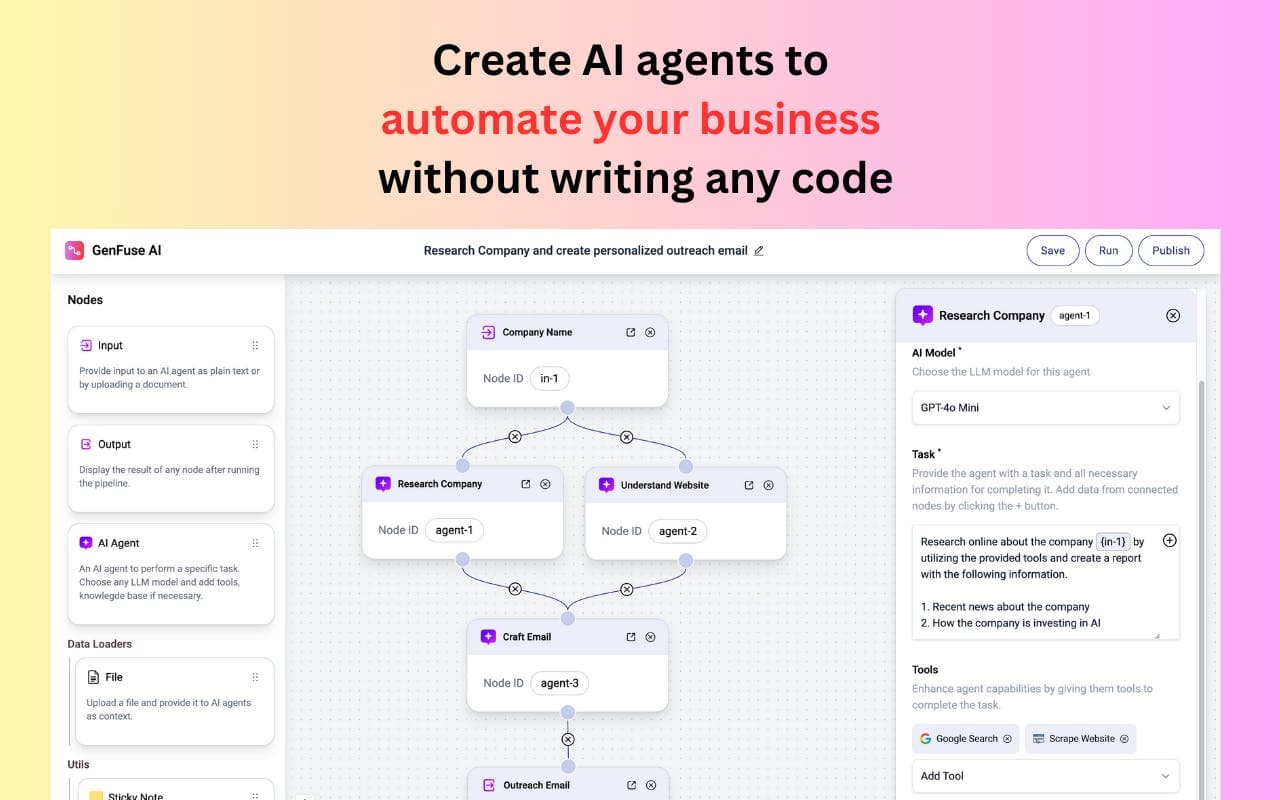
GenFuse AI is a no-code AI automation platform that turns a plain-English description into working multi-agent workflows for teams drowning in repetitive tasks.
About GenFuse AI
What Is GenFuse AI
GenFuse AI is an AI automation platform built around one promise: you describe the process you want to run, and the system assembles the workflow for you. It connects to the apps your team already uses. Then it strings them together with AI agents that can reason through a task instead of just following a fixed if-this-then-that branch.
The product targets people who know their work well but don't write code. Instead of dragging nodes onto a canvas, you type a request in natural language and a builder called Gen turns it into a runnable automation. It doubles as an AI workflow builder for teams that never had one. GenFuse AI calls this text-to-automation.
The main limit to know up front is credits. Every plan runs on a monthly credit pool. Heavy multi-step workflows burn through them fast. The free tier gives you 500 credits, which is enough to try things, not enough to run a real operation.
Getting Started
- Create an account on the GenFuse AI site with your email.
- Describe the workflow you want in the prompt box, or pick a pre-built automation template to start from.
- Let Gen build the first draft, then review each step and swap nodes, models, or connected apps as needed.
- Test the automation on a small sample before you schedule it.
- Schedule the workflow to run on its own and monitor credit use in your dashboard.
Product Information
A quick look at GenFuse AI's pricing, supported platforms, and performance.
Best for
The users, tasks, and scenarios where this tool fits best.
Users
- Operations teams
- Solo founders and small teams
- Marketers
Tasks
- Lead intake and routing
- Content operations
- Data cleanup
Scenarios
- Daily recurring admin work
- Early-stage process testing
- Cross-app reporting
Key features
Text to Automation Builder
The centerpiece is Gen, a builder that takes a written description and produces a working automation. You type what you want in everyday language, and it lays out the steps, picks the models, and wires the connections. No canvas. No nodes. The point is to let someone who has never touched a workflow editor get a first version running in minutes.
Multi-Agent Workflows
Rather than one rigid rule chain, GenFuse AI runs AI agents that can decide how to handle a step. That matters when a task needs judgment, like sorting a messy support ticket or deciding whether a lead is worth escalating. You get the flexibility of a reasoning agent without writing the logic yourself.
App Integrations
The platform connects to your existing tools, so automations move real data instead of living in a demo. Which apps are supported? The Pro plan opens up a catalog of 2,500+ tools and 10,000+ actions, which covers most common business apps. On the free and Starter plans, tool access is limited, so check that your key apps are supported before committing.
Pre-Built Templates
If you'd rather not start from a blank prompt, there's a library of pre-built automation templates that solve common business problems. Adopt one as-is. Or use it as scaffolding and adjust the steps. It's a fast way to see how a working automation is structured, before you build your own.
Scheduling
Automations can run on a schedule instead of firing only when you trigger them by hand. This is what turns a one-off script into background infrastructure, clearing daily admin or syncing records on a fixed cadence. All plans include scheduling, so the feature isn't gated behind the paid tiers.
Plan-Based Credit System
Every action costs credits, and each plan comes with a monthly pool: 500 on Free, 5,000 on Starter, 50,000 on Pro. Not a lot on the low end. That structure keeps costs predictable but asks you to estimate usage before you scale. Teams with spiky workloads should watch the counter, since a runaway workflow can drain a month's credits in a day.
Pros and cons
Pros
- Natural-language building removes the coding barrier for people who know the process but not the tools.
- Multi-agent design handles judgment-based steps that plain if-then automation can't.
- Free tier and a $15/month Starter plan make it cheap to test before you commit.
- Scheduling is included on every plan, so simple background runs don't need an upgrade.
Cons
- The 500-credit free pool runs out fast, so testing at any real scale means paying.
- Tool access is limited on lower tiers, which can block automations that depend on less common apps.
- It's a browser-only product, so there's no mobile app for checking runs on the go.
- API availability isn't clearly published, which is a problem if you want to trigger workflows from your own code.
Frequently asked questions
It builds and runs AI automations from a written description. You explain a workflow in plain English, and the platform assembles the agents and app connections needed to execute it on a schedule or on demand.
Related content
Explore related tools, skills, and articles for GenFuse AI.
GenFuse AI Alternatives
Forefront
Forefront · CodingForefront is a web platform for building with open-source AI. It lets you fine-tune leading open-source language models on your own data, evaluate how they perform, and run them through an API or export them to host yourself. Developers who want the convenience of a closed-source platform but insist on owning their models and data are the target audience here.

Startkit
StartKit.AI · CodingStartkit is a boilerplate for building AI SaaS and AI wrapper products. Think of it as an AI startup boilerplate with the boring parts already wired up: authentication, Stripe and Lemon Squeezy payments, usage limits, transactional email, and an AI API starter that talks to OpenAI, Anthropic, Groq, or Llama. You clone the repo, set your price, and start on the part of your product that people actually pay for. It's Next.js under React and Tailwind, so most of the boilerplate code already feels familiar.
Testim
Tricentis · CodingTestim is an AI-powered test automation platform for building and running end-to-end tests across web, mobile, and Salesforce applications. It leans on machine learning to keep tests stable when an interface changes, so teams spend less time fixing broken selectors. Not bad for an automated testing tool you can start using today. You create tests by recording actions in a browser, then optionally add JavaScript when you need more control. It's a solid pick for busy QA teams.