

gesture.live
gesture.live · Image · Voice & Language
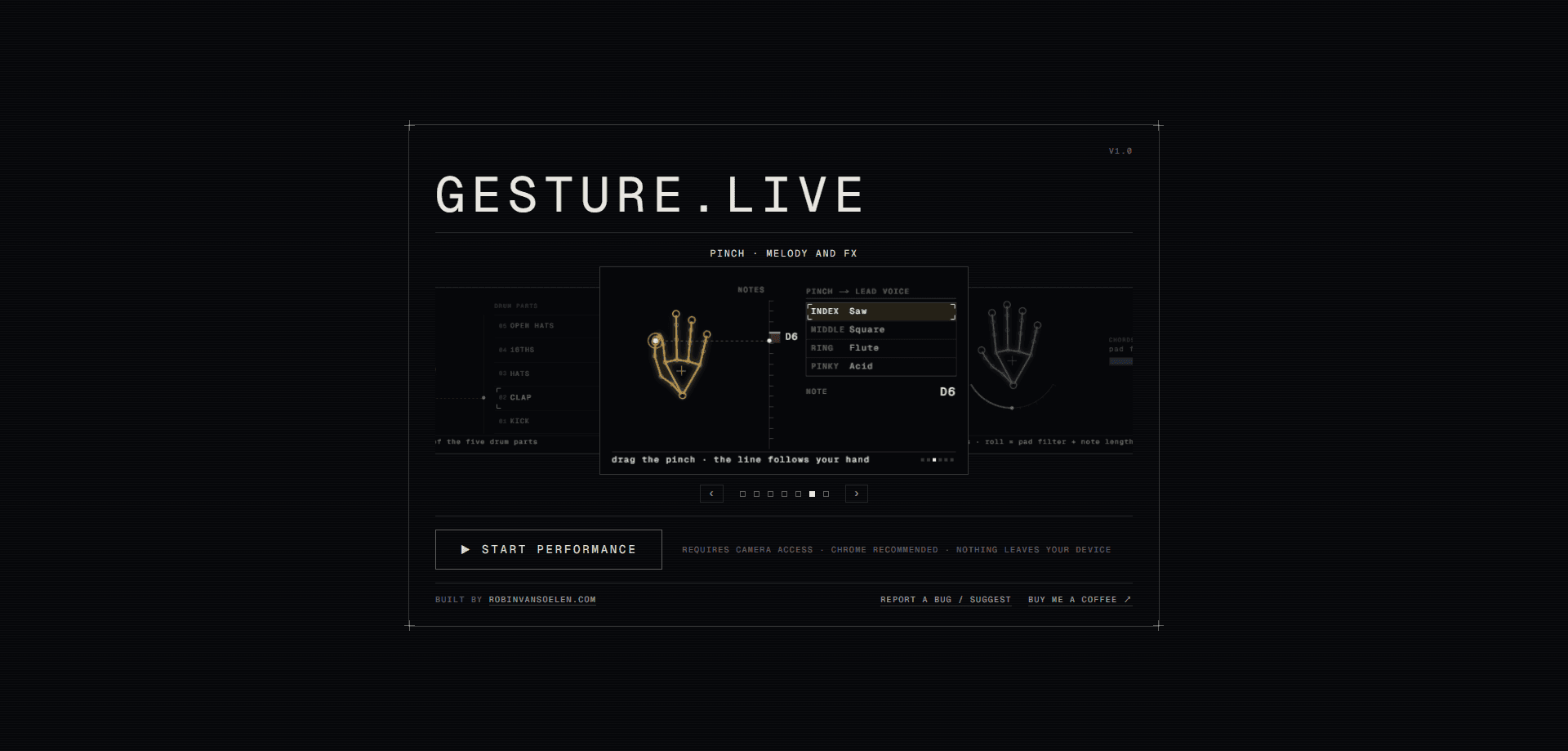
gesture.live is a browser-based gesture synth that lets you play live electronic music with your hands. You open a tab, allow the webcam, and your left hand plays chords while your right hand picks a mode for drums, bass, melody, effects, or sound sculpting. Think of it as a webcam music instrument you play by moving. There's nothing to install and no account to create, and the hand tracking runs locally on WebAssembly audio, so no video ever leaves your device.
About gesture.live
What Is gesture.live
gesture.live is a gesture-controlled synthesizer that runs entirely in a web browser. Instead of keys or pads, it reads your hand positions through the webcam and maps them to musical events: chords ring out, drum families answer a pinch, and filters sweep as you roll your wrist. It's aimed at people who want to make electronic music without learning a piano layout or buying gear.
The idea is simple. Your left hand counts out chords that already sit in the song's key, so nothing you play sounds off. Your right hand switches jobs, choosing whether the second hand drives drums, bass, melody, effects, or reshapes the chord voice itself. Height acts as spice: hold your chord hand low and you get a plain triad, lift it and the same chord grows a seventh, a ninth, then a wide thirteenth.
The biggest limit is the room you're in. You need decent lighting, a working camera, and enough space to keep both hands and your elbows in frame. Fast passages won't track as cleanly as a MIDI keyboard, and a laggy laptop can stutter the audio. For slow, expressive performances, it holds up well.
Getting Started
- Open gesture.live and press start. The browser asks for camera access, so allow it.
- Hold one hand up, palm to the camera, until the tracker picks it up.
- Count a chord by holding up fingers. The chord keeps sounding for as long as you hold the pose.
- Make a fist with your other hand, back to the camera, to summon the mode arc, then open your hand on the mode you want.
- Record a take if you like. It's finished in the browser and handed straight to you as a file.
Product Information
A quick look at gesture.live's pricing, supported platforms, and performance.
Best for
The users, tasks, and scenarios where this tool fits best.
Users
- Electronic music hobbyists
- Curious beginners
- Streamers and content creators
Tasks
- Live looping
- Sampling your own sounds
- Recording a quick demo
Scenarios
- A casual jam at your desk
- Practicing performance gestures
- A family or classroom demo
Key features
Hands-Only Chord Playing
Want chords without touching a keyboard? The left hand is always live. Count one to seven on your fingers and a chord of the current key sounds, no mode or menu required. Turning your hand over flips that same count to the parallel minor, and pointing fingers down drops the chord a semitone, so every pose hides a second option behind it.
The Mode Arc
A fist with the back of your hand facing the camera brings up the mode arc. Moving your hand highlights the nearest cell, and opening it locks that mode in. Making a palm-back gesture instead cancels the switch, so nothing changes by accident. It's a fast way to hand the right hand a new job mid-performance.
Five Performable Modes
The right hand covers drums, bass, melody, effects, and sculpt. Drums give one pinch finger per kit family, bass lets you perform density and octave jumps, and melody assigns a range to each finger. Sculpt reshapes the chord voice with arp rate, envelope, glide, and tremolo that stay latched between modes.
Height and Wrist Control
Where you hold a chord matters as much as which chord it's on. Lifting the chord hand stacks notes onto it while the sound is still ringing, and lowering it thins the chord back out. Rolling your wrist sweeps the pad filter and note length, so a held chord keeps shifting color under your hand.
Built-In Sampler
The sampler mode plays your own audio. Grab up to eight seconds from the mic or drop a file onto the page, and the take lands on that pinch finger. Each finger keeps its own material, and a guitar sample ships loaded so the default pinch never fires a silent key.
Voice Harmonizer
The chord hand can sing with you. A fourth chord voice pitch-shifts your live voice onto every held chord tone at once, all quantized to the chord. Cutoff and sculpt then shape your voice exactly as they shape the pad. Headphones are recommended, since the mic and speakers can feed back.
Saved Songs and Vertical Takes
You can save the whole musical state under a name, from key and tempo to chord voices and spice settings, then load any song mid-performance from a deck in the frame. Recording supports a 720x1280 vertical sheet for phones as well as the wide format, or both at once.
Local WebAssembly Tracking
Hand tracking runs in WebAssembly on your own machine. There's no server for a frame to reach, so nothing leaves your device, and a take is finished in the browser before you get it. That keeps the instrument private and quick to start, with no sign-up in the way. For anyone doing hand tracking music, this local approach is the whole point.
Pros and cons
Pros
- No install, no account, and no cost. You just open a tab and start playing.
- Chord hand stays in key, so beginners can sound musical immediately.
- Hand tracking runs locally, which keeps your camera feed on your own device.
- Deep performance control through height, wrist roll, and five distinct modes.
Cons
- Tracking depends on good lighting and room to move, so cramped or dim setups will stumble.
- Fast, precise passages won't match what a MIDI keyboard can do.
- Audio stability leans on your machine, and a slow laptop can crackle or drop frames.
Frequently asked questions
Yes. The instrument is free in the browser with no paid tier, so you can play, sample, and record without paying or signing up.
Related content
Explore related tools, skills, and articles for gesture.live.
gesture.live Alternatives

X Ray Interpreter
X-ray Interpreter · ImageX Ray Interpreter is a web-based AI radiology tool that turns X-rays, CT scans, MRI, ultrasound, and PET images into plain-language reports. You upload a scan, get a preliminary X-ray interpretation in moments, then ask follow-up questions if something needs explaining. It works as a second opinion and a learning aid, not as a medical diagnosis.

Aieasypic
AIEasyPic · ImageAIEasyPic is an AI image generator that turns plain text prompts into finished artwork in seconds. You can also train custom models on your own photos, swap faces in existing images, and create short video clips from text, all from a browser. It suits casual creators who want quick visuals and hobbyists who want to build a personal model without touching any code.

Chargen
Chargen · ImageChargen is an AI character generator and worldbuilding toolkit built for Dungeons & Dragons and other tabletop RPGs. It turns a one-line idea into a painted character portrait, spins up NPCs, monsters, maps and encounters from the same session, and keeps every creature's details close at hand. The tabletop RPG art side runs on a credit system called Gold, while the text generators stay free for everyone.