

Gif Face Swap
Gif Face Swap · Image · Video
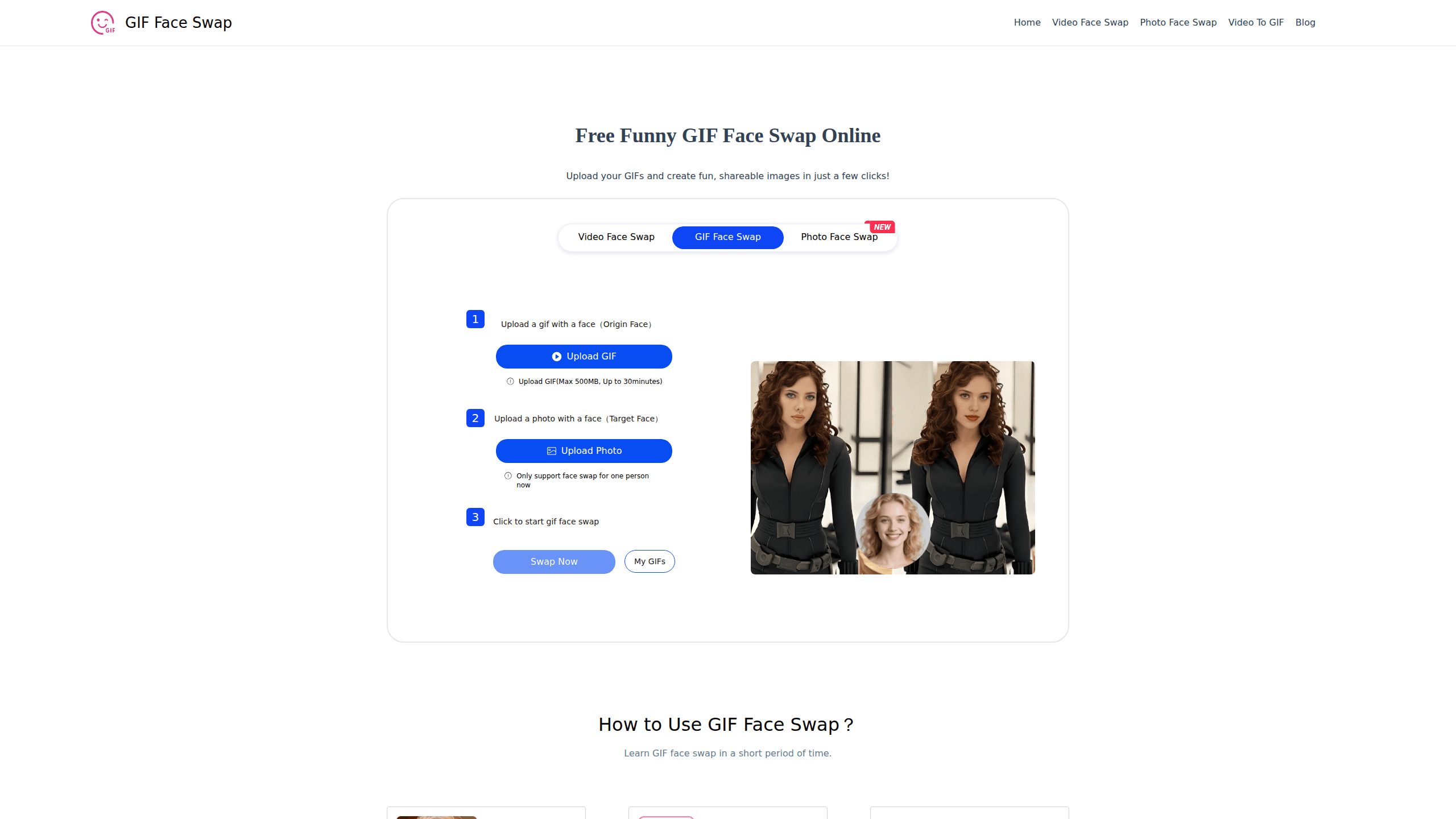
Gif Face Swap is a free browser tool that lets you swap faces in GIF files, replacing the face in an animated GIF with one from a photo you upload. It runs entirely online, needs no account, and hands you a finished animated GIF you can save or post. If you've ever wanted to drop a friend's face onto a dancing character, this is the fastest way to do it.
About Gif Face Swap
What Is Gif Face Swap
Gif Face Swap is a web-based AI tool for putting one person's face onto another person's body inside a moving GIF. You bring two things: a GIF that already contains a face, and a photo of the face you want to use as the replacement. The tool lines up the features, swaps them across the animation, and gives you a new GIF back.
The appeal is speed and zero setup. There's nothing to install, no login wall, and no editing timeline to learn. That makes it a good fit for quick jokes, meme ideas, and social posts rather than polished video production.
The main constraint is that it handles one face at a time. Group GIFs or scenes with several people won't work the way you might hope, so pick a clip where a single face is clearly visible.
Getting Started
- Open giffaceswap.io in any modern browser. No registration or email is required.
- Upload the source GIF that holds the face you want to replace. The file can go up to 500MB and about 30 minutes of footage.
- Upload a clear photo of the face you want to swap in. Use a sharp, front-facing shot for the cleanest match.
- Click the swap button and wait for the tool to process the animation.
- Preview the result, then download the finished GIF locally and share it wherever you like.
Product Information
A quick look at Gif Face Swap's pricing, supported platforms, and performance.
Best for
The users, tasks, and scenarios where this tool fits best.
Users
- Casual creators
- Content creators and bloggers
- Party and event hosts
Tasks
- Swapping a friend's face onto a movie or meme GIF for a laugh.
- Building short comedy content for social feeds.
- Making personalized invitation GIFs for events and celebrations.
Scenarios
- Sharing quick results on Instagram, Facebook, or X where a looping clip gets more attention than a still.
- Producing throwaway comedy bits for a blog or channel without a full editing suite.
- Sending a custom GIF to a friend as a birthday or inside-joke message.
Key features
Instant face swapping on animated GIFs
The core job is fast. Upload a GIF, add a target photo, and the AI finds the face and rebuilds each frame with the new one. You don't mask anything by hand, which is usually the part that eats a whole afternoon in a normal editor because you have to track the face frame by frame and fix the edges after every cut.
Works from a plain photo
Your replacement face can come from an ordinary picture. That means you don't need footage of the person, just one decent headshot. A sharp, front-facing photo gives the best match; a blurry or tilted one will show.
No signup and no software
Everything happens in the browser, on desktop or phone. There's no app to install and no account to create, so you can go from a half-formed idea to a finished, downloadable GIF in a single sitting without ever leaving the tab you already have open.
Wide input file support
Beyond GIF, the tool takes a range of common image formats for the source face, so you can pull files from your phone, your desktop, or wherever they happen to live. Uploads can reach 500MB and roughly 30 minutes of footage, which covers most clips people actually use, and that same flexibility makes it a lightweight animated GIF maker for short loops.
Free local downloads
When you're happy with the result, you save it to your device for free. No watermark tax and no paywall sitting between you and the file, which is rare for an online face swap tool.
Privacy-first handling
The site states that uploaded images and GIFs are used only to create your face swap content. That's a reasonable baseline for a tool that asks you to hand over photos of real people. Still, you should treat any upload of someone else's face with care.
Pros and cons
Pros
- Free to use, with no account or installation required.
- Handles both GIF and common image formats, so you can mix sources.
- Runs on desktop and mobile browsers alike.
- Downloads are free and saved locally, with no forced watermark.
- Fast enough for casual, on-the-spot use.
Cons
- Only swaps one face at a time, so group scenes won't work as-is.
- Results depend heavily on source quality; a poor photo or a small face in the GIF will show.
- There's no official API listed, so you can't wire it into an automated workflow.
Frequently asked questions
Yes. The tool is free, and you can download your finished GIF at no cost. There's no subscription tier shown on the site.
Related content
Explore related tools, skills, and articles for Gif Face Swap.
Gif Face Swap Alternatives

X Ray Interpreter
X-ray Interpreter · ImageX Ray Interpreter is a web-based AI radiology tool that turns X-rays, CT scans, MRI, ultrasound, and PET images into plain-language reports. You upload a scan, get a preliminary X-ray interpretation in moments, then ask follow-up questions if something needs explaining. It works as a second opinion and a learning aid, not as a medical diagnosis.

Aieasypic
AIEasyPic · ImageAIEasyPic is an AI image generator that turns plain text prompts into finished artwork in seconds. You can also train custom models on your own photos, swap faces in existing images, and create short video clips from text, all from a browser. It suits casual creators who want quick visuals and hobbyists who want to build a personal model without touching any code.

Chargen
Chargen · ImageChargen is an AI character generator and worldbuilding toolkit built for Dungeons & Dragons and other tabletop RPGs. It turns a one-line idea into a painted character portrait, spins up NPCs, monsters, maps and encounters from the same session, and keeps every creature's details close at hand. The tabletop RPG art side runs on a credit system called Gold, while the text generators stay free for everyone.