

GitAgent by Lyzr
Lyzr · Coding
GitAgent by Lyzr is a git-native AI agent framework that keeps an agent's identity, rules, memory, and tools inside a Git repository instead of scattered config files. Think of it as an AI agent protocol built on files. Your agent becomes the repo itself, so you can branch a personality, diff a rule change, and roll back memory with the same commands you already use for code. Version-controlled AI agents are the whole point here. The open-source AI agent definition stays framework-agnostic, so the same setup can run on Claude, OpenAI, CrewAI, or Lyzr. It's free to install from npm.
About GitAgent by Lyzr
What Is GitAgent by Lyzr
GitAgent is a framework-agnostic standard for defining AI agents, maintained by the team at Lyzr. The project is also known as the GAP standard, short for the GitAgent protocol. Most agent frameworks treat configuration as loose code spread across your application, which makes it hard to track who changed a rule, when a memory got edited, or why two teams ended up with different versions of the same agent. GitAgent flips that around. The repository is the agent, and every part of it lives in version-controlled files.
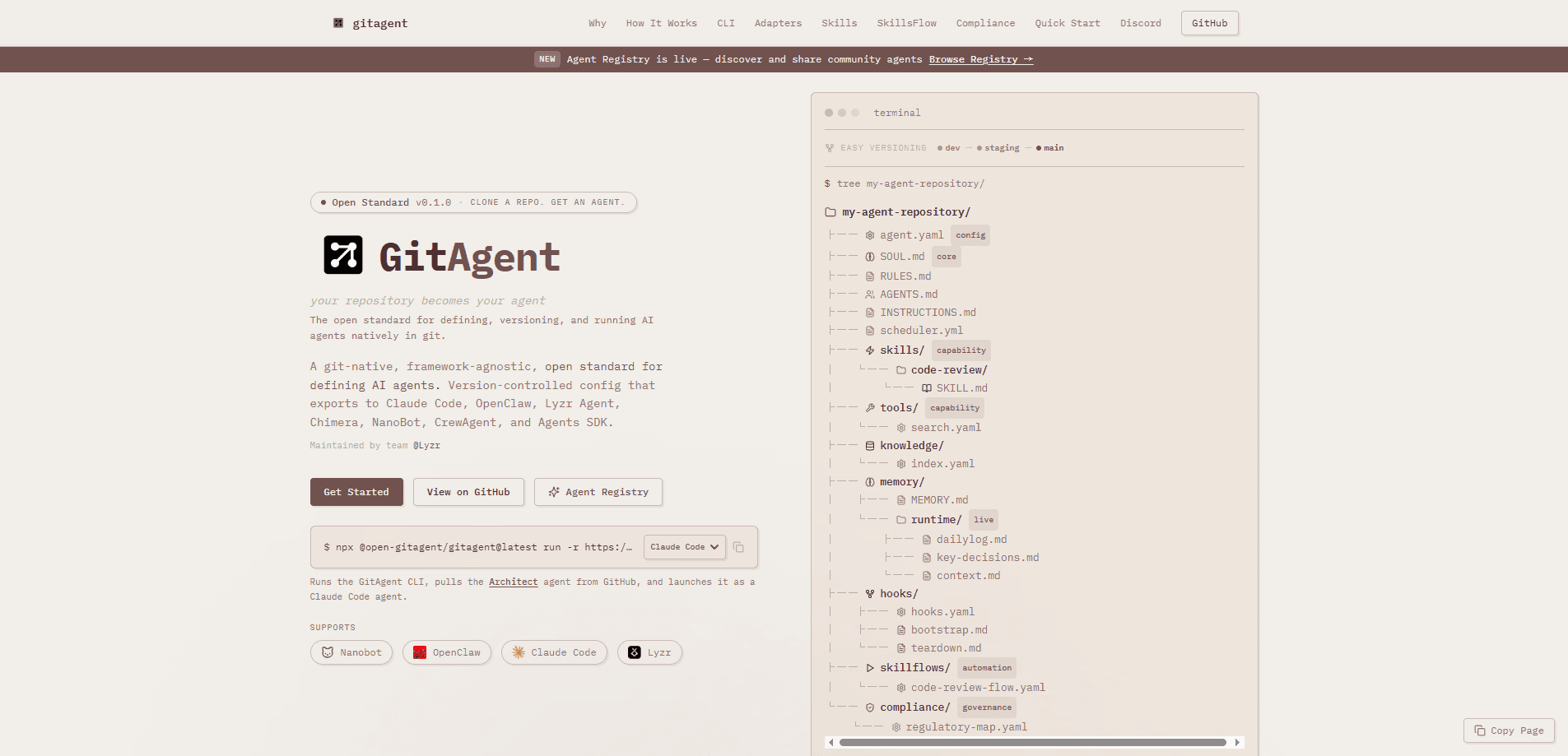
The project position is simple: clone a repo, get an agent. Instead of learning one vendor's SDK to spin up an agent, you drop a set of Markdown and YAML files into a Git repository and that repo is now a complete, portable agent definition. The core files are agent.yaml for the model and runtime config, SOUL.md for personality, RULES.md for behavioral constraints, plus memory, tools, skills, and hooks directories.
That design pays off most when you need an audit trail. In regulated industries like finance and healthcare, every rule change and every decision may need to be recorded. Git's commit history, branches, and blame give you that record for free. The tradeoff is real. GitAgent won't hand you a polished drag-and-drop dashboard; it assumes your team is comfortable with repos, terminals, and Node.js. If nobody on your team lives in Git, the learning curve will feel steep.
Getting Started
- Confirm you have Node.js 18 or newer, npm, and git installed on your machine.
- Run the one-line installer, or install the slim package with
npm install -g @open-gitagent/gitagent. - Walk through the API key setup, choosing Quick mode for a single provider or Advanced mode to wire up several.
- Create or clone a Git repository for your agent and edit agent.yaml, SOUL.md, and RULES.md to define how it behaves.
- Start the bundled local UI at http://localhost:3333, or run the agent through the SDK and commit your changes as you refine it.
Product Information
A quick look at GitAgent by Lyzr's pricing, supported platforms, and performance.
Best for
The users, tasks, and scenarios where this tool fits best.
Users
- Developers who already work in Git daily
- Platform and DevOps engineers running self-hosted tooling
- Teams in regulated industries needing an audit trail
Tasks
- Standardizing agent definitions across teams
- Forking and reusing community agents
- Version-controlling agent memory
Scenarios
- Standing up a coding assistant that needs a clear identity and ruleset you can review like any other code change.
- Shipping an agent through dev, staging, and production branches just as you would ship application code.
- Handing an agent to a new teammate
Key features
Agent as a Git Repository
The defining idea is that your agent is the repository. Identity, rules, memory, tools, and skills all sit in version-controlled files rather than inside a running service. That means you can fork an agent to try a variation, branch a personality for a different audience, and use git log to trace everything the agent has learned. If something goes wrong after an edit, git revert brings back the previous behavior. Simple as that.
Framework-Agnostic Runtime
GitAgent doesn't lock you to one provider. A single agent definition can be exported or run against Claude, OpenAI, CrewAI, LangGraph, or Lyzr, so the "soul" of your agent stays the same even when the underlying engine changes. This matters when a team standardizes on a definition but individual developers have their own favorite runtime. You write the agent once and move it between engines. No rewriting prompts from scratch.
Declarative Tools and Skills
Tools live in a tools/ directory as declarative YAML, and reusable capabilities are packaged as skill modules in a skills/ directory. Because these are files, you can review a new tool the same way you review code, and share a skill with another team by pushing it. Composability is the point. A skill built for one agent can be pulled into another without rewiring the whole definition.
Lifecycle Hooks
Hooks let you attach logic to points in the agent's lifecycle, either as scripts or programmatically. You can run a check before a task starts, log output after a step finishes, or trigger cleanup when a run ends. For teams building custom pipelines, the hooks are where GitAgent meets your existing automation. You don't rebuild it; you extend it.
Bundled Local UI and Voice Mode
The installer launches a local web UI at port 3333, and an optional voice package adds voice interaction through OpenAI Realtime and Gemini Live. You don't have to wire up a frontend to test an agent. The voice piece is split into its own package so the core install stays small, which also keeps supply-chain scanners happy in locked-down environments.
One-Line Install and SDK
Setup is a single copy-paste command that installs the CLI globally, walks you through API keys, and opens the UI. If you'd rather script everything, the same functionality is reachable through the SDK, which is what most teams use to embed GitAgent inside their own tooling. Requirements are modest. Node.js 18+, npm, and git. That's it.
Pros and cons
Pros
- Free and open source under the MIT license, with no paid tier to worry about.
- Uses Git as the source of truth, so versioning, branching, diffs, and rollback come built in.
- Framework-agnostic design lets one agent definition run on Claude, OpenAI, CrewAI, LangGraph, or Lyzr.
- Strong fit for audit-heavy industries where every rule and memory change needs a paper trail.
- Active development from the Lyzr team, with a large public GitHub presence behind the standard.
Cons
- The Git-first model assumes your team knows repos and the command line, which adds friction for non-technical users.
- There's no hosted drag-and-drop dashboard, so you can't manage agents without touching files directly.
- Installation runs through npm and a shell script, which some security-conscious shops restrict outright.
- Being an early-stage open standard, some tooling and documentation are still maturing.
Frequently asked questions
GitAgent is a free, open-source framework for defining AI agents as Git repositories. Your agent's identity, rules, memory, tools, and skills are stored as version-controlled files, so the repository itself is the agent.
Related content
Explore related tools, skills, and articles for GitAgent by Lyzr.
GitAgent by Lyzr Alternatives
Forefront
Forefront · CodingForefront is a web platform for building with open-source AI. It lets you fine-tune leading open-source language models on your own data, evaluate how they perform, and run them through an API or export them to host yourself. Developers who want the convenience of a closed-source platform but insist on owning their models and data are the target audience here.

Startkit
StartKit.AI · CodingStartkit is a boilerplate for building AI SaaS and AI wrapper products. Think of it as an AI startup boilerplate with the boring parts already wired up: authentication, Stripe and Lemon Squeezy payments, usage limits, transactional email, and an AI API starter that talks to OpenAI, Anthropic, Groq, or Llama. You clone the repo, set your price, and start on the part of your product that people actually pay for. It's Next.js under React and Tailwind, so most of the boilerplate code already feels familiar.
Testim
Tricentis · CodingTestim is an AI-powered test automation platform for building and running end-to-end tests across web, mobile, and Salesforce applications. It leans on machine learning to keep tests stable when an interface changes, so teams spend less time fixing broken selectors. Not bad for an automated testing tool you can start using today. You create tests by recording actions in a browser, then optionally add JavaScript when you need more control. It's a solid pick for busy QA teams.