

Goblin Tools AI
Skyhook BV (Bram De Buyser) · Productivity · AI Assistant
Goblin Tools AI is a set of small, single-purpose AI helpers. Instead of one giant assistant, you get focused tools: a task breakdown tool that splits a big job into steps, an AI tone rewriter that adjusts how a message sounds, a second opinion on how a text might land, and a time estimator for how long something takes. It's aimed at people who get overwhelmed by tasks that look simple on paper, especially those who are neurodivergent. The web version is free, and the mobile apps plus an optional Pro subscription cover the running costs.
About Goblin Tools AI
What Is Goblin Tools AI
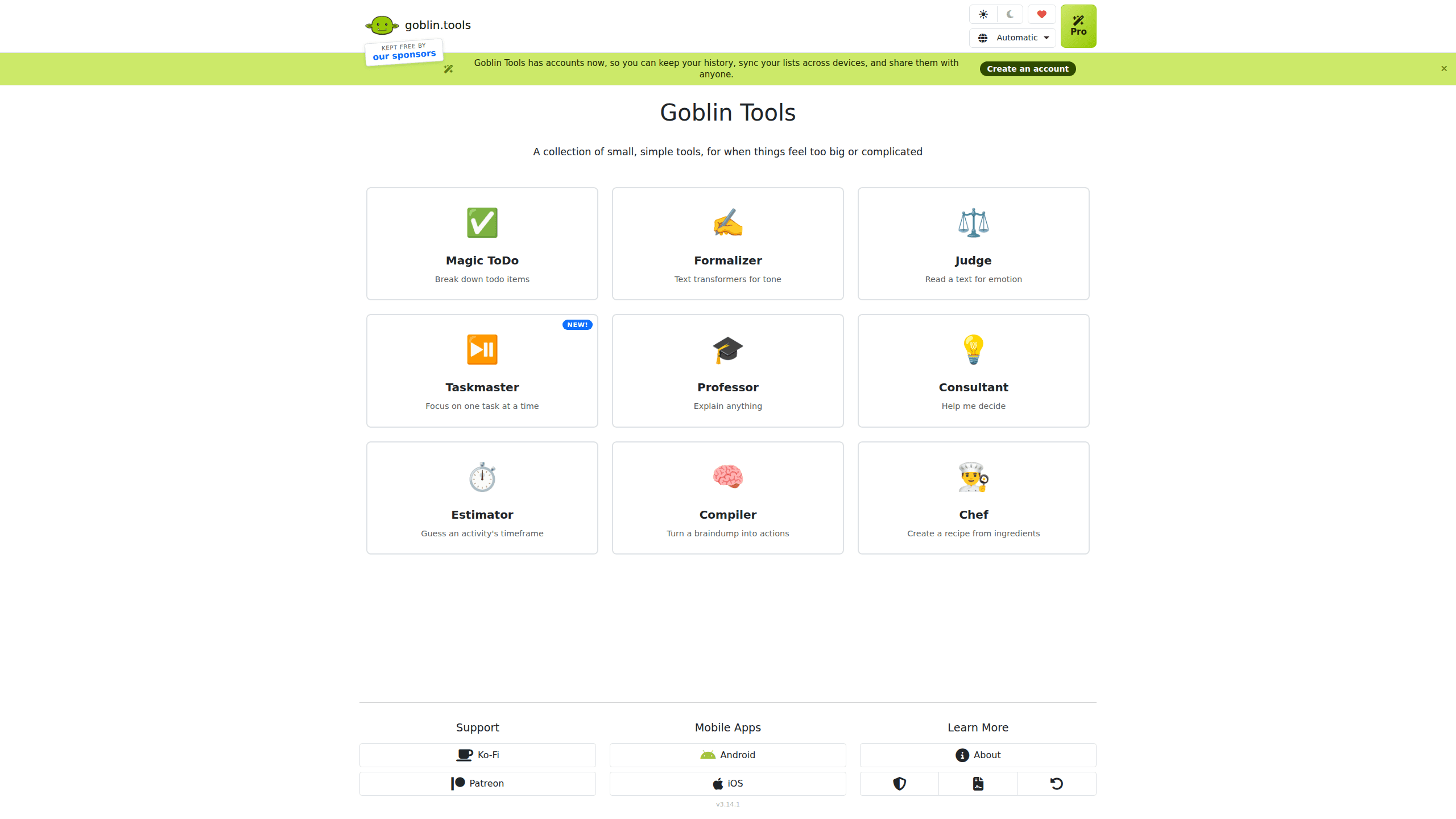
Goblin Tools AI is a set of focused tools, not one big assistant, and each tool does exactly one job so you never have to learn a sprawling interface before you get something done. Magic ToDo splits a task into smaller steps you can actually start. Formalizer rewrites text to match a tone you pick. Judge gives you a second opinion on the emotion behind a message. Estimator guesses how long a job will take. A handful of other helpers round out the set.
The site is built and maintained by Bram De Buyser, an AI and data engineer, and it operates under Skyhook BV, the company that runs the platform and handles billing and accounts. The tools run on general-purpose AI models from a mix of open and closed providers, and the team says it tries to use ethical models where it can.
Nothing here is a statement of truth. The models guess. The site is upfront about that. If you use a tool to draft an email or plan your afternoon, treat the output as a starting point you still have to check. It's not a finished answer.
Getting Started
- Open goblin.tools in a browser and pick a tool from the menu; no account is needed for the core tools.
- Type your input: a task you're stuck on, a message you want to rephrase, or something you need priced out in time.
- Adjust the tool's settings, like a spice level for Magic ToDo or a target tone for Formalizer, and run it.
- Copy, edit, or share the result; sign in for an account if you want history and cross-device sync through Pro.
Product Information
A quick look at Goblin Tools AI's pricing, supported platforms, and performance.
Best for
The users, tasks, and scenarios where this tool fits best.
Users
- People who get overwhelmed by tasks that look routine to others
- Anyone drafting sensitive messages
- Students and self-learners
Tasks
- Breaking down a project
- Rewriting an email
- Planning a day
Scenarios
- When you know you need to start but can't
- Before sending a tense message
- When a deadline feels elastic
Key features
Magic ToDo
This is the tool most people come for. You type in something you need to do and nudge a "spiciness" slider to control how finely it's chopped. Back comes a nested breakdown of steps. The magic isn't complexity. It's that it gives you a first move when you're stuck staring at a task. You can expand or collapse branches as you work through them.
Formalizer
Formalizer takes a block of text and rewrites it toward a tone you choose. You might want a version that sounds more professional, or one that's more casual or confident. It's built for the awkward moment when you know what you mean but not how to phrase it. Pro accounts add custom modes and a saved writing style. No re-setting preferences every time.
Judge
Judge reads a message and tells you what emotion or intent it seems to carry. It's not a lie detector. The site says as much. The point is a quick second opinion before you reply to something that stung. Often that's enough to stop you from firing back in the wrong tone.
Estimator
Estimator puts a number on how long a task will take, which is the thing most people misjudge. Enter a chore or project and get a rough time window. It won't be exact. Still, being roughly calibrated beats guessing wrong and blowing your afternoon.
Professor
Professor takes a complicated subject and explains it in easier terms. It's aimed at learners who hit a wall on jargon and want the plain version before they go back to the source material. Handy for homework. Useful for hobby projects. Great for brushing up on something unfamiliar.
Taskmaster and Compiler
Taskmaster walks you through one item at a time to keep you from getting pulled away mid-list. Compiler takes scattered notes and messy thoughts and turns them into an organized action list. Both lean on the same idea as the rest of the set: cut the friction between knowing what to do and doing it.
Accounts and Sync
You can now make a Goblin Tools account. It keeps your history and syncs your lists across devices. Sharing a list with someone else takes one step. So why bother? Because it turns these one-off tools into something you actually return to.
Pros and cons
Pros
- Free on the web, with no ads and no paywall on existing features, so there's no cost to try it.
- Each tool does one thing well, which makes the site fast to learn and quick to use.
- Genuinely useful for task initiation and tone-checking, the two spots where people stall most.
- Mobile apps exist for Android and iOS, so you're not tied to a browser.
- Pro adds custom modes, history, sync, and sharing for a low monthly price.
Cons
- Output quality depends on the underlying models and can be flat-out wrong, which the site itself warns about.
- There's no public API, so you can't wire the tools into your own app or workflow.
- The free web tools are thin on persistence unless you pay for Pro, so casual users lose their history.
Frequently asked questions
Yes. The web tools are free and the team says existing features will never be locked behind a paywall. Money to run the site comes from the paid mobile apps and the optional Goblin Tools Pro subscription.
Related content
Explore related tools, skills, and articles for Goblin Tools AI.
Goblin Tools AI Alternatives

Swms
Swms AI · Writing · Productivity · BusinessSwms is an AI safety compliance tool that turns a plain description of a job into ready-to-use safety documents. Describe your project, trade, and known hazards, and it writes a safe work method statement, job hazard analysis, safe work procedure, RAMS, or safety data sheet in seconds. It also ships with Oscar, a chat assistant that answers workplace safety questions in any language. Teams in construction, mining, transport, and warehousing use it to cut the paperwork that usually eats into a workday.

Wordly AI Translation
Wordly · Voice & Language · ProductivityWordly AI Translation is a real-time AI translation and captioning platform built for meetings, conferences, and events. It delivers live translation, captions, transcripts, and summaries in more than 60 languages, and attendees join by scanning a QR code or opening a link instead of using dedicated headsets. The platform works with Zoom, Microsoft Teams, Google Meet, and Webex, and it's designed for organizations that want multilingual access without hiring human interpreters for every session. Simple as that.

Rows
Rows (Superhuman) · Productivity · BusinessRows is an AI spreadsheet and data analysis tool that imports live data from more than 50 sources, then lets you work with it using plain language instead of SQL queries or nested formulas. You can pull numbers out of PDFs, connect ad platforms, databases, and bank accounts, and ask the AI to build reports, merge datasets, or set up models that recalculate themselves. It runs in the browser, works like a spreadsheet, and now sits under the Superhuman umbrella.