

GPT Image 2.5
GPTImageGen25 · Image · Marketing
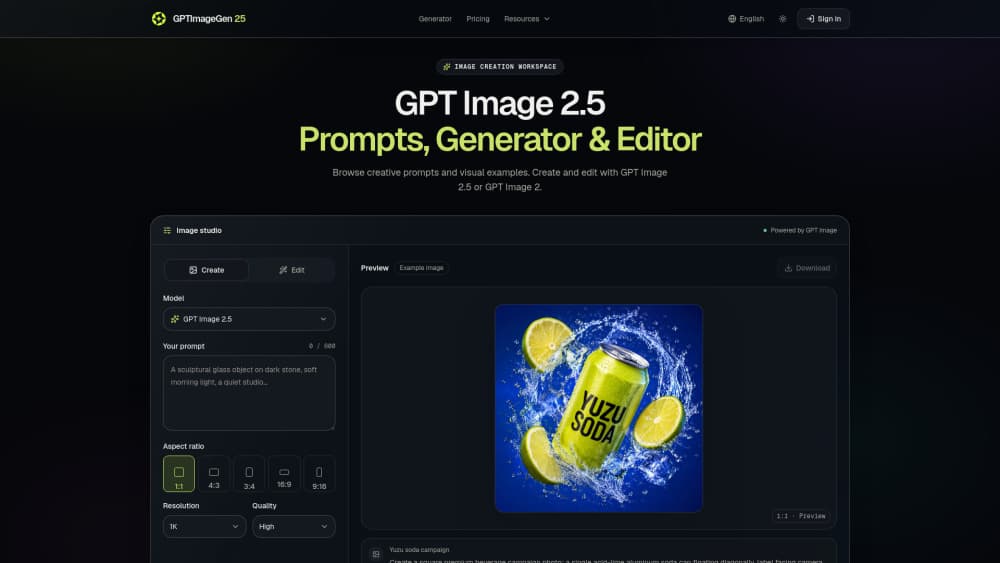
GPT Image 2.5 is an AI image generator and editor offered through GPTImageGen25, an independent workspace that runs OpenAI's GPT Image 2.5 and GPT Image 2 models. You write a prompt or upload a reference image, pick a model, and produce product photos, posters, portraits, or campaign visuals. The studio is built for people who want the newer model's controls in one place, without stitching together separate generation and editing tools.
About GPT Image 2.5
What Is GPT Image 2.5
GPT Image 2.5 is a text-to-image and image-editing model, and GPTImageGen25 is one third-party studio that puts it to work. The workspace lets you generate from a written brief or edit an existing image by describing the single thing you want changed. It supports GPT Image 2.5 Flare for fast everyday generation and GPT Image 2.5 Sunburst for edits that need tighter control, plus the older GPT Image 2 for comparison.
The model itself comes from OpenAI, which announced it on September 8, 2026 under two names: ChatGPT Images 2.5 in ChatGPT, and GPT Image 2.5 in the API docs. GPTImageGen25 isn't an official OpenAI service, and it says so on its own pages. That matters if you need enterprise support or an SLA, because you're buying credits from the studio, not from OpenAI.
The biggest practical limit is image accuracy. OpenAI still lists weaknesses in text clarity, precise placement, recurring character consistency, and structured compositions. So before you publish anything, check names, numbers, and small details by eye. It's a drafting tool that saves hours, not a guarantee.
Getting Started
- Create an account on GPTImageGen25 and choose a credit plan or buy a one-time pack.
- For generation, write your brief in the prompt field (it accepts up to 32,000 characters); for editing, upload a source image in PNG, JPEG, or WebP.
- Select the model (GPT Image 2.5 Flare, GPT Image 2.5 Sunburst, or GPT Image 2), then set aspect ratio, dimensions, quality, background, and output format.
- Generate the image, review it next to your source or brief, and revise one instruction at a time.
- Download the finished file as PNG, JPEG, or WebP.
Product Information
A quick look at GPT Image 2.5's pricing, supported platforms, and performance.
Best for
The users, tasks, and scenarios where this tool fits best.
Users
- Small business owners
- Content and social media creators
- Designers testing prompts
Tasks
- Editing one detail in an existing image
- Product photography briefs
- Text-led poster design
Scenarios
- Launching a small campaign
- Refreshing an old photo
- Comparing models before a project
Key features
Two Model Tiers for Different Jobs
GPT Image 2.5 Flare is positioned for rapid iteration, and Sunburst for detailed creative work that needs tighter editing control and longer generation times. OpenAI reports 50% lower latency for Flare than GPT Image 2, a provider claim rather than a studio benchmark. Which one should you use? Start with Flare while you explore. Switch to Sunburst when precision matters more than speed. That's the whole point of offering two tiers.
Generation and Editing in One Workspace
The studio keeps the source image, edit instruction, aspect ratio, resolution, and output controls together, so you don't bounce between a generator and a separate editor. For identity-sensitive edits, you can name the person, pose, expression, crop, clothing, camera angle, and foreground shadows as fixed constraints. That single-window setup is the main reason to use it over the raw API.
Wide Aspect Ratio and Dimension Control
The studio spans 1:3 to 3:1 aspect ratios, covering 1:1, 4:3, 3:4, 16:9, and 9:16 presets, with custom dimensions on top. GPT Image 2.5 gets six quality options (Auto through Maximum), while GPT Image 2 stops at High. That range is the selling point. You can produce a vertical story ad and a wide banner from the same prompt without juggling tools.
Long, Detailed Prompts
The prompt field accepts up to 32,000 characters, which is room for a full creative brief instead of a one-liner. That's a lot of text. You can specify the package shape, label, surface, and lighting for a product listing, or the mood, audience, and headline space for a campaign. The tradeoff is real. A long brief invites contradictory instructions, so change one line at a time and judge what improved.
Reference Images and Output Options
Up to 10 reference images are accepted for editing, in PNG, JPEG, or WebP, and you can output transparent or opaque backgrounds as PNG, JPEG, or WebP. Multi-image requests produce 1 to 10 images at once, which suits a quick spread of variants. That's plenty for most jobs. The reference-image limit is generous. More inputs also mean more chances for the model to drift from your intent, so use them with care.
Token-Based Pricing Model
Both GPT Image 2.5 models charge $30 per million image output tokens, matching GPT Image 2's rate, per the studio's documentation. This isn't a fixed per-image price: quality, dimensions, input tokens, and optional partial images all affect the total. A studio calculator helps estimate usage, and the studio warns that the GPT Image 2 calculator won't reliably estimate 2.5 token use.
Pros and cons
Pros
- Puts GPT Image 2.5 generation and editing in one web workspace, with model switching built in.
- Supports a wide aspect ratio range and custom dimensions, so one prompt covers multiple formats.
- Generous prompt length (32,000 characters) and up to 10 reference images for editing.
- Clear published credit pricing, from $9.90/month up to $199.90/month, plus a $20 one-time pack.
- Runs both GPT Image 2.5 tiers alongside GPT Image 2 for direct comparison.
Cons
- No free plan, so you pay before you can test the output quality yourself.
- It's an independent studio, not an official OpenAI service, which means no OpenAI-level support or SLA.
- OpenAI still notes weaknesses in text accuracy, character consistency, and structured compositions, so rendered text and recurring characters need manual checking.
- Token-based costs are hard to predict upfront, and credits run out faster on high-quality, high-resolution jobs.
- API availability through the studio isn't documented, so developers who need programmatic access can't count on it.
Frequently asked questions
The model is. OpenAI announced GPT Image 2.5 on September 8, 2026, with API model IDs gpt-image-2.5-flare and gpt-image-2.5-sunburst, and it's rolling out in ChatGPT as ChatGPT Images 2.5. GPTImageGen25, the studio reviewed here, is an independent third-party workspace and states that it isn't an official OpenAI service.
Related content
Explore related tools, skills, and articles for GPT Image 2.5.
GPT Image 2.5 Alternatives

X Ray Interpreter
X-ray Interpreter · ImageX Ray Interpreter is a web-based AI radiology tool that turns X-rays, CT scans, MRI, ultrasound, and PET images into plain-language reports. You upload a scan, get a preliminary X-ray interpretation in moments, then ask follow-up questions if something needs explaining. It works as a second opinion and a learning aid, not as a medical diagnosis.

Aieasypic
AIEasyPic · ImageAIEasyPic is an AI image generator that turns plain text prompts into finished artwork in seconds. You can also train custom models on your own photos, swap faces in existing images, and create short video clips from text, all from a browser. It suits casual creators who want quick visuals and hobbyists who want to build a personal model without touching any code.

Chargen
Chargen · ImageChargen is an AI character generator and worldbuilding toolkit built for Dungeons & Dragons and other tabletop RPGs. It turns a one-line idea into a painted character portrait, spins up NPCs, monsters, maps and encounters from the same session, and keeps every creature's details close at hand. The tabletop RPG art side runs on a credit system called Gold, while the text generators stay free for everyone.