
GPTGame
GPTgame · Coding
GPTgame turns a one-sentence idea into a playable browser game in about a minute. The AI writes the Phaser code, checks that it runs, then gives you a link to share or fork.
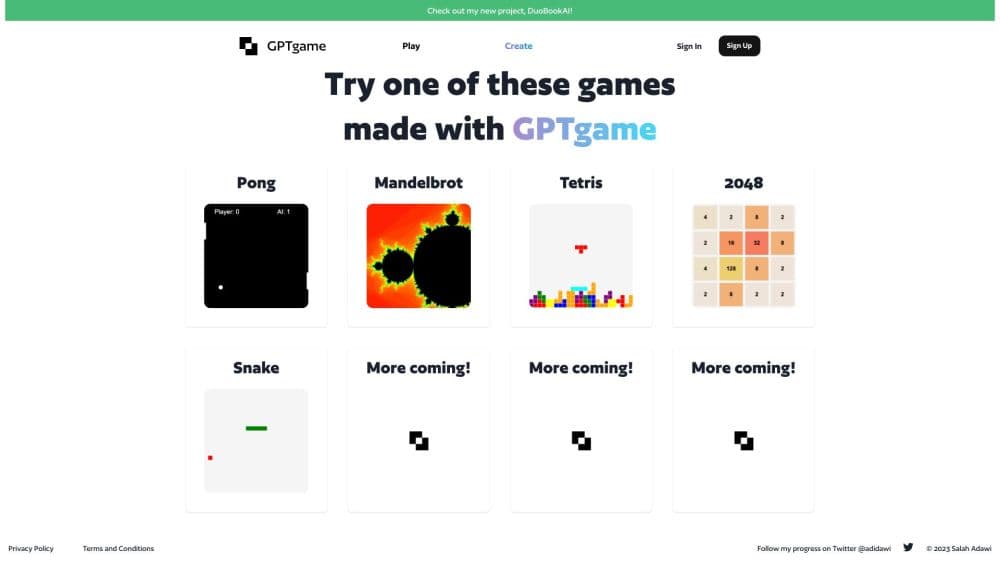
About GPTGame
What Is GPTgame
GPTgame is a browser-based AI game generator. You type one sentence, something like "dodge the asteroids" or "stack the falling blocks", and an AI pipeline turns it into a finished 2D arcade game you can play in the same tab. The service runs from Finland and rebuilt itself from scratch as GPTgame v2 in 2026, with a new generation stack, public game pages, and subscriptions.
The work behind that minute is split into stages. A planning step turns your sentence into a game spec: genre, controls, win condition, and the objects on screen. A code step writes a self-contained HTML5 game on top of Phaser. A validator then loads the result and checks that it actually starts and responds before the game reaches your browser. You watch the build stream in, which makes the wait feel shorter than a minute.
The scope is narrow on purpose. GPTgame makes single-screen 2D arcade games in genres such as arcade, top-down shooter, puzzle, endless runner, platformer, and racing. Most AI game creation tools spread across genres and asset types; this one stays with short sessions and one clear mechanic. It doesn't make 3D worlds, long narrative games, or anything with online multiplayer. What you get is a small HTML5 file with a public URL, which is enough for a joke, a prototype, a lesson, or a quick playable pitch. If you need a game you'll keep developing for months, this isn't the tool.
Getting Started
- Open gptgame.app. You can browse the public wall of games and play any of them without an account, which is the fastest way to judge output quality.
- Sign in through Clerk when you want to generate. A new account starts a 14-day trial capped at five games per week.
- Write one sentence with one mechanic. Name the genre if you have a preference, and mention the controls or the lose condition if they matter.
- Watch the game build in the browser, then play it. If the result misses, edit the sentence and generate again instead of trying to fix the code.
- Share the game URL, embed it, or fork the prompt to remix it. Pro and Studio plans add a watermark-free build and an HTML download.
Product Information
A quick look at GPTGame's pricing, supported platforms, and performance.
Best for
The users, tasks, and scenarios where this tool fits best.
Users
- Curious beginners
- Teachers and workshop hosts
- Streamers and social creators
- Indie developers testing a hook
Tasks
- Prototyping a core mechanic
- Making a quick game for a lesson or a stream
- Remixing a published game
- Producing a playable pitch
Scenarios
- A short break with an idea in your head
- A game jam warm-up
- Testing an idea in a meeting
Key features
One-Sentence Game Generation
The whole input is a sentence. GPTgame reads it as a design brief, picks a genre that fits, and fills in controls, scoring, and a win or lose condition. You don't pick a template or wire up sprites. That's the main difference from a no-code game maker built on fixed templates: there's no project to configure, and no assets to import before the first build. The text to game step is a single field and a generate button.
Live Build in the Browser
Generation streams into the page, so you see the game take shape instead of staring at a spinner. The pipeline plans the spec first, then writes the Phaser code in stages. When it finishes, the game runs in a sandboxed frame on the same page. Most builds land around the one-minute mark the site advertises, and a shorter prompt usually returns faster.
Automated Play Check
Before a game reaches you, a validator loads it and checks that it starts, that the loop runs, and that the controls respond. This catches the common failure where generated code looks fine but never gets past the title screen. It doesn't judge whether the game is fun, so a working build can still be dull. Read that as a floor, not a guarantee.
Public Game Pages and Forking
Every game gets a stable URL that anyone can open without an account. The wall sorts browser games by plays and genre, so you can see what other people made from a single prompt. Forking copies the original prompt into your editor, which turns remixing into a text edit. For a classroom or a stream, that's the feature that keeps people engaged after the first build.
HTML5 and Phaser Output
Games are self-contained HTML5 files built with Phaser, a widely used JavaScript game framework. They run in a browser on desktop and mobile, with touch controls on phones for most genres. Pro and Studio plans let you download the HTML and view the source, which is useful if you want to host the file yourself or learn from the generated code. There's no proprietary runtime to install.
Plans Built Around Output Volume
Pro costs $15 per month and covers 100 games, removes the GPTgame badge, allows commercial use, and adds private games plus comments and reactions. Studio costs $35 per month, raises the cap to 300 games, and adds custom palettes and art styles, a priority generation queue, early access to a native player app, and a PixelLab sprite integration that's marked as coming soon. Both bill through Stripe and cancel from the customer portal.
Pros and cons
Pros
- The gap between an idea and a playable build is about a minute, which is short enough to iterate on the prompt several times in one sitting.
- There's nothing to install. The game runs in the browser, and the public URL works on a phone.
- Forking a prompt is a genuinely quick way to learn what makes a good brief, since you can compare your version against a working original.
- The Pro plan covers commercial use and source download, so the output isn't locked inside the platform.
- Public games need no account to play, which makes sharing with a class or an audience frictionless.
Cons
- Generating new games needs a paid plan. The free tier is limited and stamps a GPTgame badge on public games, and the trial caps you at five games per week.
- The output is limited to single-screen 2D arcade games. There's no 3D, no long-form level design, and no multiplayer.
- Quality depends on the prompt. The validator confirms a game runs, not that it's enjoyable, so some builds feel flat until you rewrite the sentence.
- Games made in the old version didn't carry over to v2, and there's no public API for building the generator into another product.
Frequently asked questions
GPTgame is an AI game generator that turns a written prompt into a playable browser game. You describe the game in one sentence, the service writes the code with an AI pipeline, and you get a public link that runs in any modern browser.
Related content
Explore related tools, skills, and articles for GPTGame.
GPTGame Alternatives
Forefront
Forefront · CodingForefront is a web platform for building with open-source AI. It lets you fine-tune leading open-source language models on your own data, evaluate how they perform, and run them through an API or export them to host yourself. Developers who want the convenience of a closed-source platform but insist on owning their models and data are the target audience here.

Startkit
StartKit.AI · CodingStartkit is a boilerplate for building AI SaaS and AI wrapper products. Think of it as an AI startup boilerplate with the boring parts already wired up: authentication, Stripe and Lemon Squeezy payments, usage limits, transactional email, and an AI API starter that talks to OpenAI, Anthropic, Groq, or Llama. You clone the repo, set your price, and start on the part of your product that people actually pay for. It's Next.js under React and Tailwind, so most of the boilerplate code already feels familiar.
Testim
Tricentis · CodingTestim is an AI-powered test automation platform for building and running end-to-end tests across web, mobile, and Salesforce applications. It leans on machine learning to keep tests stable when an interface changes, so teams spend less time fixing broken selectors. Not bad for an automated testing tool you can start using today. You create tests by recording actions in a browser, then optionally add JavaScript when you need more control. It's a solid pick for busy QA teams.