

Grade Calculator AI
Team GradeCalculator.AI · Leaning · Other
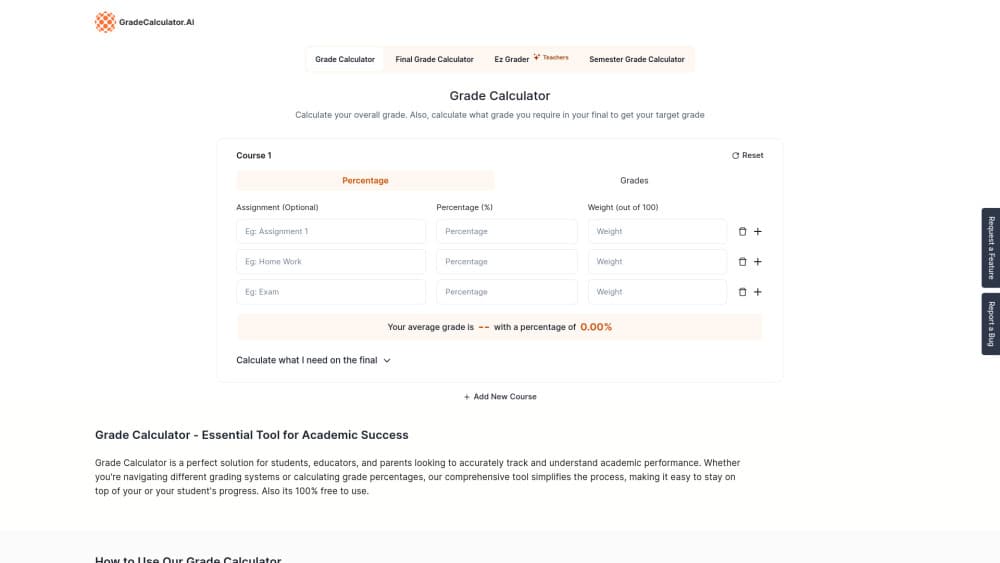
Grade Calculator AI is a free browser tool that turns scores and weights into a course average, then shows the final exam score you need to hit your target grade.
About Grade Calculator AI
What Is Grade Calculator AI
Grade Calculator AI is a free web page that holds two calculators side by side. The first one builds a course grade out of individual assignments, each with its own score and weight. The second answers a tighter question: what score do you need on the final exam to finish with the grade you want. Both run in the browser, and neither asks for an account.
The site covers the three grading systems schools actually use: percentages, letter grades from A+ to F, and GPA on a 4.0 or 5.0 scale. A conversion table maps GPA values to letters and to percentage bands, so a student moving between systems gets a working GPA calculator without the lookup work. Results update as you type. An Add New Course button handles students tracking several classes at once.
The "AI" in the name is branding, not a feature. Nothing on the page calls a language model. The math is a weighted average: multiply each score by its weight, add the results, divide by the total weight. That's worth knowing if you care where your grades travel, which is nowhere, since the numbers stay in your own browser tab.
Getting Started
- Open gradecalculator.ai. No signup, no login, no download.
- Name the course, then add each assignment with its score and its weight out of 100. Unweighted classes can leave the weight column alone.
- Scroll to the final exam box and enter your current grade, target grade, and the exam's weight to get the required score.
- Press Add New Course for the next class, or Reset to wipe a course and start again.
Product Information
A quick look at Grade Calculator AI's pricing, supported platforms, and performance.
Best for
The users, tasks, and scenarios where this tool fits best.
Users
- High school students juggling six classes
- College students on a syllabus with weighted sections
- Parents reading a report card
- Teachers checking a grading scheme
Tasks
- Working out a course grade before grades close
- Planning a final exam
- Converting between GPA, letters, and percentages
- Testing a scenario
Scenarios
- Mid-semester check
- The week before finals
- Transfer applications
Key features
Weighted Course Average
The main calculator takes a list of assignments, each with a score and a weight out of 100. It's a grade percentage calculator at heart, and it returns your average grade as a percentage, updating the total with every keystroke. This is the part that replaces the spreadsheet most students keep in a phone note.
Final Exam Target Calculator
A second panel asks for your current grade, your target grade, and how much of the course the final is worth. It returns the score required on that exam. When the answer comes back above 100, you know the target is out of reach and can adjust before the drop deadline.
Several Courses at Once
Add New Course stacks another set of rows under the first, so a full schedule fits on one page. Each course keeps its own scores and weights, which means you can compare a strong class against a weak one without reloading.
Percentage, Letter, and GPA Support
The same numbers can be read three ways. Enter scores as percentages and the tool reports the course average, then you match that figure to a letter grade or a GPA value with the built-in table. This covers US letter grades, percentage systems used in the UK and Australia, and 4.0 or 5.0 GPA scales.
Grade Conversion Table
A fixed table lists GPA, letter grade, and percentage range in parallel, from a 4.0 down to a failing mark. It works as a letter grade converter when a form wants one format and your transcript uses another. The site notes the bands are general, since schools set their own cutoffs.
Free, No Account, No Install
There's no paywall, no trial, and no email step. The whole tool is a page you open and close, which suits the way people actually check grades: in a hurry, on a phone, between classes.
Pros and cons
Pros
- Free with no account, so there's nothing to cancel later.
- Answers both the average question and the what do I need on the final question on one screen.
- Handles multiple courses without resetting.
- The conversion table removes a manual lookup when a form asks for GPA instead of a percentage.
- Loads fast on a phone browser, which matters when you're checking a grade in a hallway.
Cons
- Nothing saves. Close the tab and your scores are gone, so a course grade tracker this is not.
- No import from Canvas, Blackboard, or Google Classroom, which means typing every score by hand.
- The tool won't flag weights that don't add up to 100, so one typo quietly skews the average.
- No support for extra credit or rules that drop your lowest quiz, and those policies are common in real syllabi.
Frequently asked questions
It's a free web calculator for course grades. You enter assignment scores and weights, and it returns a weighted average plus the score you'd need on the final exam to reach a target grade. No account, no app, no cost.
Related content
Explore related tools, skills, and articles for Grade Calculator AI.
Grade Calculator AI Alternatives
Coddy
Coddy · Coding · LeaningCoddy is a gamified platform to learn to code through short interactive lessons in 20+ languages, with a browser editor, an AI tutor and free certificates.

Marv
Cameron (independent developer) · Coding · Productivity · LeaningMarv is an AI cursor companion for Windows and Mac. It sees your screen, answers out loud, and draws arrows and highlights that show you the next click.

Teachoo
iAsk AI · Leaning · ChatbotTeachoo is a free AI homework helper that walks students through math, science, writing and coding problems one step at a time, with photo input, hints and flashcards.