

Grimo AI
Grimo AI · Productivity · AI Assistant
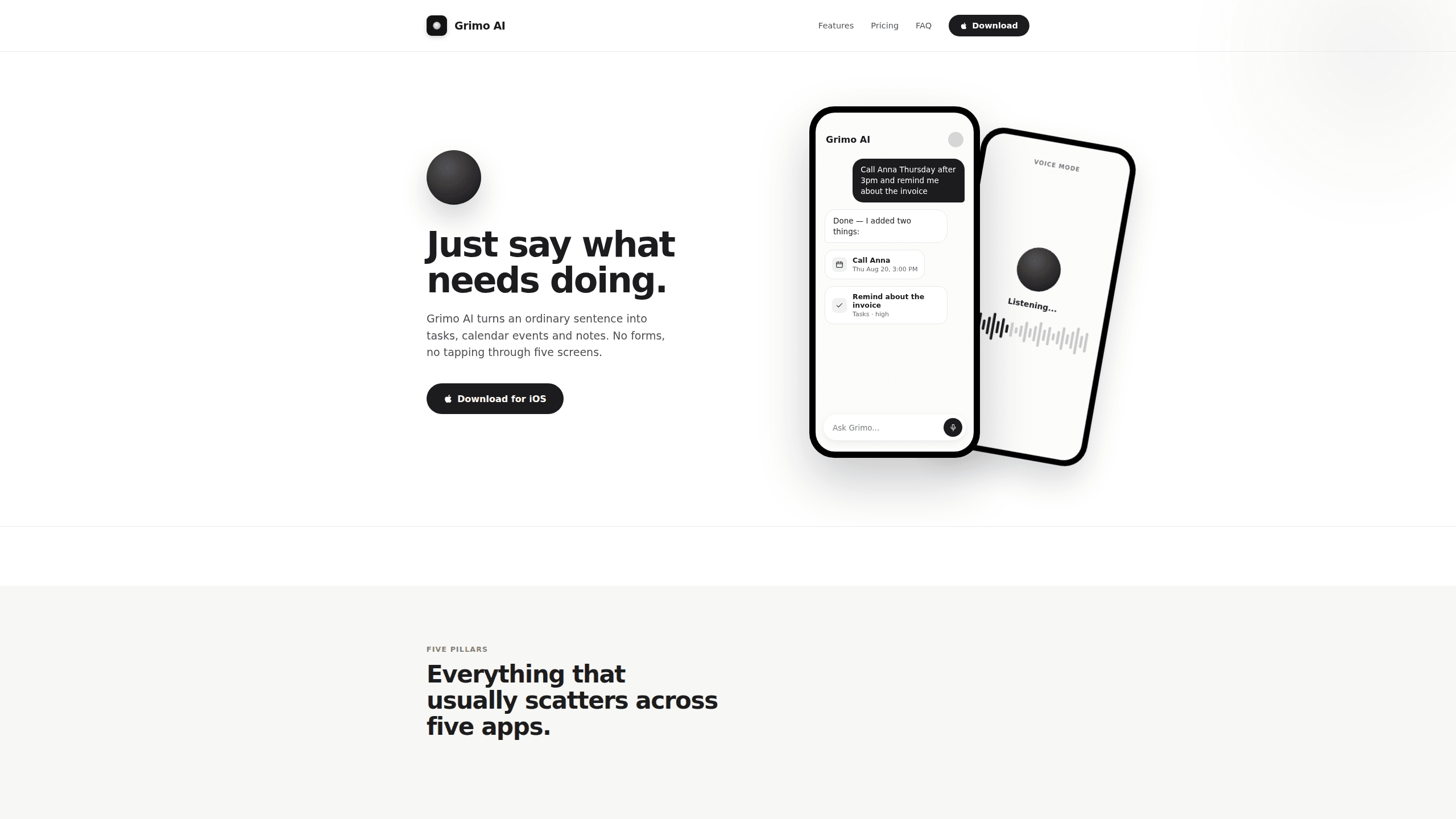
Grimo AI is an AI task assistant for iPhone and a general AI productivity app: it turns one ordinary sentence into tasks, calendar events, and notes. You type or say something like "Call Anna Thursday after 3pm and remind me about the invoice," and it splits that into two separate items, each with the right date, priority, and list. The pitch is simple. Instead of tapping through five screens to log a single to-do, you just talk, and the rest gets filled in for you.
About Grimo AI
What Is Grimo AI
Grimo AI is a personal assistant app that keeps your tasks, calendar, and notes in one place. The problem it targets is familiar to anyone juggling a to-do list, a calendar, and a notes app at the same time: a thought arrives, and by the time you have opened the right app and found the right field, you have already forgotten half of it. Grimo collapses that into a chat box. You write or dictate what you need, and the app decides whether each piece belongs on the calendar, in the task list, or as a note. One box. Three destinations.
Under the hood, your recent conversation and relevant task and event content get sent to Google's Gemini API to generate responses. If you use voice mode, the assistant's text replies are sent to OpenAI to produce spoken audio. According to the app's privacy policy, neither provider is authorized to train models on that content beyond what is needed to answer you, and audio is transcribed on the device rather than stored as a file.
The app is built for iPhone, with sign-in through Apple or Google rather than a separate password. There's no password to remember. The main limit worth knowing up front is conversation volume: free users share a fair-use allowance, and once it runs out, tasks and calendar keep working while only the chat pauses until it resets.
Getting Started
- Download Grimo AI on your iPhone and sign in with your Apple or Google account.
- Grant microphone access if you plan to use voice mode, and allow notifications so reminders reach you.
- Type or hold to speak your first request, such as "Move the dentist to Friday and remind me to send the invoice today."
- Check the reply card to confirm what the app changed, then edit any date or priority by tapping it.
- Ask "What do I have today?" to see your schedule and let Grimo nudge you before events start.
Product Information
A quick look at Grimo AI's pricing, supported platforms, and performance.
Best for
The users, tasks, and scenarios where this tool fits best.
Users
- Busy professionals who live in their calendar
- Parents and caregivers who are often hands-full
- Students juggling assignments and study sessions
- People who abandoned to-do apps because of over-typing
Tasks
- Capturing a reminder mid-conversation
- Rescheduling
- Reviewing your day
- Jotting quick notes
Scenarios
- A chaotic workday with overlapping commitments
- Running errands on the move
- Planning a trip
- End-of-day wrap-up
Key features
One-sentence capture
Grimo's core trick is voice to tasks: it turns a single sentence into structured items. Say "Call Anna Thursday after 3pm and remind me about the invoice," and it produces two entries: a calendar item for the call and a high-priority task for the invoice. No forms, no switching between apps. The reply card shows exactly what changed, so you can trust it before you move on. Want to speak to create tasks without opening a form? That's the whole idea here.
Voice mode
Hold and talk when your hands are full. Voice mode also reads your day back to you, so you can ask "What do I have today, and push the gym to tomorrow evening?" and get a spoken answer plus the actual reschedule. Audio is turned into text on your device rather than kept as a recording, according to the app's privacy policy. No file left behind.
AI calendar for messy weeks
The calendar view is built for weeks where things overlap. A workshop running into a meeting, a trip spanning three days, and a Friday deadline all stay visible together, so you can spot clashes without hunting through separate views. Overlaps stay obvious.
Smart tasks with inferred priority
Grimo picks up priority and due date from the way you phrase things. "Send the invoice today" lands as a today task with high priority; "Order the birthday gift" becomes something due in three days. You can override either field by tapping it.
Notes that file themselves
A thought mentioned in passing gets saved as a note and placed where you can find it later. That keeps small ideas out of your task list while still keeping them searchable inside the same app. Think of it as a lightweight AI note taking app tucked inside a planner.
Proactive nudges
The app surfaces smart reminders before things start, like a heads-up that a workshop begins in 30 minutes. You reply in chat to move or confirm items, so the nudge becomes an action rather than just an alert.
Pros and cons
Pros
- Turns natural speech into correctly dated tasks and events, which removes most of the typing from staying organized.
- Voice mode reads your schedule back and edits it in the same breath, useful when you're walking or driving.
- Voice transcription runs on the device, and audio isn't kept as a file after conversion.
- Free tier covers unlimited tasks, calendar, and notes, so you can test the daily habit before paying.
Cons
- The app is iOS-only, so Android users can't use it, and there's no public API for building it into other tools.
- Free users hit a fair-use conversation cap. Chat pauses until it resets, but tasks and calendar keep working. Heavy users will need the $4.99/month Premium tier.
- Because replies come from third-party AI providers, your recent chat and relevant content leave the device when the app generates a response.
- I couldn't find a published launch date, so the date in the Info table is an estimate.
Frequently asked questions
It converts a spoken or typed sentence into tasks, calendar events, and notes, deciding where each piece belongs and filling in dates and priorities. You confirm or edit the result in a chat reply.
Related content
Explore related tools, skills, and articles for Grimo AI.
Grimo AI Alternatives

Swms
Swms AI · Writing · Productivity · BusinessSwms is an AI safety compliance tool that turns a plain description of a job into ready-to-use safety documents. Describe your project, trade, and known hazards, and it writes a safe work method statement, job hazard analysis, safe work procedure, RAMS, or safety data sheet in seconds. It also ships with Oscar, a chat assistant that answers workplace safety questions in any language. Teams in construction, mining, transport, and warehousing use it to cut the paperwork that usually eats into a workday.

Wordly AI Translation
Wordly · Voice & Language · ProductivityWordly AI Translation is a real-time AI translation and captioning platform built for meetings, conferences, and events. It delivers live translation, captions, transcripts, and summaries in more than 60 languages, and attendees join by scanning a QR code or opening a link instead of using dedicated headsets. The platform works with Zoom, Microsoft Teams, Google Meet, and Webex, and it's designed for organizations that want multilingual access without hiring human interpreters for every session. Simple as that.

Rows
Rows (Superhuman) · Productivity · BusinessRows is an AI spreadsheet and data analysis tool that imports live data from more than 50 sources, then lets you work with it using plain language instead of SQL queries or nested formulas. You can pull numbers out of PDFs, connect ad platforms, databases, and bank accounts, and ask the AI to build reports, merge datasets, or set up models that recalculate themselves. It runs in the browser, works like a spreadsheet, and now sits under the Superhuman umbrella.