

Happy Horse
Happy Horse · Video
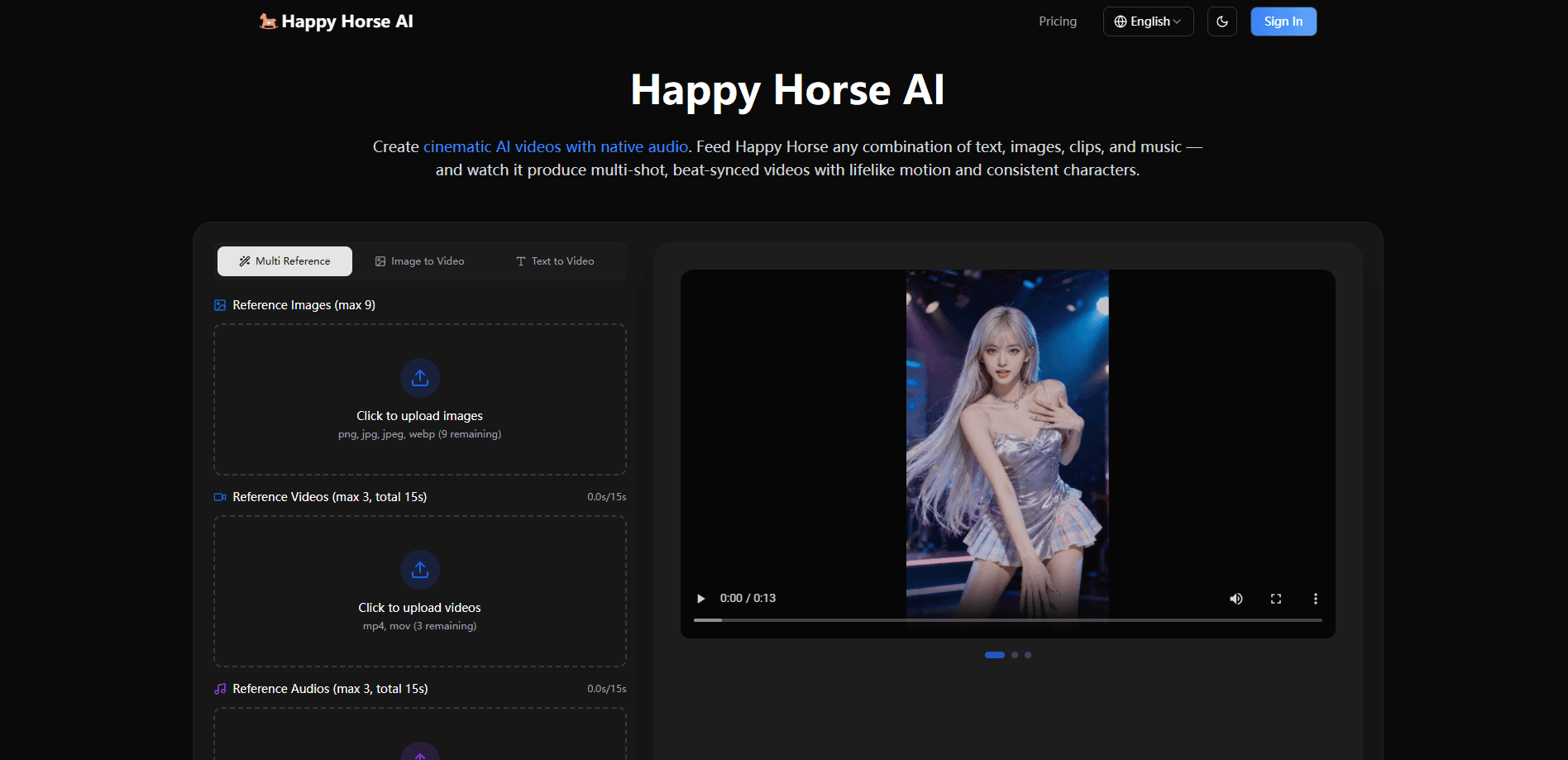
Happy Horse is a multimodal AI video generator that turns text, images, clips, and music into finished 1080p videos with synchronized audio. Image to video, text to video, and even audio-driven generation all run through the same panel. It handles multi-shot storytelling, character consistency, and camera movement in a single generation pass, so you don't have to stitch together separate tools for picture and sound. Happy Horse pricing sits at the premium end of the market, topping out at $49.90 per month. That makes it a tool for creators who ship video regularly, not for someone testing the waters.
About Happy Horse
What Is Happy Horse
Happy Horse is a browser-based AI video generation platform built around one idea: the video and its soundtrack should be created together, not assembled from two separate passes. Feed it a prompt, a few reference images, a short clip for camera direction, or an audio track, and it produces a cut with shots, transitions, and sound already matched to the action.
The pitch is aimed at people who've tried other AI video tools and hit the same wall. Character faces drift between shots. Motion looks floaty. You get a silent clip and then spend an hour sourcing music and dubbing dialogue. Happy Horse targets all three at once, and the feature it leans on hardest is native audio: sound effects, background music, and dialogue come out of the same generation as the picture, with lip movements timed to the words.
The tradeoff is scale. This is a paid-first product, and there's no free tier to poke at before you commit. Basic starts at $9.90 a month, but the features most people come for, priority generation and the fastest render speed, sit behind the Standard and Pro plans at $19.90 and $49.90. If you make one video a week for a personal project, the pricing is steep. If you're producing social clips, ads, or short films on a schedule, the math changes fast.
Getting Started
- Sign in to the Happy Horse web app and open the generation panel.
- Pick a mode, then upload your references. You can load up to 9 reference images, 3 clips (15 seconds combined), and 3 audio files (15 seconds combined).
- Write a natural-language prompt and tag uploaded assets by their names, for example telling it to use one image as the opening frame and another clip's camera sweep.
- Set resolution up to 1080p, duration, and aspect ratio, then hit generate.
- Feed the result back in to extend the clip or refine a single segment instead of starting over.
Product Information
A quick look at Happy Horse's pricing, supported platforms, and performance.
Best for
The users, tasks, and scenarios where this tool fits best.
Users
- Social media managers
- Filmmakers and video producers
- Creative directors and small studios
Tasks
- Generating a multi-shot narrative sequence
- Building ads from a template
- Beat-synced music visuals
- Motion transfer for dance and action
Scenarios
- Turning product photos into product videos
- Creating training and explainer content
- Remote solo production
Key features
Native Audio Generation
This is the feature that separates Happy Horse from most of the field. Sound effects, background music, and spoken dialogue are generated in the same pass as the video and synced to what's happening on screen. Lip movements match the words, and ambient sound carries a sense of space. For anyone who's spent an evening dubbing a silent AI clip, that's a real chunk of time back. No more late nights in an editor.
Multimodal Input Pipeline
You can combine text, images, video clips, and audio in a single generation. Upload up to 9 reference images, 3 clips, and 3 audio tracks, then tag them in your prompt to direct how each one is used. Mixing a character sheet, a camera reference, and a beat in one request gives you control that single-input tools can't match. That's the whole point of a multimodal pipeline, really.
Character and Scene Consistency
Faces, outfits, on-screen text, and overall visual style stay locked across shots. This addresses the drift problem that makes longer AI sequences look broken: the same character looking like a different person two cuts later. Song-length or story-length pieces start to hold together instead of falling apart at the seams.
Multi-Shot Storyboarding
Rather than generating one flat clip, Happy Horse produces sequences with natural cuts, transitions, and shot changes in a single run. The result reads like an edited piece. You can then extend it or refine individual segments by feeding the output back in.
Cinematic Camera Control
Upload a reference clip and the model replicates the camera work with your own subjects. Dolly zooms, rack focuses, tracking shots, and handheld shake are all on the table. It's a shortcut for anyone who wants a specific look without describing lens behavior in words.
Realistic Physics and Motion
Objects move with weight and momentum. Collisions land with impact, fabric drapes the way cloth should, and fast subjects stay sharp instead of smearing. Motion is where AI video usually falls apart. Trust me on that. So this matters more than it sounds.
Practical Output Controls
Generations run up to 1080p at durations from a few seconds, with aspect ratios covering 16:9, 9:16, 4:3, 3:4, 21:9, and 1:1. Vertical formats are there for social, wide formats for cinematic work. Resolution dropdowns include 480p and 720p for faster, cheaper drafts.
Pros and cons
Pros
- Native audio in one pass removes the usual dubbing and music-sourcing step
- Character and style consistency hold up across multi-shot sequences
- Accepts up to 9 images, 3 clips, and 3 audio files in a single generation
- Reference-clip camera control gives filmmakers a way to direct specific moves
- Vertical and wide aspect ratios cover both social and cinematic output
Cons
- No free plan, so you can't test the output quality before paying
- Monthly plans start at $9.90, and the fastest generation sits at the $49.90 Pro tier
- Credits are capped per plan, so heavy users on Basic or Standard will run out and need credit packs
- No confirmed public API, which blocks teams that want to automate generation
Frequently asked questions
Happy Horse generates video from text, images, clips, and audio. People use it for social clips, ads, short films, product showcases, and training content where they need the visuals and soundtrack produced together rather than assembled separately.
Related content
Explore related tools, skills, and articles for Happy Horse.
Happy Horse Alternatives
Griffin by Tavus
Tavus · Voice & Language · Video · ChatbotGriffin by Tavus is the first Human Interaction Model: a full-duplex, video-to-video system that watches, listens, and answers during a live video call in real time.

Syllaby AI Avatar 2.0
Syllaby · Video · MarketingSyllaby AI Avatar 2.0 turns a script into a presenter-led video with a reusable AI avatar, natural voice, B-roll and automatic subtitles, all in one browser workflow.

Vitra.ai
Vitra.ai · Voice & Language · Video · MarketingVitra.ai is an agentic content platform that creates, translates, reviews, and publishes video, images, documents, and app content in 120 languages from one shared brief.