

Hexabot
Hexastack · Marketing · Chatbot
Hexabot is a self-hosted AI chatbot builder for teams that want visual workflows, multi-channel agents, and full control over their data.
About Hexabot
What Is Hexabot
Hexabot is a conversational AI platform for building and running agentic workflows across chat channels. It started as an open-source chatbot framework and now ships as version 3, a workflow-first runtime that blends conversations, actions, memory, and knowledge retrieval in one place. The pitch is simple. You self-host it, so your production data and infrastructure stay under your control. That's the whole draw for agentic workflow automation: it runs on your terms.
The platform targets teams that need more than a drag-and-drop bot. You define workflows in YAML, attach schema-validated actions, and connect channels like web, mobile, and social messaging. A visual editor handles the conversational flow, while a plugin system lets developers add text-to-action responses and third-party integrations. For anyone weighing a managed chatbot service against owning the stack, that trade-off (more setup, more control) is the whole point.
The main limitation is the audience. Hexabot assumes you're comfortable with a command line, Docker, and Node.js. There's no hosted click-to-start tier, so if you want a bot running in five minutes without touching a terminal, this isn't that product. Setup takes time. Pricing is also per license key and tied to user and workflow counts rather than message volume, which suits steady operations but not spiky, one-off experiments.
Getting Started
- Install the official CLI with
npm install -g @hexabot-ai/cli(or run it through npx without a global install). - Create a project from the starter template by running
hexabot create my-project, then pick your package manager when prompted. - Move into the workspace with
cd my-projectand launch the local stack usinghexabot dev. - Open the admin UI at
http://localhost:3000, sign in with the admin credentials you set during setup, and build your first workflow in the visual editor. - Connect a channel, attach actions or a RAG helper, then promote the project to production with Postgres and your own license key.
Product Information
A quick look at Hexabot's pricing, supported platforms, and performance.
Best for
The users, tasks, and scenarios where this tool fits best.
Users
- Developers building custom chatbot agents
- Small agencies and freelance builders
- Teams with strict data rules
Tasks
- Designing multi-channel conversations
- Automating service requests
- Grounding answers in your own content
- Handing off to humans
Scenarios
- Standing up a customer-facing assistant
- Reducing repeat support load
- Prototyping an agentic workflow locally
Key features
Visual Workflow Editor
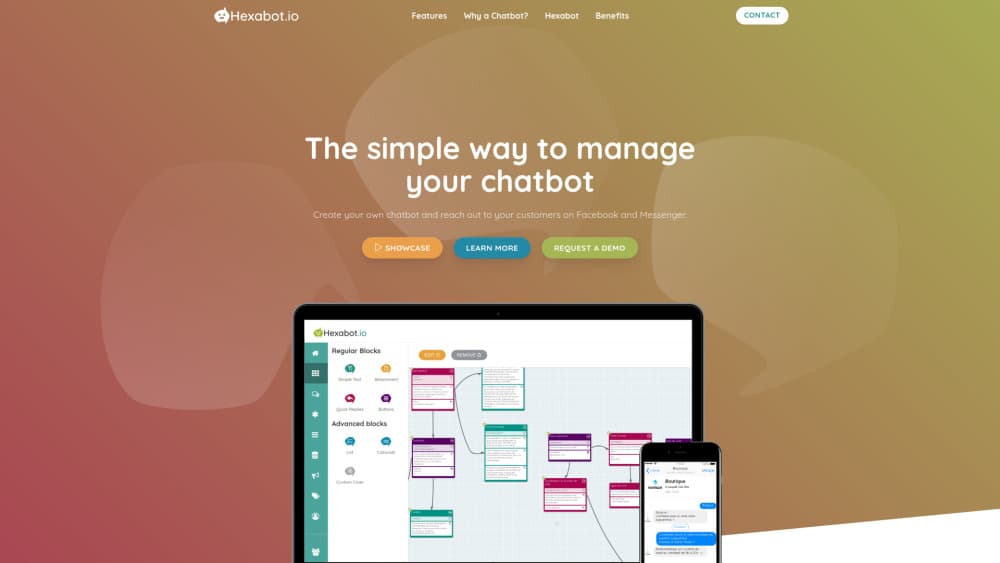
The editor is where you design conversation flows with a drag-and-drop interface. You can add text messages, quick replies, and carousels, then branch them based on what the user does. It keeps the logic readable for non-developers on the team, while the underlying runtime stays schema-first and code-driven.
Agentic Workflows in YAML
Version 3 shifted Hexabot toward workflows defined in YAML with typed runtime contracts. That means the behavior of a bot lives in a version-controlled file you can review and diff, not in a vendor dashboard you can't export. For teams already treating automation as code, this is a meaningful change. No lock-in. Just files you own.
Actions and Bindings
Actions define what a workflow actually does, with schema-validated inputs, outputs, and settings. A separate binding system lets you reuse capability and configuration across tasks, so you're not copy-pasting the same integration logic into every flow. It's the part that turns a chatbot into something that can get real work done. That's the jump from chat to action.
Multi-Channel Support
Hexabot treats channels as a core concept, so the same bot can run on web, mobile, and social messaging platforms. Conversation continuity carries across those surfaces. Does that matter? It does when customers start on one channel and finish on another. They don't have to repeat themselves.
Memory and RAG Helper
The platform supports explicit memory definitions so the bot remembers context within a session, and a configurable RAG helper grounds AI answers in your CMS content. You can use the built-in database full-text helper, install a vector helper for SQLite or PostgreSQL, or write a custom one for another retrieval system.
MCP and LLM Integration
Hexabot supports the Model Context Protocol for tool and context interoperability, and it connects to LLMs through Ollama, ChatGPT, Mistral, or Gemini. Swapping models doesn't mean rebuilding your workflows. Try one, then switch. That keeps you from getting locked into a single provider.
Extensions and Plugin System
You extend Hexabot by developing and installing extensions from the Extension Library. That opens the door to text-to-action responses, third-party system integrations, and custom helpers. If your needs outgrow the built-in features, this is where you'd add them. Nothing's off the table.
Users, Roles, and Handover
Granular access control covers different parts of the system, and subscribers can be organized with labels and segments. The inbox provides a real-time window where conversations are monitored and handed over to a human agent when the bot can't finish the job.
Pros and cons
Pros
- Self-hosted by design, so your conversations and customer data stay on infrastructure you control.
- Workflow-first architecture with YAML definitions means automations can be versioned and reviewed like code.
- Broad LLM support (Ollama, ChatGPT, Mistral, Gemini) plus MCP keeps you from being tied to one model provider.
- Multi-channel delivery and memory support let one bot handle several surfaces without separate rebuilds.
- No per-message billing; plans scale by users and workflows instead of message volume.
Cons
- No hosted tier, so you can't try it without installing the CLI and running the stack yourself.
- Setup expects comfort with Node.js, Docker, and the command line, which rules out non-technical users.
- The cheapest plan starts at $19/month, so there's nothing free for hobbyists to test with.
- License keys cap activations, users, and workflows, which can pinch a fast-growing team.
Frequently asked questions
Hexabot is used to build and run AI chatbots and agentic workflows across chat channels. Teams use it for customer service automation, internal task automation, and grounded AI assistants that pull answers from their own content.
Related content
Explore related tools, skills, and articles for Hexabot.
Hexabot Alternatives

Tractionwave
TractionWave · Image · MarketingTractionWave is an AI attention heatmap tool for static ads. Upload a PNG or JPG and it returns predicted attention, ranked hotspots, and fixes before you spend budget.

OpenSEO - AI Visibility
EveryApp · Coding · Marketing · BusinessOpenSEO is an open source SEO platform for keyword research, backlinks, rank tracking, site audits, and AI visibility, with usage-based pricing and MCP access for AI agents.

Plugins Radar
Plugins Radar · Marketing · BusinessPlugins Radar tracks where your ChatGPT plugin ranks in directory and in-chat search, which competitors outrank it and what changed, with hourly checks on 9,885 listings.