
Hug AI
Hug AI · Video
Hug AI is a free web tool that turns two photos into a heartwarming AI hug video, made for fans, creators and anyone who wants a moving memory.
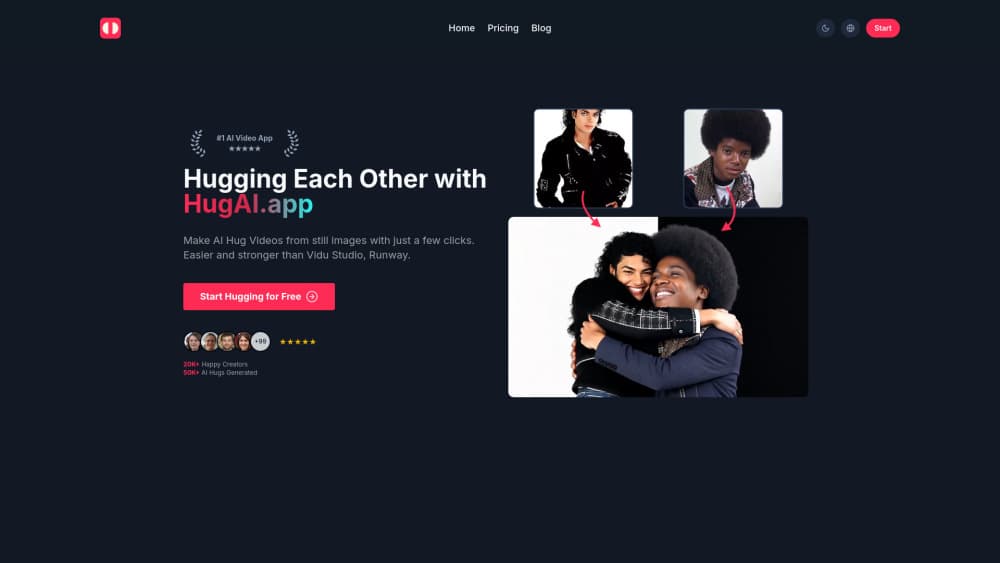
About Hug AI
What Is Hug AI
Hug AI is a browser-based AI video generator that takes two still images and animates the people in them into a single, natural-looking hug. You upload a left and a right photo, hit generate, and the site stitches the faces and bodies together into a short clip that keeps both people recognizable.
The appeal is emotional, not technical. People use it to bring old family pictures back to life, to share a hug with someone far away, or to make a quick reel that stops the scroll. No timeline editing. No keyframes. No plugins.
The catch is control. You don't get fine tools to fix a bad result, so odd lighting, crowded backgrounds, or photos where the subjects face different directions can produce awkward output. That's a real limit. Treat it as a fast one-shot generator, not a studio. It's quick. Results take a few minutes, and credits are limited on the free tier.
Getting Started
- Open the Hug AI site and sign in with the account you want to use.
- Upload a left image and a right image, ideally clear, front-facing shots of one person each.
- Click the generate button and let the AI hug video render.
- Preview the clip, then download it or share it to your social channels.
Product Information
A quick look at Hug AI's pricing, supported platforms, and performance.
Best for
The users, tasks, and scenarios where this tool fits best.
Users
- Social media creators
- Families and gift-givers
- Freelancers and marketers
Tasks
- Turning two photos into an AI hug video
- Making a photo to video clip for a birthday or anniversary post
- Animating static portraits for a landing page or ad test
Scenarios
- Sending a remote hug to someone you can't visit in person
- Reviving a family photo for a memorial or reunion
- Filling a content calendar on a tight budget
Key features
Photo to Hug Video in Three Steps
Hug AI keeps the flow to upload, generate, and download. The tool handles the motion and blending for you, which is the whole point for people who don't want to learn video software. A single clip usually renders in a few minutes.
Two-Photo Blending
The generator takes one left image and one right image and merges the subjects into an embrace. Images that keep each person centered and well lit give the cleanest output. It's built around pairs, not crowds. So a group shot won't behave the same way.
Face and Body Preservation
The point of an AI hug video is that both people still look like themselves. Hug AI works to carry over facial features and body shape into the motion. Heavy filters or low resolution on the source photos can dull the likeness.
Browser-Based, No Install
Everything runs in the browser on the web, so you can start on a laptop and finish on a phone without installing anything. That lowers the barrier for casual users who just want one clip for a post.
Free Tier with Credits
New users get free credits to test the AI hug generator before paying. Limits apply, so heavy users will hit the ceiling quickly and need a paid plan. It's enough to judge whether the output style fits your content.
No Watermark on Paid Plans
Paid tiers remove the watermark and ads and add a commercial license. If you plan to use clips in client work or ads, the license matters more than the visual cleanup.
Pros and cons
Pros
- Genuinely simple: two photos in, one hug video out, with no editing knowledge required
- Works entirely in the browser, so there's nothing to install
- Free credits let you test the output before committing to a plan
- Paid plans cover a commercial license, which helps creators using clips for work
Cons
- Little manual control, so a bad source photo means redoing the whole generation
- Struggles with complex backgrounds and more than two people, which limits real-world photos
- Free credits run out fast, so regular use pushes you to a paid plan quickly
Frequently asked questions
It turns two still photos into a short animated clip where the people appear to hug. You upload the images, generate, then download the result.
Related content
Explore related tools, skills, and articles for Hug AI.
Hug AI Alternatives

Vadu AI
Vadu AI · Image · VideoVadu AI is a web-based AI video generator that turns written prompts or still images into short clips, and it can also generate images on its own. You type what you want, pick a model and style, and the platform renders the result in minutes. A free plan covers light testing, while paid tiers run from $9 to $77.40 per month based on how many credits you burn.

Mykaraoke Video
MyKaraoke Video · VideoMykaraoke Video is an online karaoke video maker and lyric video maker that turns any song into a finished, lyrics-synced video right in your browser. It handles the slow part for you. The AI pulls vocals out of the mix and locks the lyrics to the beat, then lets you customize background, fonts, and colors before exporting in 1080p MP4. If you make lyric videos for social media, party nights, or music promotion, it skips the software installs and manual timing work entirely. Want a karaoke video generator that doesn't eat your whole evening? That's the pitch here.

Finalframe
Finalframe · VideoFinalframe is a set of free, browser-based tools for grabbing exact frames out of a video clip. Its best-known feature, the Final Frame Extractor, lets you extract the last frame of any video so you can use it as the starting image for AI video tools like Luma Dream Machine, Runway, or Kling. Want to keep a clip going? That last frame is your starting point. The tool runs locally in your browser, needs no sign-up, and costs nothing. A separate paid AI video-generation app from the same team is currently offline while it's rebuilt.