

Hypereel
Hypereel · Video
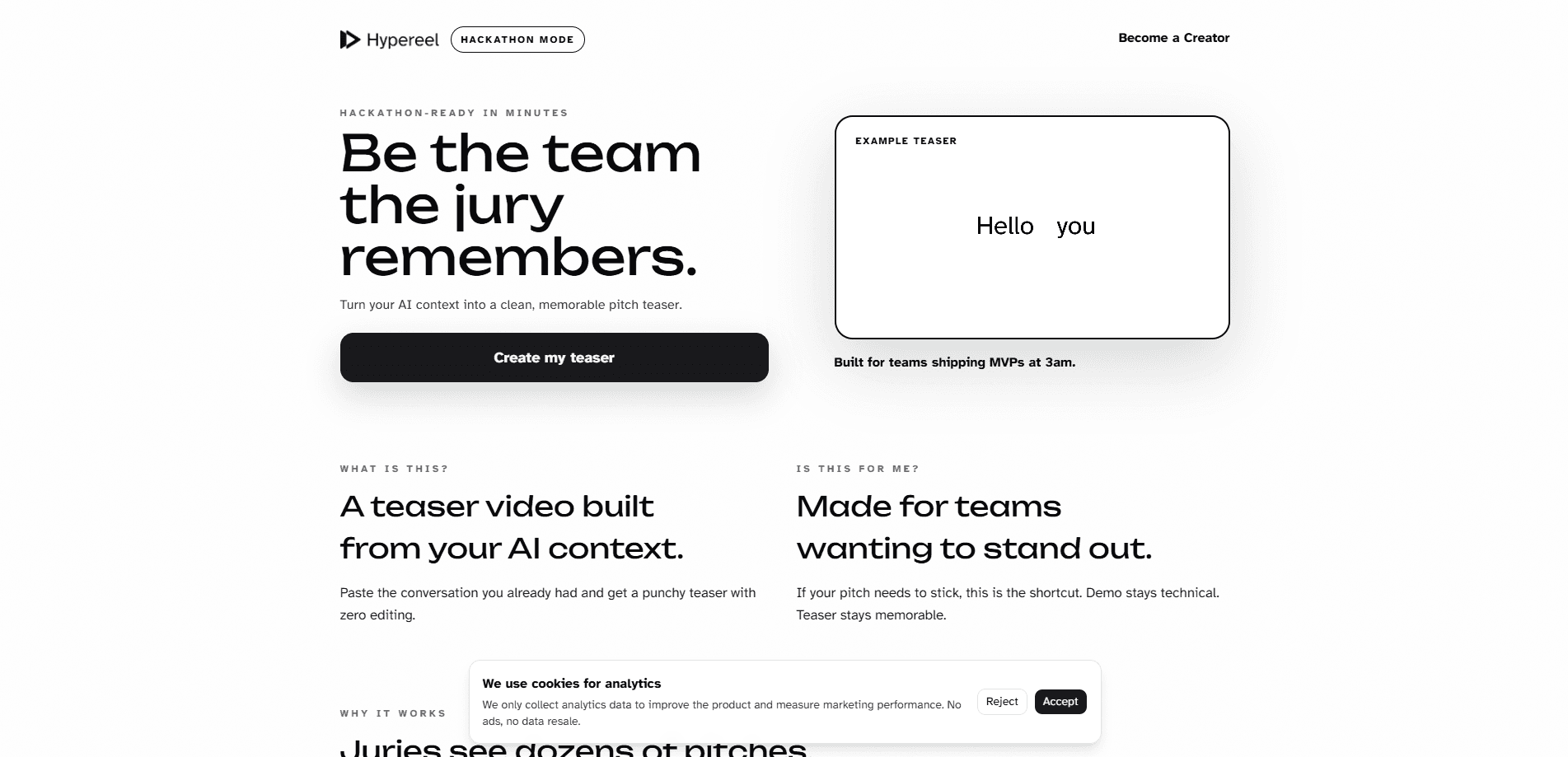
Hypereel turns the AI chat and notes from a hackathon build into a 30-second pitch teaser video. Paste the context, edit the copy, then pay $5 to $50 for the render.
About Hypereel
What Is Hypereel
Hypereel is a browser tool that takes the conversation you already had with an AI assistant while building something and turns it into a short teaser video. The input is text you wrote anyway. The output is a 30-second clip you can open a pitch with, attach to a Devpost submission, or post on social media.
The premise is blunt: juries sit through dozens of presentations that look alike. Same slide template, same live demo, same speaker walking through a feature list. Hypereel bets that sound and motion break the pattern faster than another deck, and that the first 30 seconds decide whether anyone watches the demo that follows. The team says teasers built this way have been part of pitches that collected over $10,000 in hackathon prize money since 2023.
What it doesn't do matters just as much. There's no timeline editor, no layer panel, and no manual keyframing, which is the point for teams without a video person. You get one render per project, so the footage is a teaser rather than a full demo walkthrough. Everything runs in a browser, and there's no free tier to try first, so the $5 minimum is the real entry price.
Getting Started
- Open hypereel.studio and sign up with a Google account or an email address.
- Paste the notes or chat transcript that powered your build into the context field.
- Generate a draft and read the script Hypereel cuts for you, which condenses the story into roughly 30 seconds.
- Edit the copy where the wording misses your project.
- Choose what the teaser is worth to you within the $5 to $50 range, then render and download it for your pitch.
Product Information
A quick look at Hypereel's pricing, supported platforms, and performance.
Best for
The users, tasks, and scenarios where this tool fits best.
Users
- Hackathon teams without a video person
- Developers who built with an AI assistant
- First-time pitchers
- Solo builders applying to accelerators
Tasks
- Opening a final pitch
- Filling a Devpost submission video slot
- Posting a launch clip
- Recruiting collaborators after the event
Scenarios
- The last hour before submissions close
- A demo day with a three-minute slot
- Applying to a program weeks later
Key features
AI Context as the Input
You paste the notes or chat transcript that produced the project, and Hypereel reads it for the story instead of asking you to write a brief. For teams that spent two days prompting an assistant, that transcript is the most complete record of what the product does and why. The step takes a paste, not an outline.
Automatic 30-Second Cut
The draft arrives as a short script that Hypereel structures for you. Thirty seconds is the working length, which forces a choice about what the pitch is actually about. Teams that can't explain the project in that window usually have a positioning problem, and the draft exposes it early.
Editable Copy Before Render
You can rewrite the lines before anything renders. That matters because AI summaries of a build tend to smooth over the specific detail that made it interesting. The edit step is text, not a timeline, so it stays usable for someone who has never opened Premiere or CapCut.
One Render per Project
Each project gets a single render, and tweaks before that render are unlimited. The rule keeps costs predictable for a student team and pushes the work into the script stage, where changes are cheap. Plan the wording first, then commit.
Sound, Motion and Pacing
The output is built to feel different from a slide deck, with audio and movement carrying the transitions. It behaves like a dedicated teaser video generator rather than a slide export with a soundtrack. That's the part a static deck can't copy, and the site leans on it as the reason a jury remembers one team out of twenty. It's a teaser, so expect atmosphere and a hook rather than a feature walkthrough.
Pay What It's Worth
Pricing runs from $5 to $50 per project, and you pick the number. There's no subscription and no seat count, which suits a team that needs one video for one weekend. A $5 render and a $50 render buy the same deliverable, so the amount is a judgment call about value rather than a feature gate.
Pros and cons
Pros
- The input is a chat you already have. No scriptwriting, no storyboard, no shot list.
- Thirty seconds forces a sharper pitch. Teams find out fast whether the idea survives a short explanation.
- Unlimited tweaks before the render means the $5 floor is realistic for a student budget.
- Output slots into the three places hackathon teams actually need video: the opener, the submission form, and social.
- Browser-only workflow, so a Windows laptop and a borrowed monitor are enough.
Cons
- One render per project. If the product changes direction after you export, you're paying again for a new one.
- No free tier. You can't see the finished quality before spending, which is a real risk for a team on a tight budget.
- It makes teasers, not demo videos. Anyone who needs a feature walkthrough with screen capture has to record that separately.
- No public API or team workspace is documented, so agencies and multi-project teams have no path to batch work.
Frequently asked questions
Hypereel makes a 30-second teaser video from the AI chat or notes behind a project. Hackathon teams use it to open a pitch, fill a Devpost video field, or post a launch clip without editing anything by hand.
Related content
Explore related tools, skills, and articles for Hypereel.
Hypereel Alternatives

ngram 2.0
ngram · Video · Marketingngram 2.0 is an AI video generator for teams. It turns a prompt, a screen recording, or a product URL into a narrated explainer, product demo, or AI avatar video, and every scene stays editable.

OpenScreen 2
OpenScreen (open-source project) · Video · ProductivityOpenScreen 2 is a free, open-source screen recorder and demo video editor for Windows, macOS, and Linux, with automatic zooms, styled frames, local captions, and agent edits.

Skreno
Skreno · Video · ProductivitySkreno is a browser screen recorder that captures a tab, a window or your whole display, then attaches AI transcripts, summaries and console logs to one share link.