
Illusion Diffusion AI Online
Cloudbridge Innovations Ltd. · Image
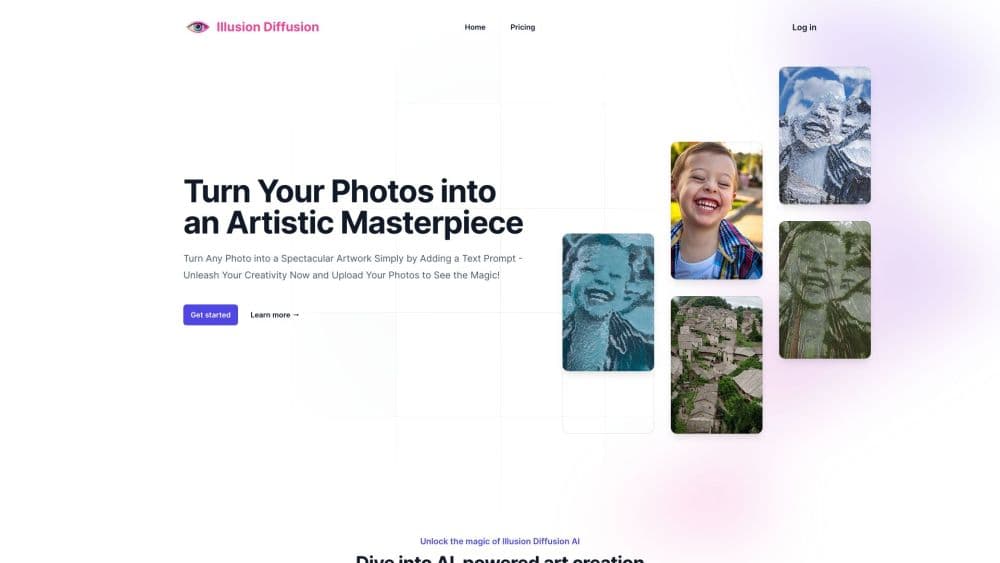
Illusion Diffusion AI Online is a web tool that turns a photo, logo, or line of text into optical illusion art. You upload a shaping image, add a prompt, and get blended art in seconds.
About Illusion Diffusion AI Online
What Is Illusion Diffusion AI
Illusion Diffusion AI Online is a browser based image generator built around one visual trick. You feed it a shaping image, a logo, a line of typography, a QR style pattern, or a plain photo, and then describe a scene in words. The output is a finished picture that hides the shape inside the scene. Squint or step back, and the original form pops out.
The technique is not a secret. According to the operator, the pipeline uses ControlNet to read the edges of your uploaded image with the Canny edge detector, and Openpose to pick up human keypoints like hands, legs, and head position. Stable Diffusion then paints a fresh image under those constraints. You never touch those settings; you only upload and describe.
The main constraint is credit based usage. Outside a free trial run, each artwork costs one credit, credits expire within one or two months depending on the pack, and refunds are not offered. It works as a credit based AI art tool for people who want one specific effect without installing a local diffusion stack.
Getting Started
- Open illusiondiffusion.net and click the free trial link. No credit card is needed for the first attempt.
- Upload the image you want to shape. Line art, a black and white silhouette, a logo, or a bold word all work best.
- Type a prompt describing the scene you want inside the shape, such as a forest path in autumn light.
- Hit generate and wait a few seconds for the result.
- Download the image, or buy a credit pack if you want faster generation, higher resolution, and no watermark.
Product Information
A quick look at Illusion Diffusion AI Online's pricing, supported platforms, and performance.
Best for
The users, tasks, and scenarios where this tool fits best.
Users
- Digital artists experimenting with hidden image art
- Social media creators hunting for scroll stopping visuals
- Small brands testing logo style ideas
- Curious beginners with no diffusion experience
Tasks
- Turning a phrase into an artwork
- Making a poster for a personal project
- Building eye catching marketing images
- Creating shareable optical illusion art prints
Scenarios
- A weekend experiment
- A content calendar backlog
- A client mockup round
Key features
Hidden Image Blending
You upload a shape and the tool builds a new scene that conceals it. A silhouette of a face, a bold word, or a logo outline survives in the final picture as soft, low contrast structure. This hidden image AI effect works best when the source image is simple and high contrast, because control is drawn from edges and body keypoints rather than from color.
Text Prompt Control
A single image prompt generator field drives the scene. It tells the model what to paint inside your shape, so the same silhouette can become a forest, a beach at dusk, or a room full of static. Short, concrete prompts tend to beat long lists of style words, which matters when each attempt spends a credit.
Edge and Pose Guidance
Two separate control passes do the heavy lifting. One reads edges through the Canny detector, which keeps the outline of your upload intact. The other reads human keypoints through Openpose, which keeps a person's pose recognizable. That combination is why photo subjects still read as people after the scene is rebuilt.
Fast Queue Generation
The site sells speed as its first paid benefit. Free runs share a long queue, while credit packs generate faster and return higher resolution files. For anyone iterating on a prompt, the difference is a single feature you feel immediately.
Clean Downloads and Sharing
Paid credits deliver images with no watermark, and downloads go straight to your computer. The site also supports posting results to social platforms, which makes it workable as a content pipeline rather than just a toy.
Built In Usage Gallery
The homepage gallery shows finished examples across quotes, brand marks, and portraits. It is the fastest way to judge whether the effect will fit your material before spending anything, and it doubles as a prompt reference for tone and subject.
Pros and cons
Pros
- No install and no model setup, so the whole workflow stays in the browser.
- The effect is genuinely distinctive, and a hidden logo or phrase inside a nature scene stands out in a feed.
- Free first run with no card required, which makes it cheap to check quality on your own image.
- One time credit packs instead of a subscription, so you can leave without cancelling anything.
- Paid files come without a watermark and are downloadable for personal and social use.
Cons
- Credits expire after one or two months, so bought credits you do not use are lost.
- No refunds and no subscription, which means a failed experiment still costs a credit.
- No public API documentation, so teams wanting to automate generation have no supported path.
- Prompt control is coarse compared with a local Stable Diffusion setup with tunable ControlNet strength and guidance scales.
Frequently asked questions
It makes optical illusion images. You upload a shape, logo, or text, describe the scene you want, and the tool returns a picture that hides the shape inside that scene. Typical uses are social posts, posters, brand mockups, and art experiments.
Related content
Explore related tools, skills, and articles for Illusion Diffusion AI Online.
Illusion Diffusion AI Online Alternatives

Tractionwave
TractionWave · Image · MarketingTractionWave is an AI attention heatmap tool for static ads. Upload a PNG or JPG and it returns predicted attention, ranked hotspots, and fixes before you spend budget.

Imejis.io
Imejis.io · Image · MarketingImejis.io is an AI design studio for agents and marketing teams. Describe an image in plain words, and it writes the copy, builds the layout, reflows it to every size, then exports a finished file.

Layoutr
Van Dijk Ontwikkeling · Image · China AILayoutr is a browser floor plan tool that scales your own plan, places furniture at true size, shows the room in 3D and renders it with AI.