

Image 2.5
Image 2.5 · Image · Marketing
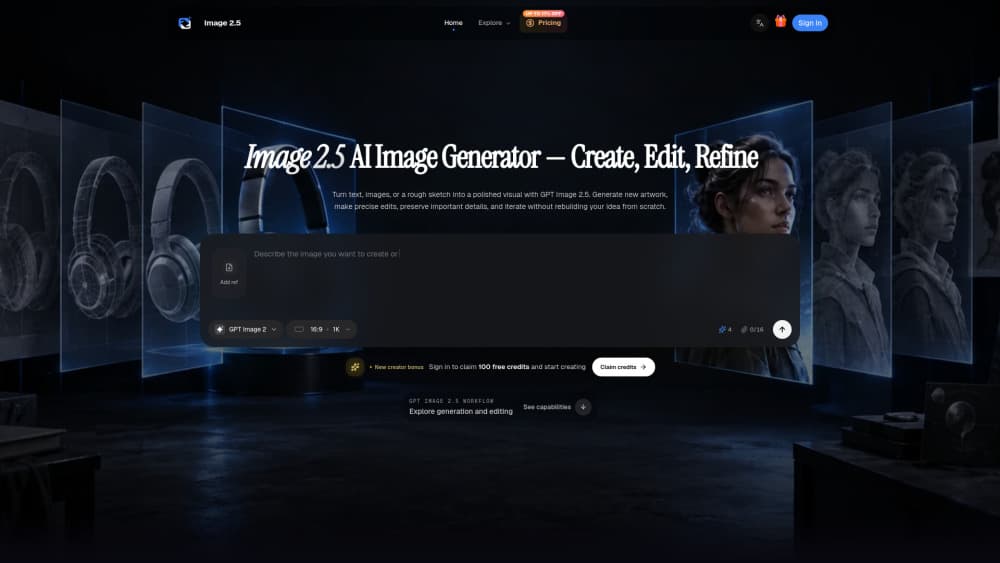
Image 2.5 is an AI image generator and editor that turns text prompts and reference images into finished visuals. Some call it a GPT Image 2.5 front end. Others just call it a fast AI photo editor. Both fit. You can describe a scene, add up to a handful of reference images, pick a model tier, and get a result back in seconds. The same workspace also handles edits: change a background, swap a color, or fix a detail, and keep the rest of the frame untouched. It's built for people who need more than one good image. Marketers, ecommerce teams, designers, and creators use it to push a single concept through several rounds without losing the parts they already liked. Transparent PNG export and credit-based pricing make it practical for cutouts, product shots, and social assets. It's also forgiving. First try, usable draft. This page walks through what Image 2.5 does, how it works in real use, what it costs, and who it fits best.
About Image 2.5
What Is Image 2.5
Image 2.5 is a browser-based AI image tool for generating and editing visuals. It combines text-to-image, image-to-image, and reference-driven generation in one workspace, so you don't bounce between apps to draft, revise, and export.
The core promise is control. Older generators often redraw everything when you ask for one small change. Image 2.5 leans on precision editing and multi-turn consistency: you mark the area you want changed, write what should happen there, and the surrounding composition, lighting, and subject stay where they were. That shifts image work from a one-shot gamble into something closer to an actual review loop.
It supports two model tiers in most access points, one tuned for speed and everyday drafts, another tuned for detailed edits and final compositions. Reference images guide people, products, style, or layout, which matters when you need the same subject across many outputs. Output options cover common aspect ratios, higher resolutions, and transparent backgrounds. Commercial use is typically included depending on the plan you pick.
Getting Started
- Open the site and sign in. New accounts usually start with a small bundle of free credits.
- Write your prompt in the text box. Add the subject, setting, and style, plus any exact wording you want rendered in the image.
- Add reference images if consistency matters. Upload PNG, JPG, or WebP files within the size limit.
- Choose your settings: model tier, image quality, aspect ratio, background, and file format.
- Check the credit cost shown before you generate, then hit the generate button and export the result you want.
Product Information
A quick look at Image 2.5's pricing, supported platforms, and performance.
Best for
The users, tasks, and scenarios where this tool fits best.
Users
- Marketers building campaign visuals and social ads
- Ecommerce teams producing product shots and catalog imagery
- Designers exploring concepts and visual proposals
- Creators and indie makers who need on-brand graphics fast
Tasks
- Turning a written idea into a finished image
- Editing one region of an image without redrawing the rest
- Keeping a person, product, or style consistent across many outputs
- Exporting transparent PNGs for cutouts, stickers, and design assets
Scenarios
- Building a set of product images around one recognizable subject
- Iterating on a poster or landing page visual through several review rounds
- Producing social covers and feed images in a fixed brand style
- Making quick concept drafts before committing to a detailed render
Key features
Text-to-Image Generation
Type a description and get an image back. The prompt box accepts a few thousand characters, so you can specify subject, lighting, composition, and style in one pass. A mug on a pale stone table with soft morning light and space on the left for a headline is enough detail to start. You don't need a long creative brief, and you don't need a stack of modifier keywords to get a usable first draft. That lowers the barrier for people who know what they want but don't want to learn prompt tricks. The model reads plain descriptions well, which is the point: you describe, it builds.
Precision Editing
This is where Image 2.5 separates itself from straight generators. Instead of rewriting a whole picture to change one thing, you point at the area you want changed and say what should happen there. Swap this background for a snowy mountain. Change the jacket to blue. Everything outside your selection, the composition, the lighting, the people, the logo, stays intact. Want to keep the face? You can. That's the difference between asking for a new image and asking for a revision. For anyone who's watched a generator wreck a good face while changing a shirt color, it's the feature that makes the tool usable in a real workflow. It turns editing into a targeted action rather than a full re-roll.
Multi-Turn Consistency
Precision editing matters most across several rounds. Image 2.5 holds earlier decisions as you keep going, so the fifth revision still carries the adjustments you made in the second. Earlier work doesn't unravel. You can change a background without disturbing the subject, change a subject without disturbing the background, and stack several edits without watching the image drift. This is what makes the tool fit production work. A campaign needs variations that share a recognizable core; a product line needs the same item shot from different angles. If every edit reset the image, none of that would be possible. Persistent consistency is the quiet feature that carries the loud ones.
Reference Images
You can feed the generator images instead of or alongside text. References guide the people, products, style, or composition in the output, which is how you keep a brand character, a specific product, or a look consistent from one render to the next. Most access points accept multiple references at once, letting you mix a subject shot with a style board. Files go in as PNG, JPG, or WebP within the size limit. In practice this is the fastest way to get a workable result on a named subject, because you stop describing what you can simply show.
Two Model Tiers
Image 2.5 ships in two flavors in most access points. One favors speed and everyday generation, keeping ideas moving while you explore directions. The other favors fine detail and longer generation times, meant for final compositions and demanding edits. The tradeoff is deliberate: draft fast, then commit processing power to the version that ships. You compare candidates at the size they'll actually be displayed, which keeps early experimentation cheap and late-stage decisions careful. Having both tiers in one workspace means you don't move your project between tools just to change gears.
Output Controls
The export settings cover the practical needs. Choose an aspect ratio or shape to match where the image will live, from square social posts to widescreen banners. Raise resolution when the output needs more detail, knowing it uses more credits. Switch the background to transparent for cutouts, stickers, and design assets. Pick the file format that suits the job; PNG keeps crisp detail and supports transparency. Content preferences let you steer toward standard or more specific requests. Together these controls cut the usual post-processing step, since the file comes out closer to what the layout actually needs.
Pros and cons
Pros
- Precision editing changes only the area you select, leaving the rest intact
- Multi-turn consistency holds earlier edits across long revision chains
- Reference images keep subjects and styles stable across many outputs
- Transparent PNG export removes a manual cutout step
- Credit cost is shown before you generate, so spending stays predictable
Cons
- Credit-based pricing means heavy, high-resolution work adds up quickly
- The two model tiers force a speed-versus-detail choice each time
- Fewer credits on entry-level plans can limit experimentation
- API availability isn't clearly documented for outside builders
Frequently asked questions
There's a free starting point. New accounts typically receive a small bundle of free credits, and most access points let you try generation without a credit card first. Those credits run out, and higher resolutions or multiple outputs cost more per task. After that you move to a paid plan or buy more credits.
Related content
Explore related tools, skills, and articles for Image 2.5.
Image 2.5 Alternatives

X Ray Interpreter
X-ray Interpreter · ImageX Ray Interpreter is a web-based AI radiology tool that turns X-rays, CT scans, MRI, ultrasound, and PET images into plain-language reports. You upload a scan, get a preliminary X-ray interpretation in moments, then ask follow-up questions if something needs explaining. It works as a second opinion and a learning aid, not as a medical diagnosis.

Aieasypic
AIEasyPic · ImageAIEasyPic is an AI image generator that turns plain text prompts into finished artwork in seconds. You can also train custom models on your own photos, swap faces in existing images, and create short video clips from text, all from a browser. It suits casual creators who want quick visuals and hobbyists who want to build a personal model without touching any code.

Chargen
Chargen · ImageChargen is an AI character generator and worldbuilding toolkit built for Dungeons & Dragons and other tabletop RPGs. It turns a one-line idea into a painted character portrait, spins up NPCs, monsters, maps and encounters from the same session, and keeps every creature's details close at hand. The tabletop RPG art side runs on a credit system called Gold, while the text generators stay free for everyone.