

ImageToText.AI
image-to-text.ai · Image
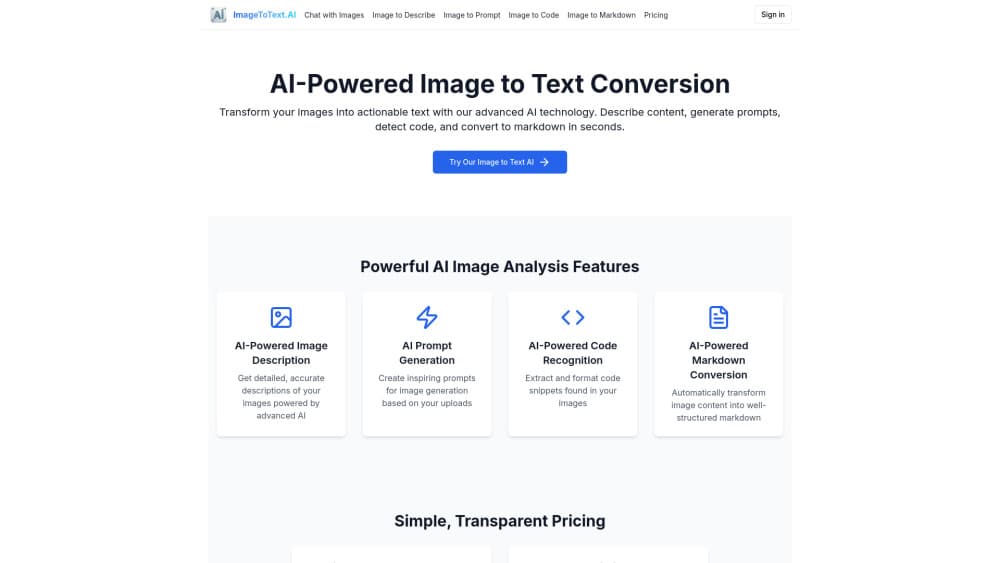
ImageToText.AI is a free online OCR tool that pulls editable text out of images, screenshots, and scans, with no signup and support for 20+ languages.
About ImageToText.AI
What Is ImageToText.AI
ImageToText.AI is a browser-based OCR service that reads the words inside a picture and hands them back as clean, copyable text. The name says it plainly: you give it an image, it gives you the text. It runs on a tuned Tesseract pipeline, the same open-source engine behind a lot of OCR software. So it handles printed pages, screenshots, and clean scans well. No install needed.
The site bundles 22 free tools rather than just one converter. Beyond the core image to text function, there are routes for image to word, PDF to text, handwriting to text, and a run of image utilities. That matters when your files don't sit neatly in one format. A chat screenshot, a photographed textbook page, and a scanned form all get handled here. If your goal is to extract text from image files in several formats, this single page covers the lot. No hunting for a different app each time.
The limits are worth knowing up front. OCR is only as good as the image you feed it, so faint receipts, heavy glare, and messy handwriting will produce rough results. The API exists but sits in private preview, so you can't wire it into your own workflow yet without emailing for access. Curious where it stumbles? Read on.
Getting Started
- Open the free image to text tool in any browser. Nothing to install, no account to create.
- Upload your file by dragging it onto the box, clicking to browse, or pasting a screenshot from your clipboard. JPG, PNG, WebP, BMP, TIFF, HEIC, and PDF are all accepted.
- Wait a few seconds while the OCR engine finds the text blocks and recognizes the characters.
- Review the extracted text in the preview pane and fix any stray characters, especially on lower-quality images.
- Copy the text to your clipboard or download it as TXT, DOCX, or Markdown.
Product Information
A quick look at ImageToText.AI's pricing, supported platforms, and performance.
Best for
The users, tasks, and scenarios where this tool fits best.
Users
- Students
- Office workers
- Designers and developers
Tasks
- Extracting text from screenshots
- Converting scans to editable documents
- Turning handwriting into text
Scenarios
- Digitizing a printed page fast
- Copying text you can't select
- Processing a batch before a deadline
Key features
Free OCR with no signup
The core converter is free and unlimited, and it doesn't ask you to register. That's the biggest draw here. You open the page, drop in an image, and get text back. No trial countdown, no watermark stamped on your output, no email gate before you see whether it works. For a tool you might use twice a year, that removes every reason not to.
20+ language support
The engine reads text in English, Spanish, French, German, Chinese, Japanese, Arabic, and more, switched with a single click. If you handle documents in more than one language, that beats juggling separate converters. Recognition quality still depends on the source, but the language list covers most everyday needs without any extra setup on your side.
Clean printed text and screenshots
ImageToText.AI is tuned for exactly what most people throw at it: crisp print, screenshots, and high-resolution scans. It preserves layout when you need it, so column structure and line breaks survive the trip instead of collapsing into one wall of text. Screenshots come out especially well. That's where a lot of casual use actually lives.
22 tools in one place
The image to text converter isn't alone. There are separate tools for image to word (.docx output), PDF to text, handwriting to text, and a set of image utilities for resizing, converting, and compressing. Having them under one roof means you fix the format problem and the extraction problem in the same tab. That's simpler than stitching three different sites together.
Privacy-minded file handling
Uploads are processed and then automatically deleted. The site states plainly that it doesn't keep your files and doesn't sell your data, which is a meaningful line for anyone who regularly feeds in contracts, IDs, or internal documents and wants to know where those files end up. One caveat: it stops short of a formal compliance certification, so check their policy if your files are genuinely sensitive.
Priority queue and credits
Conversions are always free, but the site sells queue-skipping. A Priority Pack is $6 for 100 credits, where one credit moves one job to the front. Credits never expire. During launch, priority is free and accounts come pre-loaded, so it effectively costs nothing right now. The catch is simple. You're only ever paying to go faster, never to open up the tool itself.
Developer API in preview
There's a documented API with a submit-and-poll design: POST a job, check its status, download the result. It reuses the same priority queue as the website. It's in private preview for now, so access means emailing the team, and metered billing is slated for general availability. Not something to build a product on today. Still a clear signal of where it's headed.
Pros and cons
Pros
- Genuinely free with no signup, no watermark, and no conversion cap.
- Handles a wide spread of input formats, including HEIC photos and PDFs.
- 22 tools bundled together, so format conversion and text extraction sit in one place.
- Files are auto-deleted after processing, which reduces the privacy worry.
- The priority credit system is honest about what you're paying for: speed, nothing else.
Cons
- Faint receipts, glare, and messy handwriting produce rough output, since results track image quality.
- The API is still in private preview, so you can't integrate it into your own workflow without requesting access.
- Because everything runs in the browser, large batch jobs depend on the queue unless you spend credits.
Frequently asked questions
Yes. Every conversion is free and unlimited, with no signup and no watermark. You only pay if you want to skip the standard queue. Even queue-skipping is free during launch, since accounts come pre-loaded with credits.
Related content
Explore related tools, skills, and articles for ImageToText.AI.
ImageToText.AI Alternatives

X Ray Interpreter
X-ray Interpreter · ImageX Ray Interpreter is a web-based AI radiology tool that turns X-rays, CT scans, MRI, ultrasound, and PET images into plain-language reports. You upload a scan, get a preliminary X-ray interpretation in moments, then ask follow-up questions if something needs explaining. It works as a second opinion and a learning aid, not as a medical diagnosis.

Aieasypic
AIEasyPic · ImageAIEasyPic is an AI image generator that turns plain text prompts into finished artwork in seconds. You can also train custom models on your own photos, swap faces in existing images, and create short video clips from text, all from a browser. It suits casual creators who want quick visuals and hobbyists who want to build a personal model without touching any code.

Chargen
Chargen · ImageChargen is an AI character generator and worldbuilding toolkit built for Dungeons & Dragons and other tabletop RPGs. It turns a one-line idea into a painted character portrait, spins up NPCs, monsters, maps and encounters from the same session, and keeps every creature's details close at hand. The tabletop RPG art side runs on a credit system called Gold, while the text generators stay free for everyone.