

Immerse
Immerse · Chatbot
Immerse is a VR and AI language learning platform that mixes virtual world practice, live small-group classes, and real-world capture to build speaking fluency.
About Immerse
What Is Immerse
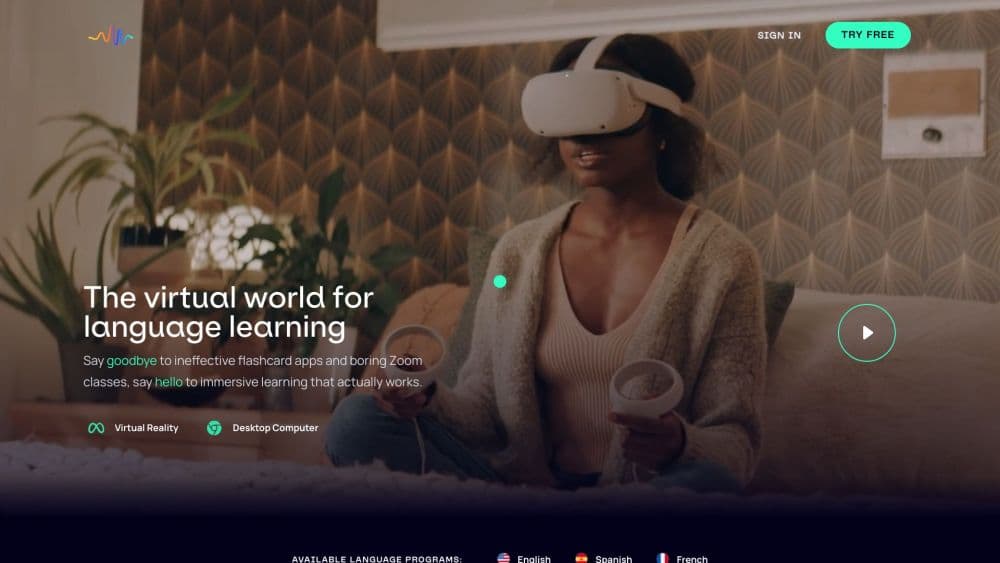
Immerse is a language learning platform built around speaking rather than memorizing. Lessons run inside virtual scenes, from a cafe counter to a hotel front desk, and an AI coach plays the other person in the conversation. Live human teachers run small classes on the same platform, so you can move from a solo rehearsal to a real exchange without changing apps.
The company started in 2017 and launched its first VR tutoring platform in February 2019. It now sells to individuals and to companies that need measurable language performance across a workforce. Consumer plans cover English, Spanish, French, and Portuguese. The member base is spread across 97 countries, and the Meta Quest language app holds a 4.9 out of 5 rating on the store.
The limit is scope. Four languages is a narrow list next to apps that carry dozens, and the speaking-first design assumes you're willing to talk out loud from the first session. VR adds presence, but you don't need a headset to use it. Phone, tablet, and desktop all reach the same lessons and progress.
Getting Started
- Create an account on the Immerse site or download the app, then take a short placement conversation so the platform can pick a starting level.
- Choose a language and a goal, such as workplace English or travel Spanish. The first sessions are short and mostly spoken.
- Join a live class or start an AI practice session in a virtual scene. Repeat the same conversation as many times as you need.
- Review the transcript and feedback after each session, then let the next lesson rebuild around the phrases you fumbled.
Product Information
A quick look at Immerse's pricing, supported platforms, and performance.
Best for
The users, tasks, and scenarios where this tool fits best.
Users
- Professionals who need to speak at work
- University students who read well but freeze when speaking
- Travelers and recent expats
Tasks
- Rehearsing a job interview in a second language
- Preparing for a specific trip
- Turning a real conversation into study material
Scenarios
- A 20-minute practice block at home
- The week before a business trip
- A company rolling out English training
Key features
Virtual Scenes Instead of Flashcards
Every lesson sits inside a rendered location with a task attached. You order food, check into a hotel, or walk through a workplace introduction, and the language you need comes from the task rather than a vocabulary list. The scenes give context to a phrase, which makes it easier to recall later. A headset adds depth, but the same scenes run on a phone or a browser.
AI Coaches That Adjust After Each Session
The AI avatar coach corrects you as you speak and notes where you stalled. The next session pulls those weak spots forward, so the curriculum shifts with your performance instead of following a fixed unit order. You can repeat a hard conversation as often as you like, which is the main advantage over a classroom. The feedback is specific to what you said, not a generic score.
Daily Live Classes With Human Teachers
Small-group classes run every day in realistic settings, led by coaches who give feedback on pronunciation, word choice, and flow. Essential includes live classes with a limit, while Pro removes the cap and adds unlimited instructor feedback. This is where the platform differs from pure AI apps: a person notices when you sound uncertain, not just when a word is wrong.
Capture on Your Phone and AI Glasses
Capture records a real conversation and turns it into a short lesson. Start it before a meeting, a market visit, or a dinner, and the platform produces a transcript with review, practice, and preparation for the next attempt. It works on the phone you already own, and supported Meta AI glasses make it hands-free. Recording only begins when you start it, and you choose which moments become lessons.
A Community Across 97 Countries
Members meet in games, hangouts, and casual language exchange with people at a similar stage. The point is low-stakes speaking with a stranger who is also learning, which is often easier than a first attempt with a native speaker. Events run inside the virtual world, so the community is not a forum bolted onto the app.
Progress Tracking and Fluency Data
A placement conversation sets your level, and the platform tracks progress against CEFR bands from pre-A1 through C1. Individual learners see completed tasks, transcripts, and feedback in one place. Teams get a wider dashboard that compares current ability with role-specific standards, plus sign-on through Workday, Degreed, SAP SuccessFactors, Cornerstone, Docebo, Canvas, and Blackboard.
Pros and cons
Pros
- Speaking comes first: every session asks you to produce language out loud, which targets the gap that reading and listening apps leave behind.
- One subscription covers AI practice, live classes, and community, so you don't buy a tutor separately.
- Capture closes the loop between study and daily life, and it works on a phone without any extra hardware.
- Progress follows you across phone, desktop, VR, and supported AI glasses, so a session can start on one device and finish on another.
- Immerse pricing is public and simple: $15/mo for Essential and $35/mo for Pro, with a 14-day trial and no charge if you cancel inside it.
Cons
- Only four languages: English, Spanish, French, and Portuguese. Anyone learning Japanese, German, or Mandarin needs a different app.
- Live class times can clash with your schedule, and unlimited classes sit behind the $35 Pro plan.
- VR is optional but adds cost if you want the full sense of presence, since a headset is a separate purchase.
- No public API is documented, so teams that want custom integrations are limited to the supported LMS sign-on list.
Frequently asked questions
Immerse is for building speaking fluency in English, Spanish, French, or Portuguese. You practice conversations in VR scenes with an AI coach, join live small-group classes, and record real conversations to turn them into lessons.
Related content
Explore related tools, skills, and articles for Immerse.
Immerse Alternatives

Knocket
Knocket (Tencent RTC team) · Productivity · Business · ChatbotKnocket is a free live chat and contact page tool that lets visitors message you from your website, app, or a shareable link, with every reply handled from Telegram or one inbox.
Agibot
Agibot · Productivity · AI Assistant · ChatbotAgibot is a personal AI agent for Mac that keeps running after you close the window, runs routines on a schedule, and works from Telegram or Slack with your own API keys.

Melete
Melete · Productivity · AI Assistant · ChatbotMelete is an AI workspace for teams where agents research, draft, and act in Slack, Notion, Linear, and GitHub. Shared memory and approval gates keep people in control.