
InkCraft
InkCraft · Image
InkCraft is a free tattoo try-on tool that runs in your browser. Upload a photo of the body part you're considering, pick a design, and it places the ink on your skin in 3D at real size, so the artwork bends around curves and creases instead of sitting flat like a sticker. There's no signup, no download, and no email required. It's built for the moment before you commit, when the design matters less than where and how big it should be. Think of it as a virtual tattoo try-on for your own skin.
About InkCraft
What Is InkCraft
InkCraft is a tattoo simulator for people still deciding. You bring a photo, it brings the design and the placement math. The whole point is answering the two questions that cause most tattoo regret: which spot, and what scale. Not the art itself. Placement and size. Seeing a piece on your own forearm at true size, before anyone picks up a needle, is the cheapest way to get that call right.
The tool runs entirely in a browser tab. There's no app to install for the core try-on and no account to create, and your photo is used only to build the preview, then dropped from server memory when the request ends. Most people open it on a phone and try a design on the spot they're thinking about. That's it.
The limits are worth knowing up front. The free browser tool caps you at five new photos per ten minutes, exports carry a small InkCraft mark in the corner, and the full-body AI generation features live in the iOS app rather than the web version.
Getting Started
- Open the try-on editor in your browser. No account or email needed, just a quick "not a robot" check before processing.
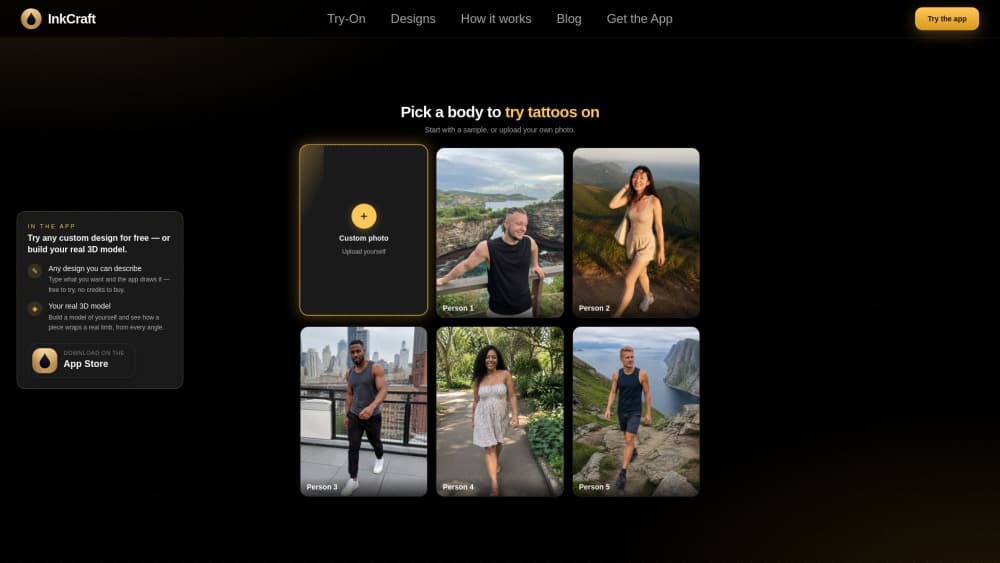
- Start with one of five sample bodies, or upload your own photo. JPEG, PNG, or WebP up to 10 MB; a clear, well-lit shot of the body part works best.
- Pick a design from the library of hundreds, then drag it onto your skin.
- Adjust size, rotation, opacity, ink darkness, and how strongly the design wraps. You can stack several designs on one photo.
- Export the preview as a PNG to keep, text to a friend, or show your artist.
Product Information
A quick look at InkCraft's pricing, supported platforms, and performance.
Best for
The users, tasks, and scenarios where this tool fits best.
Users
- First-timers weighing a design
- People planning a large piece
- Anyone coordinating with an artist
Tasks
- Testing placement
- Getting a tattoo placement preview
- Comparing candidates
- Checking scale
- Previewing cover work
Scenarios
- Standing in the shop and second-guessing the stencil
- Late-night doubts before an appointment
- Sketching an idea with friends
Key features
True 3D placement that wraps the body
The core difference from pasting a picture on a photo is that InkCraft bends the design around the contours of your skin, accounting for curves, folds, and perspective. A shoulder or calf is where this shows. A flat overlay there looks obviously fake. What you see is close to how the tattoo would actually sit.
Five sample bodies for instant testing
You don't need a photo to start. Five ready-made bodies let you drop a design and see placement immediately, which is handy when you're exploring styles rather than committing to a spot. It removes the awkward step of photographing yourself and gets you to a preview in seconds.
A large, style-sorted design library
The library holds hundreds of designs grouped by style: fine line, blackwork, traditional, geometric, watercolour, lettering, and more. Each entry on the tattoo idea pages links straight into the editor, so tapping a design you like puts it on your photo without hunting for it again.
Fine-grained placement controls
You get size, rotation, opacity, ink darkness, and a control for how strongly the design wraps around the body. Those last two separate a believable preview from a rough mockup. Real ink sits in the skin, not on top of it. You can also layer several designs on one photo to compare a full composition.
Browser-first, no install
The try-on runs in any browser with WebGL 2, on a phone or a laptop, with nothing to download. Location and camera metadata are stripped in your browser before your photo is uploaded. Your image is used for a single request and deleted from server memory when that request ends, never written to disk.
Free iOS app with AI generation
The iOS app unlocks the fuller experience: unlimited previews, full-body placement across arms, back, chest, and legs, AI tattoo generation, and scar-cover previews. It's free to download, and the app extends what the web tool does without replacing it.
Pros and cons
Pros
- Free with no account, no email, and no expiring trial, so there's no cost to testing an idea.
- The 3D wrap makes placement previews realistic on curved body parts where flat overlays fail.
- Works on phone and desktop in the browser, which matches how most people actually use it.
- Photo privacy is handled cleanly: metadata stripped in-browser, single-request use, nothing stored.
Cons
- The free browser version limits you to five new photos per ten minutes, which slows down bulk experimentation.
- Exported PNGs carry a small InkCraft watermark in the corner, so they're a reference, not a clean deliverable.
- AI generation and full-body placement are iOS-only, so Android and desktop users get the try-on but not the generation tools.
Frequently asked questions
InkCraft is a tattoo simulator that shows a design on your own skin before you commit. You upload a photo, place a design, and see it wrapped in 3D at real size, which helps you decide placement and scale rather than the design itself.
Related content
Explore related tools, skills, and articles for InkCraft.
InkCraft Alternatives

X Ray Interpreter
X-ray Interpreter · ImageX Ray Interpreter is a web-based AI radiology tool that turns X-rays, CT scans, MRI, ultrasound, and PET images into plain-language reports. You upload a scan, get a preliminary X-ray interpretation in moments, then ask follow-up questions if something needs explaining. It works as a second opinion and a learning aid, not as a medical diagnosis.

Aieasypic
AIEasyPic · ImageAIEasyPic is an AI image generator that turns plain text prompts into finished artwork in seconds. You can also train custom models on your own photos, swap faces in existing images, and create short video clips from text, all from a browser. It suits casual creators who want quick visuals and hobbyists who want to build a personal model without touching any code.

Chargen
Chargen · ImageChargen is an AI character generator and worldbuilding toolkit built for Dungeons & Dragons and other tabletop RPGs. It turns a one-line idea into a painted character portrait, spins up NPCs, monsters, maps and encounters from the same session, and keeps every creature's details close at hand. The tabletop RPG art side runs on a credit system called Gold, while the text generators stay free for everyone.