

InstaSnippet
mkegnt · Chatbot · Prompts
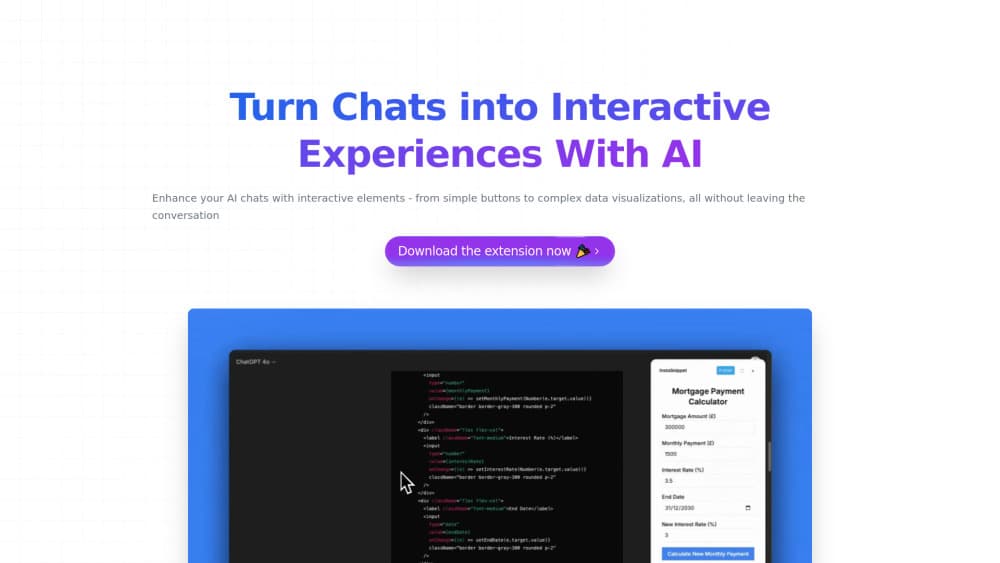
InstaSnippet is a free Chrome extension that renders interactive React components inside AI chats like ChatGPT and Claude, so replies become live widgets instead of plain text.
About InstaSnippet
What Is InstaSnippet
InstaSnippet is a Chrome extension that turns AI chat threads into something you can actually click. Instead of reading a wall of text, you get live React components rendered right inside the conversation. Simple buttons. Small charts. Whatever you ask for.
The idea is simple. Chatbots are good at describing things and bad at showing them. Ask for a calculator or a quick poll, and you usually get code you have to run somewhere else. InstaSnippet skips that step by drawing the component in the chat window itself. So why bother with the extra application when the answer can just appear in place?
It's a young project. Snippet sharing is still marked as coming soon, so you can't hand a saved component to a friend yet, and the tool today is built for the desktop web version of these chats rather than for the mobile apps. That's fine for now. The core trick, drawing live components inside a chat, already works.
Getting Started
- Open the Chrome Web Store listing for InstaSnippet and add the extension to your browser.
- Pin it to the toolbar so you can reach it while a chat is open.
- Open ChatGPT or Claude in a normal browser tab and start a conversation.
- Ask the assistant for an interactive element, such as a button, slider, or small data visualization.
- Watch the generated component render inside the chat and interact with it directly.
Product Information
A quick look at InstaSnippet's pricing, supported platforms, and performance.
Best for
The users, tasks, and scenarios where this tool fits best.
Users
- Curious AI users who want chats to do more than produce text
- Students and teachers who explain ideas with small demos, since a rendered widget beats a paragraph of description in a lesson.
- Developers who sketch React UI ideas during a chat and want a quick preview without leaving the tab.
Tasks
- Turning a text answer into a working widget
- Prototyping small interface pieces
- Building quick internal tools for one-off jobs, like a small calculator or a tally, without opening an editor.
Scenarios
- Working through a data question in ChatGPT and wanting a chart instead of a table of numbers.
- Explaining a concept to someone over a shared screen, where an interactive demo lands better than prose.
- Testing a UI idea in Claude while your code editor is closed and you just want to see it render.
Key features
In-chat React rendering
InstaSnippet draws React components directly inside the conversation. You don't copy code into another app or spin up a local server. The component shows up where you're already reading, so the loop from idea to working element stays short, and you can iterate in the same thread without breaking focus to open an editor.
Support for multiple AI platforms
The extension works with ChatGPT, Claude, and other AI chats, per the developer, so you can keep using whichever assistant fits the task at hand instead of being locked to one vendor. Rendering React components in ChatGPT is the headline use case, but the same trick works in Claude. That matters if you split your work across assistants, because one tool covers the ones you already use rather than locking you to a single platform and forcing you to reinstall a separate helper every time you switch.
Range from simple to complex components
You can build anything from a basic button to a more involved interactive feature. The developer describes the range as flexible enough for simple UI elements and complex data visualizations, which covers both quick demos and denser displays. Small stuff works. Big stuff works too.
No code required to interact
You ask for what you want in plain language and then use the result. The component is interactive, not a screenshot. Click it. Watch it respond. That's the part that separates this from pasting code into a chat and reading it as text.
Works as a browser extension
Because it lives in Chrome, InstaSnippet stays with you across tabs and sites. There's no desktop app to install, no account to juggle, and no launcher to keep in sync. The extension simply rides along with whatever AI chat you have open in your browser, which is exactly how a small utility should behave when it wants to stay out of your way.
Free to use
The landing page bills the tool as free, and there's no paid tier listed. No account. No credit card. That keeps the barrier low: install it, try it, and drop it if it doesn't fit your workflow.
Pros and cons
Pros
- Renders React components inside ChatGPT and Claude, so you interact with results instead of reading code.
- Free, with no paid plan and no account friction on the official page.
- Handles both simple UI bits and more complex interactive features.
- Lightweight Chrome extension that follows you across tabs.
Cons
- Snippet sharing is still "coming soon," so you can't send a saved component to a teammate yet.
- Built for desktop web chats, which means mobile app users are left out.
- Documentation is thin, so expect some trial and error on what components render cleanly.
- No public API, which rules out wiring it into other tools automatically.
Frequently asked questions
It renders interactive React components inside AI chat interfaces. Instead of the chatbot describing a widget in text, InstaSnippet draws it in the conversation so you can click and use it, and the whole exchange stays in one place rather than being copied out to a separate app just to see whether the idea works.
Related content
Explore related tools, skills, and articles for InstaSnippet.
InstaSnippet Alternatives

Knocket
Knocket (Tencent RTC team) · Productivity · Business · ChatbotKnocket is a free live chat and contact page tool that lets visitors message you from your website, app, or a shareable link, with every reply handled from Telegram or one inbox.
Agibot
Agibot · Productivity · AI Assistant · ChatbotAgibot is a personal AI agent for Mac that keeps running after you close the window, runs routines on a schedule, and works from Telegram or Slack with your own API keys.

Melete
Melete · Productivity · AI Assistant · ChatbotMelete is an AI workspace for teams where agents research, draft, and act in Slack, Notion, Linear, and GitHub. Shared memory and approval gates keep people in control.