

Invokeai
Invoke AI · Image
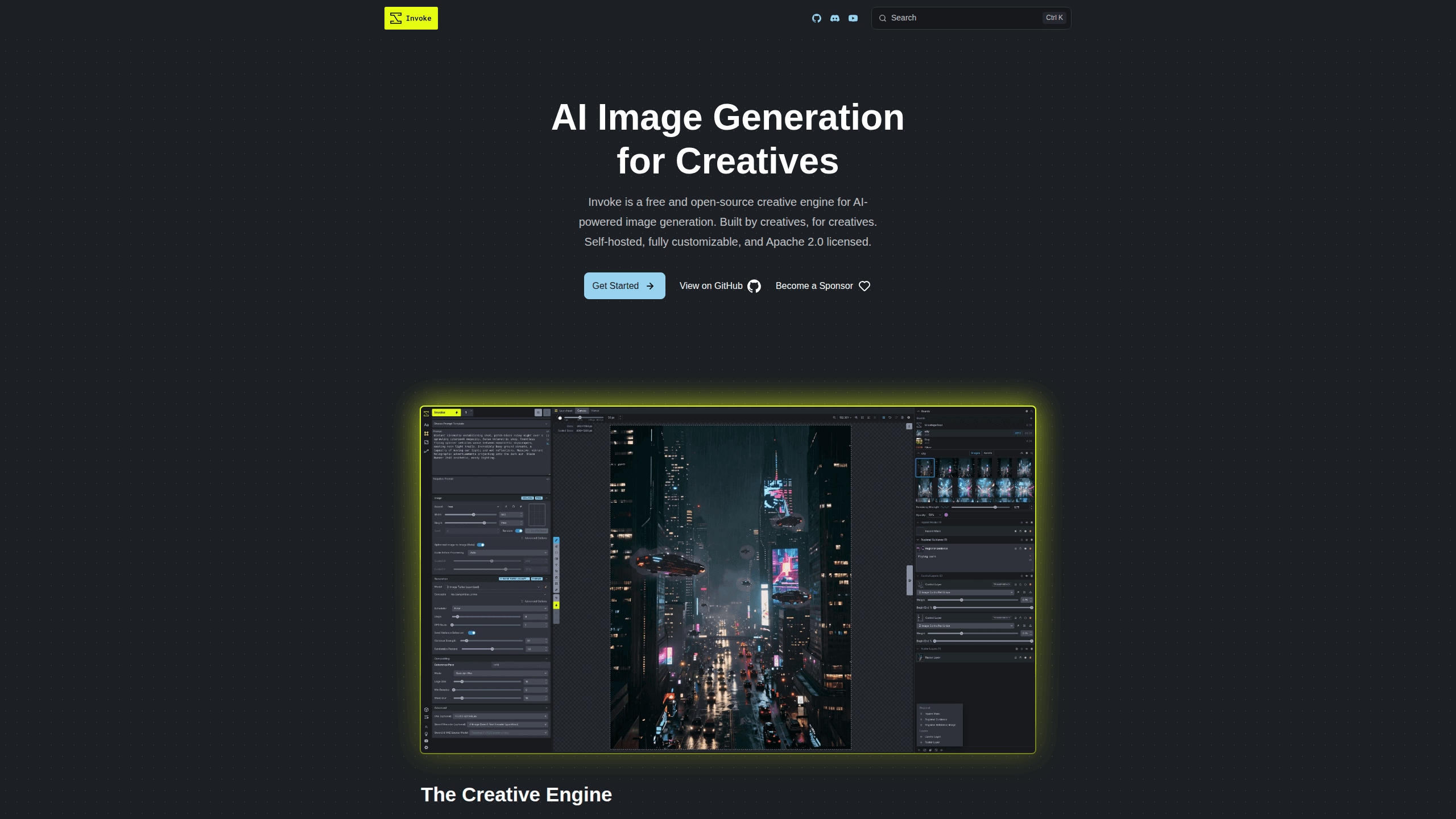
InvokeAI is a free, open-source AI image generator you run on your own computer instead of in the cloud. It pairs a layered canvas for editing with node-based workflows for building repeatable pipelines, and it supports models like Flux, SDXL, and SD 1.5. Because everything stays local, your prompts and images never leave your machine.
About Invokeai
What Is InvokeAI
InvokeAI is a creative engine for open-source image generation that runs locally and is licensed under Apache 2.0. It started life as a friendlier Stable Diffusion interface, a replacement for the scrappy command-line scripts people used to generate images in 2022. Since then it has grown into a full production toolkit for artists, designers, and hobbyists who want control over how images get made. The project is built and maintained by an open-source community rather than a single company selling subscriptions.
The main draw is ownership. Cloud image tools charge per generation, apply content filters, and hold your prompts on their servers, which is fine until a client contract says assets can't leave the building. InvokeAI flips that: you bring your own GPU, and the software handles checkpoints, LoRAs, ControlNets, and upscaling on your hardware. That means no monthly bill and no queue waiting behind other users.
The tradeoff is setup. You need a machine with a capable GPU. Install isn't hard, but it isn't nothing either. Apple users need an M-series chip, since Intel Macs aren't supported. No compatible GPU? The hosted options are your workaround.
Getting Started
- Check your hardware: Windows 10+ or Linux with an NVIDIA or AMD GPU, or a macOS machine with Apple Silicon (M-series).
- Download the installer for your platform from the official site, or run the Docker image if you prefer not to install dependencies directly.
- Launch the application and let it download a base model such as SDXL or Flux on first run.
- Open the canvas or the workflow editor, write a prompt, and generate your first image.
- Save models you like into the Model Manager so you can reuse checkpoints, LoRAs, and ControlNets across projects.
Product Information
A quick look at Invokeai's pricing, supported platforms, and performance.
Best for
The users, tasks, and scenarios where this tool fits best.
Users
- Digital artists and illustrators
- Privacy-conscious creators
- Tinkerers and developers
Tasks
- Building repeatable generation pipelines
- Composition control
- Batch iteration and upscaling
Scenarios
- Studio work with client assets that can't leave the building, where a self-hosted AI art tool keeps everything on local hardware.
- Experimenting with new base models
- Learning how diffusion pipelines actually work by rewiring nodes and watching what each step does.
Key features
Unified Canvas
The canvas brings layer-based editing to AI generation. You can draw, paint, sketch, and inpaint on separate layers, then move each one on its own. This matters when you're composing a scene in stages instead of accepting whatever a single prompt returns, because you can lock in the parts that already look right. Because every layer stays editable, refining one part of an image never forces you to regenerate the whole thing, which is the part most prompt-only tools get wrong. It's closer to how artists work in Photoshop than to a typical prompt-and-hope generator.
Node-Based Workflows
Every generation can be expressed as a visual graph of nodes, so you see exactly how the pipeline runs, which model feeds which sampler, and where the upscaling step sits. You connect models, samplers, and post-processing steps, then save the graph to reuse later. Custom parameters can be exposed as simple UI controls so you don't have to touch the graph just to tweak a value.
Broad Model Support
InvokeAI supports current foundational models including Flux, SDXL, and SD 1.5 out of the box, so you can pick the model that matches your style instead of being stuck with one. A Model Manager keeps checkpoints, LoRAs, Textual Inversions, and ControlNets organized in one place. That range means you're not locked to one model family when a new release lands.
Local and Private by Default
The software runs entirely on your own hardware, so prompts and finished images stay on your disk with no cloud account required and no third party holding a copy of your work. For anyone worried about handing creative work to a third party, that's the whole point of choosing this tool.
ControlNet Implementation
ControlNet support covers depth maps, edge detection, and pose guidance for directing how a generation is laid out. You use these to dictate composition rather than describing it in words. In practice, it's the difference between "a person standing in a doorway" as a prompt and actually placing the figure where you want it.
Fast Iteration
Batch generation, prompt wildcards, and high-resolution upscaling are all built in, so a single prompt can spin off dozens of variations without a separate app. Wildcards swap in random values from a list so one prompt can produce dozens of variants. Upscaling then takes the winners to print-ready resolution, all inside the same workspace.
Open Source and Community Driven
The code is Apache 2.0 licensed and developed in the open. Users file bugs, request features, and contribute directly to the roadmap. If a feature is missing, there's an actual path to getting it built rather than a support ticket that goes nowhere. Want a fix faster? Write it.
Pros and cons
Pros
- Free to use with no subscription, since it's open source and self-hosted.
- Full privacy: prompts and images stay on your own machine.
- Layered canvas and node workflows give control that cloud prompt boxes can't match.
- Supports Flux, SDXL, SD 1.5, plus LoRAs, ControlNets, and Textual Inversions.
- Documented REST API lets developers script generations into other tools.
Cons
- Requires a capable GPU; Intel Macs and integrated-graphics machines won't run it.
- Setup takes more know-how than signing into a web app.
- Local speed depends entirely on your hardware, so weaker GPUs mean slow generations.
- There's no official cloud version, so you manage updates, models, and storage yourself.
Frequently asked questions
Yes. InvokeAI is open source under the Apache 2.0 license and free to download and run. There are no subscription tiers. Your only real cost is the hardware you run it on, or a paid hosted GPU service if you don't own a capable machine.
Related content
Explore related tools, skills, and articles for Invokeai.
Invokeai Alternatives

X Ray Interpreter
X-ray Interpreter · ImageX Ray Interpreter is a web-based AI radiology tool that turns X-rays, CT scans, MRI, ultrasound, and PET images into plain-language reports. You upload a scan, get a preliminary X-ray interpretation in moments, then ask follow-up questions if something needs explaining. It works as a second opinion and a learning aid, not as a medical diagnosis.

Aieasypic
AIEasyPic · ImageAIEasyPic is an AI image generator that turns plain text prompts into finished artwork in seconds. You can also train custom models on your own photos, swap faces in existing images, and create short video clips from text, all from a browser. It suits casual creators who want quick visuals and hobbyists who want to build a personal model without touching any code.

Chargen
Chargen · ImageChargen is an AI character generator and worldbuilding toolkit built for Dungeons & Dragons and other tabletop RPGs. It turns a one-line idea into a painted character portrait, spins up NPCs, monsters, maps and encounters from the same session, and keeps every creature's details close at hand. The tabletop RPG art side runs on a credit system called Gold, while the text generators stay free for everyone.