

Ipic AI
Ipic AI · Image
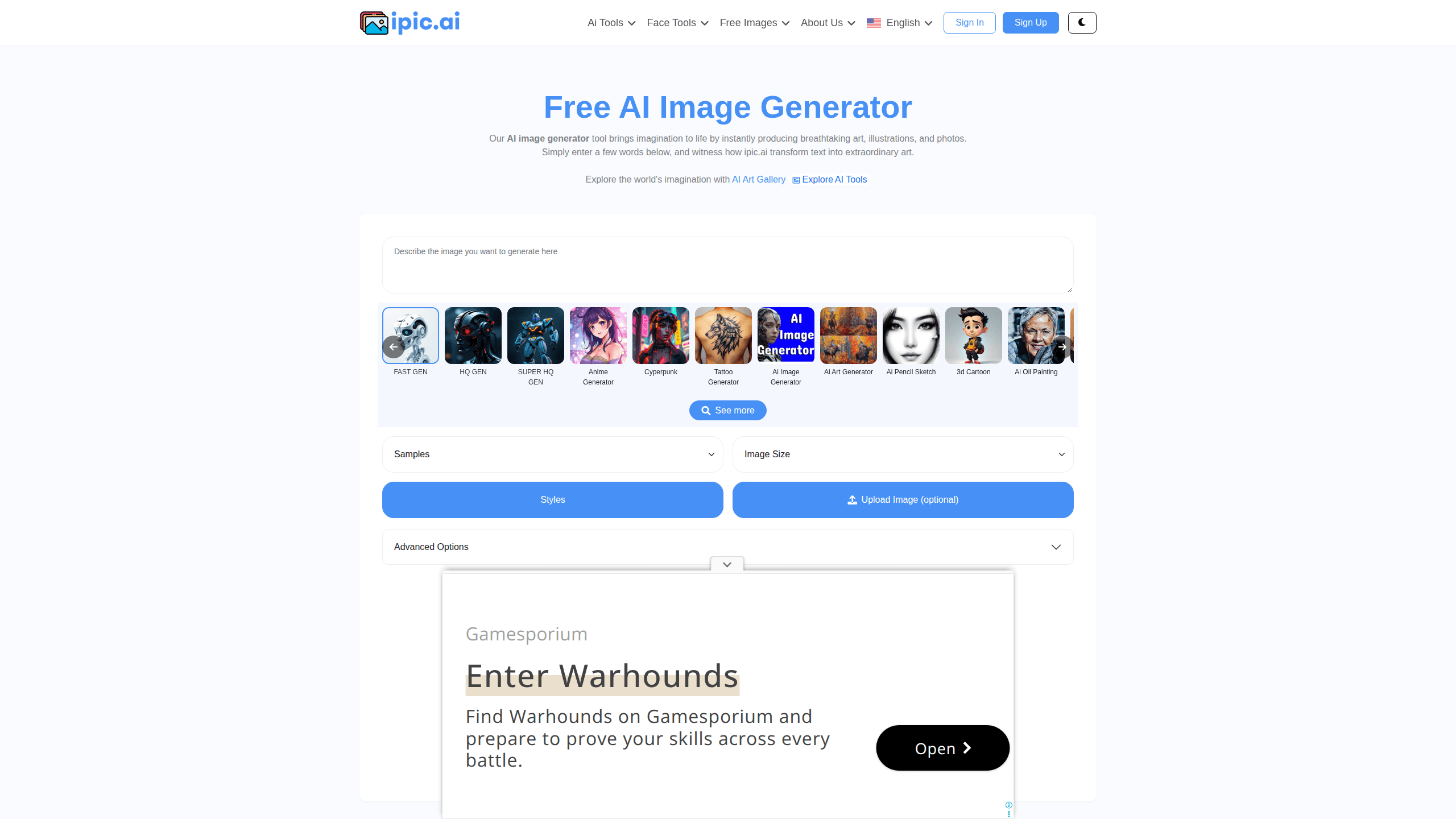
Ipic AI is a web-based AI image generator that turns short text prompts into art, illustrations, photos, and portraits. It bundles a broad set of one-click tools, from an AI art generator and anime generator to an avatar generator and face swapper, so you can jump between styles without learning a new interface. Handy. A free tier covers casual testing, while paid plans add higher resolution sizes, no watermark, and commercial use.
About Ipic AI
What Is Ipic AI
Ipic AI is an online AI image generator built for people who want finished visuals without opening design software. You type a description, pick a size and style, and the site returns generated images in seconds. It runs entirely in the browser, so there's nothing to install and no graphics card to buy before you can make your first picture.
The product leans on breadth rather than a single trick. Alongside straightforward text to image generation, it ships focused tools for anime, avatars, headshots, meme faces, tattoo designs, and image outpainting. That range is the main draw. A blogger chasing a featured image and a creator building a profile picture both find something useful on the same site.
The catch is on the free plan. Free users get 10 images a day at small sizes, see ads, and get a watermark on output. The gallery is public too. That means both your prompts and the results can be viewed by others. If privacy or watermark-free output matters, you'll need a paid tier.
Getting Started
- Go to ipic.ai and create a free account with your email, or sign in if you already have one.
- Type a text prompt into the box, then choose an image size and an optional style preset.
- Optionally upload a reference image and adjust advanced settings like seed and denoise.
- Hit Generate and wait a few seconds for the results to appear.
- Download the image, or upgrade to a paid plan to remove the watermark and get larger sizes.
Product Information
A quick look at Ipic AI's pricing, supported platforms, and performance.
Best for
The users, tasks, and scenarios where this tool fits best.
Users
- Bloggers and writers
- Social media creators
- Hobbyists and beginners
Tasks
- Creating AI art and illustrations from a written description
- Generating anime characters and stylized portraits
- Making an AI headshot or corporate ID
- Designing tattoo concepts
- Swapping faces or removing backgrounds
Scenarios
- Filling a blog with images on a tight deadline
- Testing a content idea before paying for design
- Bulk image generation for resale or app use
- Quick profile and thumbnail updates
Key features
Text to Image Generation
Ipic AI's core engine turns a written prompt into a finished image across multiple art styles. You can set the output size, and on paid tiers that spans from small squares up to 1024x1024 and rectangular formats. Does fast matter here? It does. The site advertises quick generation, so iterating on a prompt takes seconds rather than minutes. It's the feature most people start with, and it stays the workhorse for one-off visuals.
Focused AI Tools
Beyond the general generator, Ipic AI ships a menu of single-purpose tools: an anime generator, an AI art generator, a 3D cartoon maker, an oil painting filter, a pencil sketch tool, and a meme generator, each one applying a preset pipeline so you don't have to write a style-heavy prompt yourself. That shortcut matters. For anyone who wants a specific look without prompt engineering, these presets save real time.
Avatar and Headshot Generators
The avatar generator and headshot generator target profile-picture and professional-portrait use. The avatar tool produces characters in a range of styles, while the headshot side aims at polished, ID-style results for resumes, team pages, and social profiles. I'm not sure how the headshot quality holds up against dedicated portrait apps, since that varies a lot by input photo. Either way, both tools sit in the free tier's reach, so testing them costs nothing.
Face Swapper and Background Remover
Two editing tools round out the suite. The face swapper drops one face onto another image, and the background remover cuts a subject out cleanly. These are the kind of jobs people usually open a separate editor for, so having them in the same tab is convenient. They work best on straightforward, well-lit images. Busy scenes with many faces tend to produce messier results.
Image Outpainting
Image outpainting extends a picture beyond its original edges, filling in new surroundings that match the existing scene. It's useful when a generated image is close but framed too tightly, and you want more room around the subject. This is a smaller, more technical feature than the headline tools. Still, it's the one that lets you fix a nearly-perfect result instead of regenerating from scratch.
API Access and Bulk Generation
Paid plans above the entry tier mention API access, with the Platinum and Dedicated plans pitched at API resellers and mass generation for teams that push thousands of images through an automated pipeline every month. Higher tiers raise the monthly image allowance, from 1,000 images on Silver up to high-volume runs on the Dedicated plan. Wiring image generation into an app or a content pipeline? This is the path. The cheaper plans describe their API access as throttled, so budget for slower throughput.
Pros and cons
Pros
- Broad tool lineup covers art, anime, avatars, headshots, face swaps, and outpainting in one place
- Free tier generates 10 images a day, enough to judge quality before paying
- Entry paid plan is cheap at $9.99 a month for 1,000 images
- Runs in the browser with no install, so it works on modest hardware
- Higher tiers include API access for automated and bulk workflows
Cons
- Free plan output carries a watermark and is public, so it's not suitable for private or commercial work
- Advertisements appear on the free tier, which interrupts the workflow
- Only the smallest sizes are available for free; larger resolutions need a paid plan
- No native mobile app, so mobile users rely on the browser
- API access on cheaper paid plans is throttled, which limits fast bulk generation
Frequently asked questions
Ipic AI is an AI image generator that creates art, illustrations, photos, avatars, and headshots from text prompts. It also includes editing tools like face swapping, background removal, and image outpainting for quick adjustments.
Related content
Explore related tools, skills, and articles for Ipic AI.
Ipic AI Alternatives

X Ray Interpreter
X-ray Interpreter · ImageX Ray Interpreter is a web-based AI radiology tool that turns X-rays, CT scans, MRI, ultrasound, and PET images into plain-language reports. You upload a scan, get a preliminary X-ray interpretation in moments, then ask follow-up questions if something needs explaining. It works as a second opinion and a learning aid, not as a medical diagnosis.

Aieasypic
AIEasyPic · ImageAIEasyPic is an AI image generator that turns plain text prompts into finished artwork in seconds. You can also train custom models on your own photos, swap faces in existing images, and create short video clips from text, all from a browser. It suits casual creators who want quick visuals and hobbyists who want to build a personal model without touching any code.

Chargen
Chargen · ImageChargen is an AI character generator and worldbuilding toolkit built for Dungeons & Dragons and other tabletop RPGs. It turns a one-line idea into a painted character portrait, spins up NPCs, monsters, maps and encounters from the same session, and keeps every creature's details close at hand. The tabletop RPG art side runs on a credit system called Gold, while the text generators stay free for everyone.