

Jelled.ai
Jelled.ai (acquired by Inflection AI) · Marketing · Leaning · Other
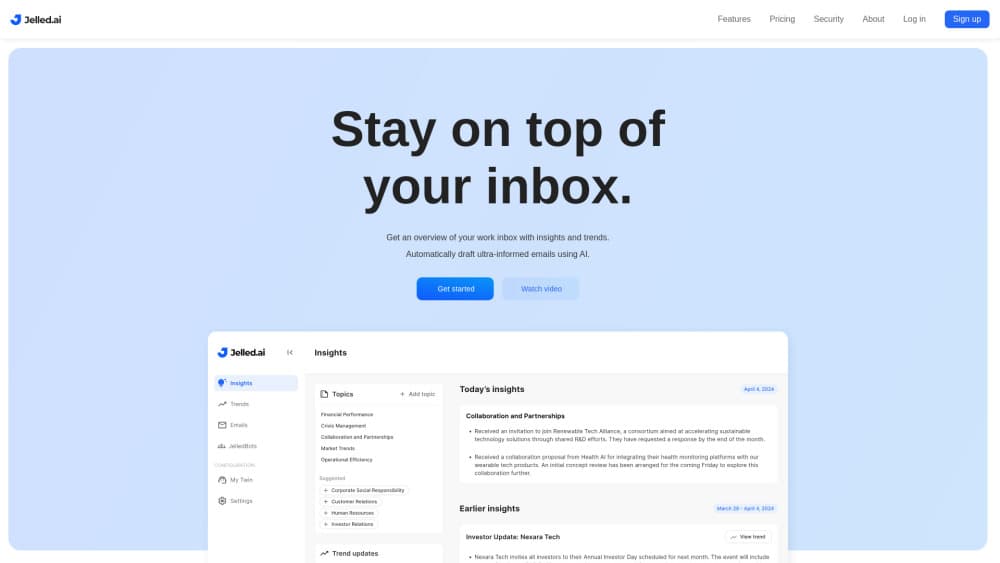
Jelled.ai is an AI email assistant that builds a digital twin from your Gmail and Slack history, labels what matters, filters noise, and drafts replies in your own voice.
About Jelled.ai
What Is Jelled.ai
Jelled.ai is an AI email assistant for people who spend their day inside an inbox. It connects to Gmail and Slack, reads the history stored there, and builds a digital twin: a working model of how you write, who you answer first, and which threads carry real decisions.
The approach differs from rule based filters. You don't maintain a stack of conditions. Jelled reads message content, assigns email labels by topic, moves low value mail out of the way, and writes draft replies that follow your past phrasing. The same archive feeds a feature the company calls Continuity, a searchable record of project context that survives staff changes.
The cost is access. The twin only gets useful when you hand over your mail and chat history, and a shallow data pool produces a vague copy of you. Jelled.ai was acquired by Inflection AI in November 2024, so confirm the current roadmap before you rebuild a team workflow around it.
Getting Started
- Sign up at jelled.ai and start the Personal plan trial.
- Connect the Google account and the Slack workspace you use for work.
- Define the work topics you care about, because each topic becomes one of your email labels in Gmail.
- Read the first suggested drafts and correct them, since the twin picks up your voice from those edits.
Product Information
A quick look at Jelled.ai's pricing, supported platforms, and performance.
Best for
The users, tasks, and scenarios where this tool fits best.
Users
- Founders and executives
- Sales and account managers
- Consultants and freelancers
Tasks
- Clearing a backlog after time off
- Drafting routine replies
- Spotting shifts in client feedback
- Handing over a project
Scenarios
- A Monday inbox with 200 unread messages
- Returning from a two week trip
- A small team with no operations hire
Key features
Digital Twin Built From Your History
The twin is the core of the product. It reads past messages, learns your tone, your greeting habits, and how much detail you give different people. Every draft and every priority call comes from that model, which is why the first week feels rough and the fourth week feels closer to your own writing.
Email Labels by Topic
You define work topics such as a client name, a product line, or a hiring pipeline. Jelled matches incoming mail to those topics and applies matching email labels inside Gmail, so the inbox view reflects projects rather than senders. Labels stay useful without manual dragging.
Noise Filtering for Low Value Mail
Newsletters, automated alerts, and cc heavy threads get detected and moved out of the main view. The filter reads content instead of relying on sender lists, so a new vendor blast gets caught the first time. You still see everything in Gmail, just not in the priority stream.
AI Email Drafting in Your Voice
The assistant writes replies using full thread context, not just the last message. Drafts arrive ready for a quick edit, which suits short confirmations and status notes. Anything sensitive still needs your own pass, and the tool doesn't hide that.
Slack Integration and Cross Channel Digest
Slack integration pulls channel and direct message context into the same twin. A question asked in chat and a follow up sent by mail land in one summary, ranked by urgency. Teams that live in both tools get more from this than email only users.
Trend Detection and Continuity Archive
Trend detection looks for repeating themes across conversations, such as a feature request that keeps returning or a delivery delay that affects several accounts. Continuity stores the underlying history so you can search old decisions later. Both features depend on long, connected data, which is the honest reason the trial asks for full access.
Pros and cons
Pros
- Drafts reflect your own phrasing instead of generic assistant tone, which cuts editing time on routine mail.
- Topic based email labels remove the upkeep that kills most rule based inbox management setups.
- Slack integration puts chat and mail in one priority list, useful for roles that switch between both all day.
- Continuity gives institutional memory a searchable home, a real benefit for client work and team handovers.
- The 30 day Personal trial needs no credit card, so you can judge the drafts on your own inbox.
Cons
- Full inbox and chat access is a hard requirement, and that is a serious ask for regulated industries.
- At $30 per month for one person, the math only works if you handle a heavy message load.
- The twin starts weak and improves slowly, so a short trial may end before you see the real value.
- Inflection AI acquired the company in November 2024, and product direction after an acquisition can shift without much notice.
Frequently asked questions
It reads your Gmail and Slack history, builds a model of your communication style, then labels mail by topic, hides low priority messages, and drafts replies for you to review.
Related content
Explore related tools, skills, and articles for Jelled.ai.
Jelled.ai Alternatives

Tractionwave
TractionWave · Image · MarketingTractionWave is an AI attention heatmap tool for static ads. Upload a PNG or JPG and it returns predicted attention, ranked hotspots, and fixes before you spend budget.

OpenSEO - AI Visibility
EveryApp · Coding · Marketing · BusinessOpenSEO is an open source SEO platform for keyword research, backlinks, rank tracking, site audits, and AI visibility, with usage-based pricing and MCP access for AI agents.

Plugins Radar
Plugins Radar · Marketing · BusinessPlugins Radar tracks where your ChatGPT plugin ranks in directory and in-chat search, which competitors outrank it and what changed, with hourly checks on 9,885 listings.