

Jimini
Jimini AI · Productivity · AI Assistant
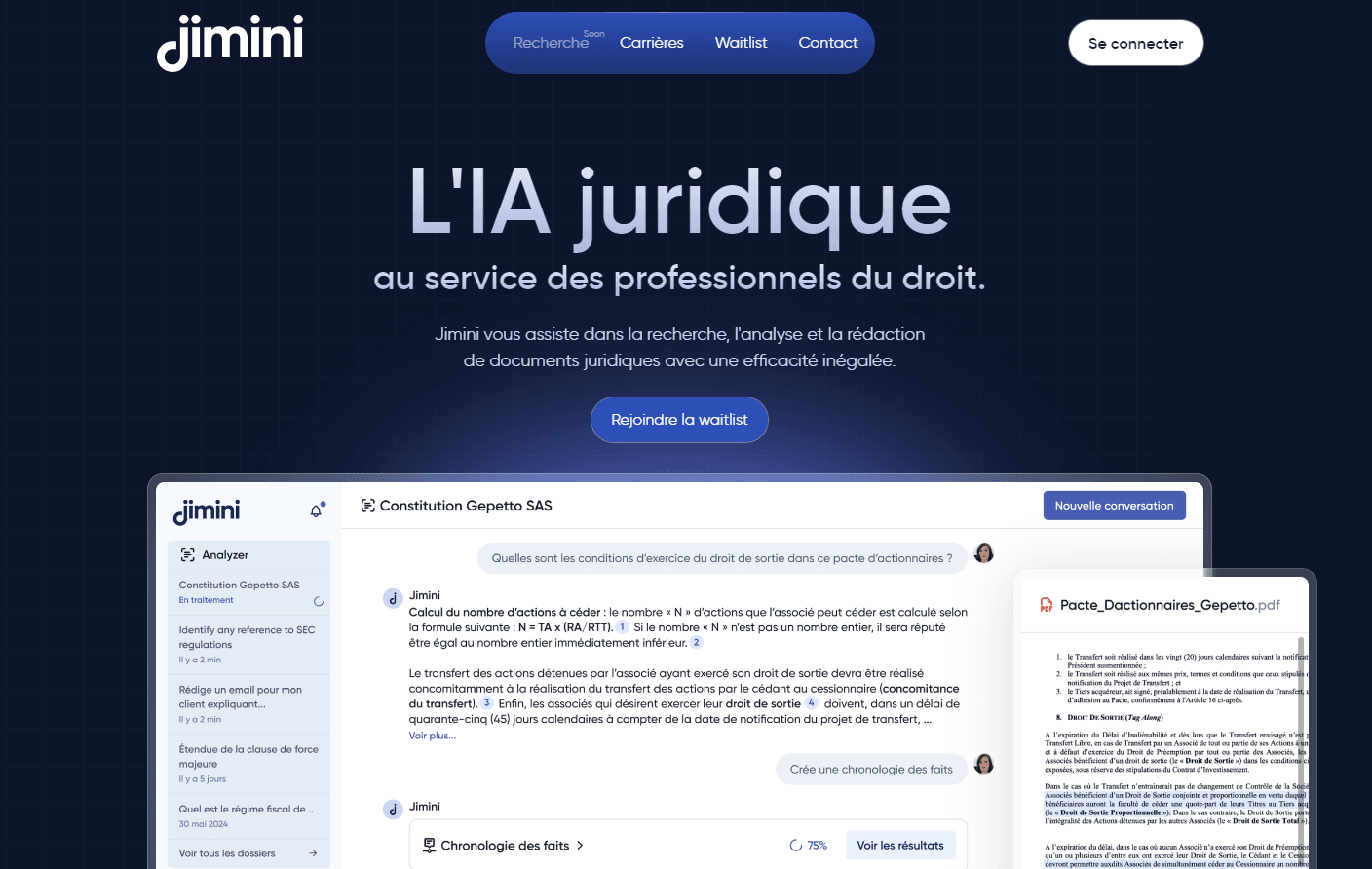
Jimini is a legal AI assistant that helps lawyers and in-house counsel analyse documents, draft contracts, and run sourced legal research from one platform.
About Jimini
What Is Jimini
Jimini is an AI assistant built for legal work, and it comes from a Paris-based team that started the company in 2023. The product covers the three things lawyers do most: reading and analysing files, writing and editing documents, and researching law with citations that can be checked. It sits on top of several large language models rather than one, and it picks between them depending on the task.
What separates it from a general chatbot, and from most legal AI software, is the work wrapped around the models. Jimini connects to your own document base, pulls answers from statutes, codes, and case law, and runs over 200 prebuilt workflows that legal experts on the team designed. The pitch is speed on routine matters: contract review, case-file summaries, and first drafts.
The trade-offs are worth knowing up front. Jimini is built for civil law systems, so common-law lawyers in the US or UK won't get the same source coverage. Pricing isn't published, so you have to talk to sales. And the free access is a two-week trial, not an ongoing free tier.
Getting Started
- Sign up at jimini.ai and start the two-week trial.
- Upload a document, or connect your firm's document base so Jimini can search it.
- Pick a tool: the Legal Agent for analysis and drafting, or a workflow such as analysing a case file or a mail merge.
- Review the answer with its cited sources, then export or edit the draft inside Word or Outlook.
- Add teammates and share approved prompts so the whole firm works from the same playbook.
Product Information
A quick look at Jimini's pricing, supported platforms, and performance.
Best for
The users, tasks, and scenarios where this tool fits best.
Users
- Lawyers at small and mid-size firms
- In-house counsel
- Legal teams of ten or more
Tasks
- Contract review
- Legal research AI
- First drafts and summaries
Scenarios
- Clearing a backlog of case files
- Drafting in Word or Outlook
- Handling confidential client files
Key features
Multi-model legal research
Jimini doesn't lock you to one AI model. It selects and combines several of the market's models for each task, then layers legal reasoning and source management on top. For a lawyer, the effect is answers tied to statutes, codes, and case law rather than a confident guess.
Document analysis at scale
The Analysis Grid reads hundreds of files and returns the fields you ask for, with ready-made templates sorted by practice area and your own grids built from scratch. It also handles scans, so a photographed exhibit works as well as a clean PDF. Results export to Excel or Word.
Agentic workflows
More than 200 workflows run in one click. Instead of writing a prompt, you press a button and the system chains the steps it needs. It calls the right tools and sources until the result is ready. Each one was designed and tested by the company's own legal team.
Drafting inside Word and Outlook
The Microsoft add-ins put Jimini where the work happens. You can strengthen a clause, rephrase a paragraph, or run research without switching to another tab, and Outlook turns your inbox into a place where drafts get answered. The extensions are included in the subscription.
Anonymisation and translation
Jimini removes sensitive details from a document before you share it, and it translates text, files, and scans into more than 30 languages. One option is a two-column layout that keeps the original beside the translation. Both features matter for cross-border matters.
Privacy and French hosting
The platform is hosted entirely in France, is ISO 27001 certified, and follows GDPR rules designed for professional secrecy. Data is encrypted at rest and in transit, and the company states that customer data is never used to train its models.
Pros and cons
Pros
- Sourced answers with verifiable citations cut the time spent double-checking research.
- The Microsoft add-ins keep drafting and analysis inside Word and Outlook, so there's no new tool to learn.
- Handles any format, from Word contracts to scanned PDFs, including exhibits.
- Over 200 prebuilt workflows cover recurring tasks without prompt writing.
- Strong confidentiality stack: French hosting, ISO 27001, and no training on customer data.
Cons
- Pricing isn't public, so you can't estimate cost without contacting sales.
- There's no free plan, only a two-week trial, which is short for a firm-wide decision.
- The source coverage targets civil law systems, so common-law practitioners get less value.
- No published API, which limits firms that want to embed Jimini in their own systems.
Frequently asked questions
Jimini helps with three kinds of legal work: analysing documents, writing and editing text, and researching law with sourced answers. It runs as a web app and as add-ins for Word and Outlook.
Related content
Explore related tools, skills, and articles for Jimini.
Jimini Alternatives

Swms
Swms AI · Writing · Productivity · BusinessSwms is an AI safety compliance tool that turns a plain description of a job into ready-to-use safety documents. Describe your project, trade, and known hazards, and it writes a safe work method statement, job hazard analysis, safe work procedure, RAMS, or safety data sheet in seconds. It also ships with Oscar, a chat assistant that answers workplace safety questions in any language. Teams in construction, mining, transport, and warehousing use it to cut the paperwork that usually eats into a workday.

Wordly AI Translation
Wordly · Voice & Language · ProductivityWordly AI Translation is a real-time AI translation and captioning platform built for meetings, conferences, and events. It delivers live translation, captions, transcripts, and summaries in more than 60 languages, and attendees join by scanning a QR code or opening a link instead of using dedicated headsets. The platform works with Zoom, Microsoft Teams, Google Meet, and Webex, and it's designed for organizations that want multilingual access without hiring human interpreters for every session. Simple as that.

Rows
Rows (Superhuman) · Productivity · BusinessRows is an AI spreadsheet and data analysis tool that imports live data from more than 50 sources, then lets you work with it using plain language instead of SQL queries or nested formulas. You can pull numbers out of PDFs, connect ad platforms, databases, and bank accounts, and ask the AI to build reports, merge datasets, or set up models that recalculate themselves. It runs in the browser, works like a spreadsheet, and now sits under the Superhuman umbrella.