

Jumper
Witchcraft Software AB · Video · Coding
Jumper is a local AI video analysis and footage search tool for editors. It finds shots, spoken words, and people inside Premiere Pro, Resolve, FCP, and Avid, all on your machine.
About Jumper
What Is Jumper
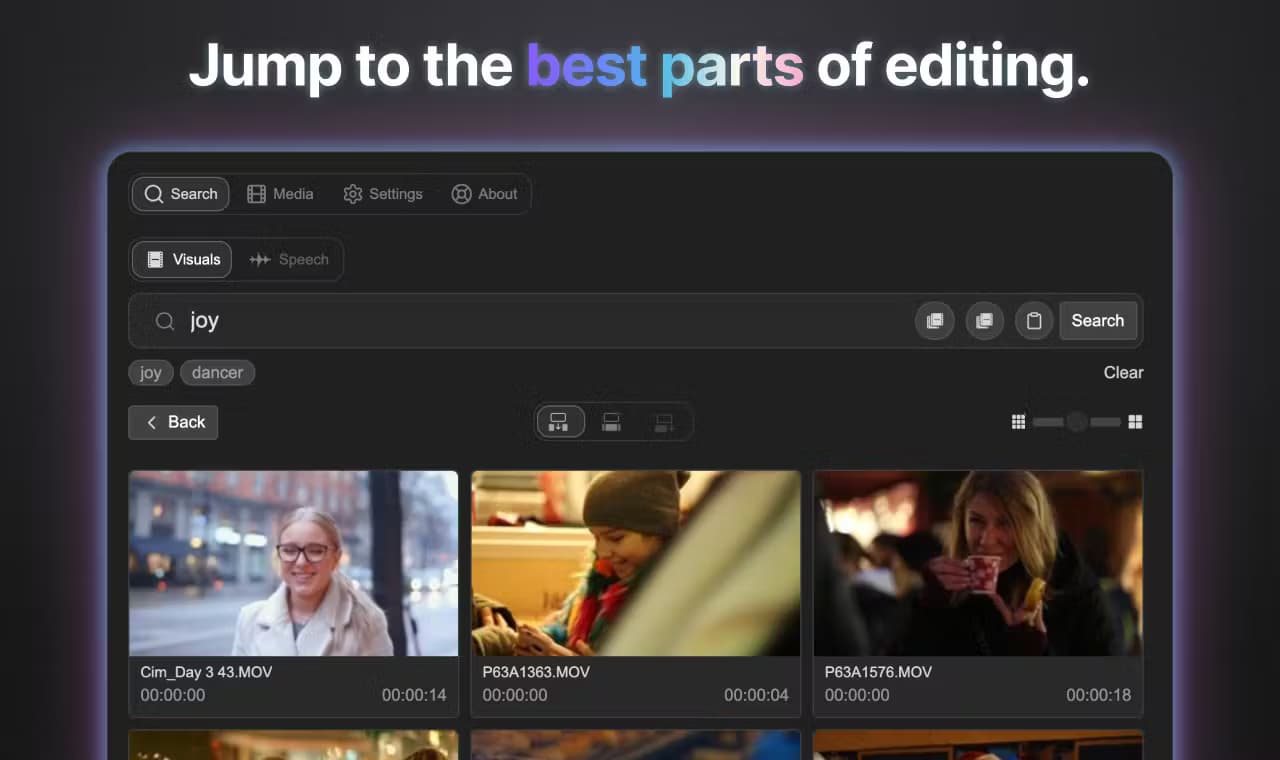
Jumper is a search engine for video footage that runs on your own computer. Instead of scrubbing through hours of clips, an editor types a plain description and Jumper returns the matching moments with their source in and out points. It works as a video editing assistant built into Adobe Premiere Pro, Final Cut Pro, DaVinci Resolve Studio, and Avid Media Composer, and as a standalone desktop app for macOS and Windows, available from getjumper.io.
The product was built by Witchcraft Software AB, a Swedish company founded in 2024. A working editor got tired of losing hours to manual logging, and together with two engineers released the first version in November 2024. Since then it has grown into a full editorial search platform, adding face recognition, speech search across 111 languages, and agentic editing that lets AI agents drive searches through a local MCP server.
The main limit is the hardware it needs. Visual analysis leans on the GPU, so an NVIDIA card on Windows or an Apple Silicon Mac gives the fastest results, and older machines drop to slower CPU processing. Jumper also asks for a license check once a week and downloads model files over the internet the first time, so a fully air-gapped setup takes extra steps. There's no mobile app and no browser version; this is desktop software for people who cut video for a living.
Getting Started
- Install the Jumper desktop app for macOS or Windows and connect it to your editing software through the built-in plugin.
- Point Jumper at the folders or drives holding your media, then start analysis. It indexes visuals, speech, faces, and technical metadata locally.
- Run your first search by typing a keyword or dropping in a reference frame, then review the returned clips with their precise start and end times.
- Refine results with Speech Search for exact lines or People search to pull every appearance of a face.
- Send any hit straight to your timeline, or export results as subclips and CSV from the standalone app.
Product Information
A quick look at Jumper's pricing, supported platforms, and performance.
Best for
The users, tasks, and scenarios where this tool fits best.
Users
- Documentary and unscripted editors
- Freelance video editors
- Studios and post houses
Tasks
- Finding b-roll by description
- Locating a spoken line
- Pulling every appearance of a person
Scenarios
- Cutting a documentary from a large archive
- Assembling a scene fast
- Handing work to an AI agent
Key features
Visual search without tags
Jumper indexes visual content as it analyzes, then matches natural-language descriptions and reference images to the right moments. You don't add tags by hand; the machine learning layer builds the index for you. Because it works from what's actually on screen, it surfaces shots you'd have missed if you searched only by filename.
Speech search across 111 languages
Jumper transcribes dialogue and lets you jump straight to a spoken word or phrase. It supports 111 languages, and when the same line appears on multiple audio channels it merges the transcripts and drops the duplicates, so search results stay clean on multi-mic recordings.
Face recognition and people search
Jumper detects and groups faces across your library, so you can reveal every shot a person appears in by typing their name or clicking their face. On a long interview or archive project, face recognition in video replaces the assistant whose whole job was logging who appeared where.
Cross-project and offline-drive search
Search All Analyzed Media goes beyond the open project. Jumper searches every file it has analyzed across projects and storage drives, and it even reaches media on disconnected drives, because the search data lives separately from the footage itself.
Summary analysis for long footage
Summary Analysis builds layered, navigable descriptions of long-form material. Editors get a quick overview before diving in, and AI agents can use the same summaries to decide which segments are worth a closer look.
Agentic editing through MCP
Jumper is agent-ready. A local MCP server lets compatible AI agents such as Claude Code and OpenAI Codex run searches, review footage, and help assemble deliverables. The agent works with your analyzed footage on your machine, and you stay in control of what it can reach.
Built-in Script Editor
The Script Editor turns transcripts into editable text alongside the footage. Editors can fix names, tighten quotes, or search a story by its words, then move straight from a script line back to the matching clip.
Standalone app and public API
The standalone app analyzes, searches, and exports results without opening an editing suite, with subclip and CSV export. A public API lets teams build their own local media-search tools on top of Jumper.
Pros and cons
Pros
- Local and offline: analysis runs on your own device and footage is never uploaded, which matters for confidential or client material.
- Deep NLE integration: it works inside Premiere Pro, Final Cut Pro, DaVinci Resolve Studio, and Avid, so you don't leave your editing software to search.
- Fast search on large libraries: the about page cites a test where roughly 100 hours of footage returned results in about 0.2 seconds on common machines.
- Wide language coverage: speech search handles 111 languages, which suits multilingual productions.
- One-time lifetime option: licenses can be bought outright, so teams that don't like subscriptions have a path that includes a year of updates.
Cons
- Desktop only: there's no mobile app or browser version, so workflows depend on a Mac or Windows machine.
- Hardware matters: visual analysis is much faster with an NVIDIA GPU or Apple Silicon, and CPU-only machines fall well behind.
- Weekly license check: paid licenses re-validate online once a week, so a machine kept fully offline needs planning.
- Curriculum-limited trial: the free trial lets you analyze unlimited media but caps searches at 40, which is enough to test the idea and no more.
- Shared analysis needs Pro: any workstation reading analysis created on another machine must hold a Pro tier license, which raises the cost for multi-seat teams.
Frequently asked questions
Jumper searches video footage by visual content, spoken dialogue, and people. Editors use it to find a specific shot, line, or appearance across hours of material without logging clips by hand. It runs as a plugin for major editing software and as a standalone app.
Related content
Explore related tools, skills, and articles for Jumper.
Jumper Alternatives

ngram 2.0
ngram · Video · Marketingngram 2.0 is an AI video generator for teams. It turns a prompt, a screen recording, or a product URL into a narrated explainer, product demo, or AI avatar video, and every scene stays editable.

OpenScreen 2
OpenScreen (open-source project) · Video · ProductivityOpenScreen 2 is a free, open-source screen recorder and demo video editor for Windows, macOS, and Linux, with automatic zooms, styled frames, local captions, and agent edits.

Skreno
Skreno · Video · ProductivitySkreno is a browser screen recorder that captures a tab, a window or your whole display, then attaches AI transcripts, summaries and console logs to one share link.