
Tech Jobs
Hairun Huang · Coding
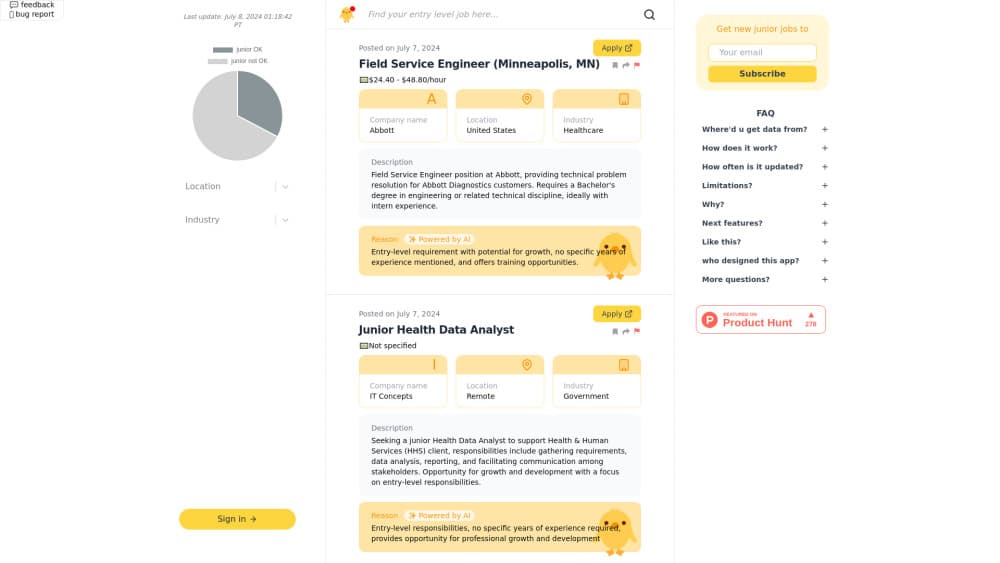
Tech Jobs is the directory name for Junior OK, a free tech job board that collects junior friendly developer and design roles and uses AI to flag the ones that truly need no professional experience.
About Tech Jobs
What Is Tech Jobs
Tech Jobs is how the Junior OK job board appears in this directory. Junior OK is a web based job aggregator built for people chasing a first role in tech: computer science graduates, career switchers, and self taught developers who keep opening postings that ask for three years of experience.
Hairun Huang launched it in July 2024, after graduating with a CS diploma and watching classmates struggle to land interviews. The pitch was narrow on purpose. Instead of another huge tech job board, Junior OK lists only roles it can defend as entry level.
The catch: this is an aggregator, not an employer. Every listing points back to the original posting, so applications, salary details, and reply times depend on the source board. The juniorok.io domain also stopped serving the job board by October 2026, which makes the product described here a record of what launched rather than a live service.
Getting Started
- Open the Junior OK site and scan the feed of junior developer jobs and design roles.
- Read the short note under each listing that explains why the role counts as entry level.
- Open the original posting and check requirements, location, and pay before you apply.
- Apply on the source board and keep a record of where you sent each application.
Product Information
A quick look at Tech Jobs's pricing, supported platforms, and performance.
Best for
The users, tasks, and scenarios where this tool fits best.
Users
- New computer science graduates
- Career switchers
- Design students
Tasks
- Building a first shortlist
- Checking if a role is really entry level
- Finding entry-level tech jobs beyond the big hiring platforms
- Tracking entry level software jobs across two tracks
Scenarios
- Job hunting right after graduation
- Moving into tech from another field
- Mentoring students or friends
Key features
Junior-only feed
Everything in the main list is meant for people with little or no professional experience. Postings that clearly ask for senior level ownership get dropped before publication. That single rule is the reason the site exists.
AI screening with reasons
A model reviews each posting and decides whether the requirements fit an entry level candidate. It also writes a short justification, so you can judge the call yourself instead of trusting a label.
Automatic collection from several boards
An automation flow scans multiple job sources on a schedule and pulls in new postings. The list stays fresher than a hand curated page, and coverage reaches past a single company career site.
Senior listing filter
Before anything reaches the AI step, code strips postings that announce seniority in the title or the requirements. Noise gets cut early, which matters when the raw feed is mostly mid level roles.
Developer and design coverage
Software engineering roles and design roles sit side by side. Product teams hire both at junior level, and applicants with hybrid skills get one place to look.
Links straight to the source
Each card sends you to the original posting on the board that published it. You apply where the employer expects, and the site never sits between you and the recruiter.
Pros and cons
Pros
- Free for job seekers, with no paid tier and no account wall in the documented flow.
- The AI note explains each entry level call, which beats a bare junior tag.
- Senior roles get filtered early, so the feed stays short enough to read every day.
- Aggregation brings in postings from smaller boards you probably wouldn't check yourself.
- Design and development share one feed, which suits small teams and hybrid applicants.
Cons
- The juniorok.io domain stopped serving the board by October 2026, so old links no longer lead to listings.
- Because it aggregates, salary formats, application steps, and response times vary by source board.
- AI screening is a filter, not a promise. Some approved postings still ask for a portfolio or an internship.
Frequently asked questions
Tech Jobs is the directory name for Junior OK, a free web job board that lists junior friendly roles in software development and design.
Related content
Explore related tools, skills, and articles for Tech Jobs.
Tech Jobs Alternatives
Forefront
Forefront · CodingForefront is a web platform for building with open-source AI. It lets you fine-tune leading open-source language models on your own data, evaluate how they perform, and run them through an API or export them to host yourself. Developers who want the convenience of a closed-source platform but insist on owning their models and data are the target audience here.

Startkit
StartKit.AI · CodingStartkit is a boilerplate for building AI SaaS and AI wrapper products. Think of it as an AI startup boilerplate with the boring parts already wired up: authentication, Stripe and Lemon Squeezy payments, usage limits, transactional email, and an AI API starter that talks to OpenAI, Anthropic, Groq, or Llama. You clone the repo, set your price, and start on the part of your product that people actually pay for. It's Next.js under React and Tailwind, so most of the boilerplate code already feels familiar.
Testim
Tricentis · CodingTestim is an AI-powered test automation platform for building and running end-to-end tests across web, mobile, and Salesforce applications. It leans on machine learning to keep tests stable when an interface changes, so teams spend less time fixing broken selectors. Not bad for an automated testing tool you can start using today. You create tests by recording actions in a browser, then optionally add JavaScript when you need more control. It's a solid pick for busy QA teams.