

Just Gpt It
Just GPT It · Leaning
Need a simple way to learn ChatGPT? Just GPT It builds a shareable example link so beginners can see how to ask questions, then send it to friends.
About Just Gpt It
What Is Just GPT It
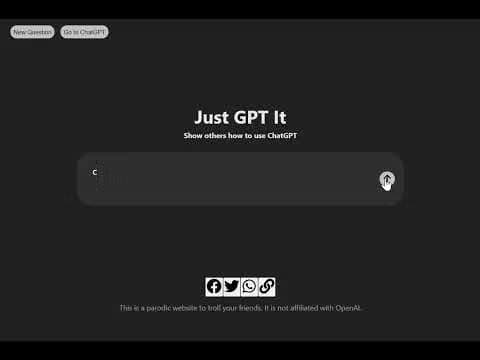
Just GPT It works as a small teaching tool for people who still freeze up when a chatbot asks them something. The idea is simple. You type a question on the site, it builds a ready-made ChatGPT conversation link, and you pass that link to a friend who's never touched an AI assistant before. Instead of explaining "just type what you want" for the tenth time, you show them.
The project describes itself, plainly, as a parodic website built to troll your friends. That honesty matters. It isn't a ChatGPT clone, and it doesn't pretend to answer anything on its own. Every result routes back to the real ChatGPT, so learners end up practicing on the actual product rather than a stand-in.
So who does it actually help? Anyone who's been handed a login and told to "figure it out." The catch is scope. There's no account system, no saved history, and no lesson plan that tracks progress. Each visit starts fresh, which keeps it dead simple but also means it won't work as a structured course. It's a nudge, not a curriculum.
Getting Started
- Open justgptit.com in any browser. Nothing to install and no sign-up to sit through.
- Type the question you want your friend to see, or pick one of the built-in examples if you'd rather not write your own.
- Hit send and wait a moment while the site assembles the example conversation.
- Copy the share link, or push it straight out through Facebook, Twitter, or WhatsApp.
- Send it to your friend and watch them ask ChatGPT their first real question.
Product Information
A quick look at Just Gpt It's pricing, supported platforms, and performance.
Best for
The users, tasks, and scenarios where this tool fits best.
Users
- Beginners who've never used ChatGPT
- Teachers and workshop hosts
- Friends who keep asking "how do you even use this thing"
Tasks
- Demonstrating a good AI question
- Sharing a prompt example on social media
- Warming someone up before their first ChatGPT session
Scenarios
- Explaining AI to a relative over a holiday dinner
- Running a classroom demo with limited prep time
- Answering "what's the point of ChatGPT" in a group chat
Key features
Shareable Question Links
The core move is turning a typed question into a share ChatGPT link that anyone can open. You write the prompt, the site wraps it into a ChatGPT request, and the recipient lands in a live conversation with that question already asked. It's the fastest way to move someone from curious to actually typing.
Built-In Share Buttons
Copying a link is fine, but the site also wires up one-click sharing to Facebook, Twitter, and WhatsApp. A shared prompt plus a one-tap link is what makes the tool spread. For anyone teaching a group or posting to a feed, that cuts a step. The link is the whole product, so making it easy to spread is the point.
Example Prompts for Copying
If you can't think of a question worth showing off, the site offers AI prompt examples built around common beginner doubts. They cover the kind of everyday asks people actually search for, like summarizing text or drafting an email. A working example often teaches faster than an abstract explanation.
Animated Walkthrough
There's an animated mode that plays through a sample exchange at a readable pace, so a newcomer can watch a question and answer unfold before trying it themselves. It's aimed at people who learn better by seeing than by reading instructions, and it gives teachers something to play during a demo.
No-Signup Landing Experience
You don't make an account to use the tool, and there's no dashboard to learn. Open the page, type, share. The whole thing is designed for a five-second interaction, which is why it also won't retain anything between visits.
Clear Scope Disclosure
The footer states outright that the site is a parody and isn't affiliated with OpenAI. That transparency sets expectations. Users know they're getting a shortcut to the real product, not a competing assistant, and nobody's left wondering why it can't answer questions on its own.
Pros and cons
Pros
- Free to use with no account, so there's zero friction for a one-off demo.
- Routes learners to the real ChatGPT instead of a stripped-down imitation.
- One-click sharing to Facebook, Twitter, and WhatsApp makes spreading an example fast.
- Example prompts give hesitant beginners a starting point when they can't think of a question.
Cons
- No saved history or progress tracking, so it can't serve as a structured course.
- The recipient still needs their own ChatGPT account to keep the conversation going.
- Everything routes to ChatGPT, so it's useless for teaching other AI assistants.
- It's a parody project, which means no support channel if something breaks.
Frequently asked questions
It's a teaching tool for ChatGPT beginners who want to learn ChatGPT fast. You type a question, the site builds a shareable conversation link, and you send it to someone who wants to see how to use ChatGPT in practice. It's meant to demo, not to replace ChatGPT itself.
Related content
Explore related tools, skills, and articles for Just Gpt It.
Just Gpt It Alternatives
Coddy
Coddy · Coding · LeaningCoddy is a gamified platform to learn to code through short interactive lessons in 20+ languages, with a browser editor, an AI tutor and free certificates.

Marv
Cameron (independent developer) · Coding · Productivity · LeaningMarv is an AI cursor companion for Windows and Mac. It sees your screen, answers out loud, and draws arrows and highlights that show you the next click.

Teachoo
iAsk AI · Leaning · ChatbotTeachoo is a free AI homework helper that walks students through math, science, writing and coding problems one step at a time, with photo input, hints and flashcards.