

Kommodo Screen Recorder
Kommodo · Video · Productivity
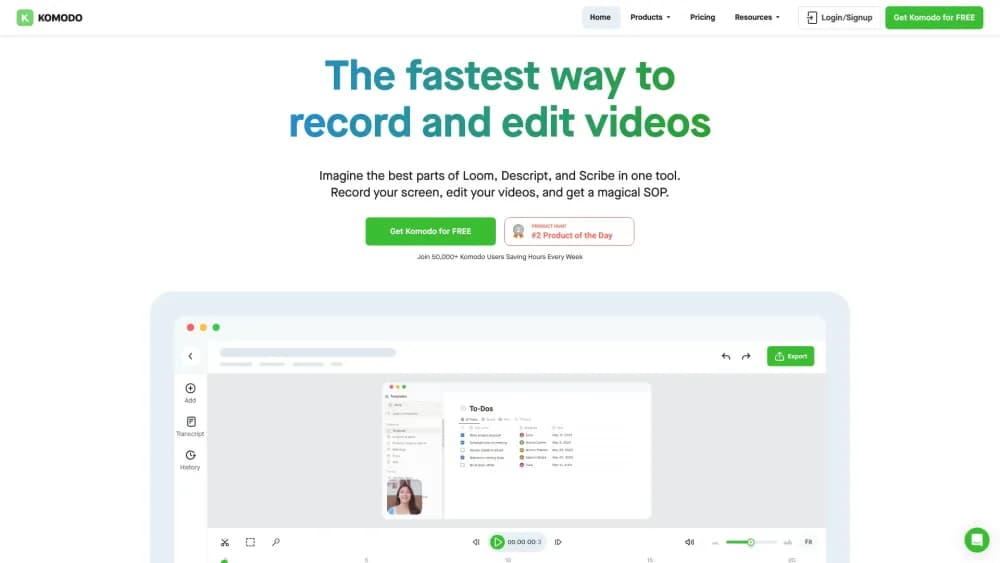
Kommodo is an AI screen recorder that turns recordings into videos, transcripts, and written guides. It runs in the browser and on desktop, with free unlimited recording and AI tools on paid tiers.
About Kommodo Screen Recorder
What Is Kommodo
Kommodo is a screen recorder that adds an AI layer on top of the recording. You capture your screen, and the tool writes a transcript, pulls out a summary, and can turn the footage into a written guide or standard operating procedure. In practice it doubles as an SOP generator: the idea is that a recording stops being a file you have to rewatch and becomes something searchable and readable.
It targets teams that produce a lot of walkthroughs: onboarding sessions, product demos, sales calls, internal training. Instead of recording in one app and writing documentation in another, Kommodo keeps both in the same workspace. Recordings, pages, and guides live together, and an AI assistant can answer questions across everything you have recorded.
Two boundaries are worth knowing up front. Recordings on the free Starter plan stay available for 60 days, so long-lived archives need a paid plan. And the AI features that do the real work, like transcription, summaries, and guide generation, are part of the paid tiers rather than the free one.
Getting Started
- Create an account at kommodo.ai. You can start recording without a credit card, and the browser extension or desktop app handles capture on Windows and Mac.
- Record your screen. Kommodo tracks clicks, keystrokes, and navigation steps automatically, so an edit session can reorder those steps afterward instead of you scripting them.
- Let the AI process the recording. It produces a transcript, a summary, and action items, and it can draft a guide from the steps it captured.
- Edit or reorganize. The browser-based editor covers trimming, cuts, and version history, so you can fix a section without redoing the whole take.
- Share or publish. Send a link, embed the recording, or publish it as a branded page with your own subdomain and logo.
Product Information
A quick look at Kommodo Screen Recorder's pricing, supported platforms, and performance.
Best for
The users, tasks, and scenarios where this tool fits best.
Users
- Customer success and support teams
- Sales teams
- Trainers and educators
- Product and engineering teams
Tasks
- Turning a screen recording into a written SOP
- Summarizing meetings
- Searching past recordings
- Producing a polished demo video
Scenarios
- Documenting a repeated process once
- Keeping a team knowledge base current
- Sourcing answers from existing recordings
Key features
AI Transcription and Summaries
Every recording comes back with a transcript and a summary. That turns a video into text you can scan and copy, and it feeds everything else the tool does, from the assistant to the generated guides. For teams that record often, the transcript is what makes an old recording findable again.
Automatic SOP and Guide Generation
Kommodo captures the steps you take while recording and can turn them into a written guide or standard operating procedure. Because it tracks clicks and navigation, the draft already has the sequence in order, and you rearrange or trim it in the editor. This is the feature that separates it from a plain screen recorder.
AI Assistant Over Your Library
The assistant answers questions using your recordings as the source, and it points to the moment the answer came from. You ask in plain language and get a response with a link back into the footage, which matters when you have hundreds of clips and remember the topic but not the title.
AI Meeting Recorder and Notetaker
Kommodo syncs with Google Calendar, records meetings on schedule, and generates meeting summaries, weekly recaps, insights, and action items afterward. Those outputs can be sent to Slack or Jira. It folds meeting capture into the same library as your other recordings rather than keeping them in a separate notetaker.
Browser-Based Video Editor
The editor runs in the browser and covers the basics you usually need after a take: trimming, cutting, and adjusting a section. Version control lets you undo changes, and you can export the result. It is meant to fix a recording without sending you into a separate editing suite.
Custom Branding and Landing Pages
Paid plans let you control the viewing experience with your own subdomain, logo, and colors. Recording pages support full markdown, images, text, and embedded elements like tweets or lead forms. For customer-facing walkthroughs, a branded page reads as a finished deliverable rather than a raw screen capture.
Public API
Kommodo offers a REST API that exposes your recordings, transcripts, and AI metadata over HTTP. You can list and filter recordings, pull the full AI envelope with chapters and action items, stream transcripts as WebVTT, and publish a recording as a page without opening the dashboard. It is aimed at teams that want to sync footage into a warehouse, a RAG pipeline, or an agent workflow.
Pros and cons
Pros
- Recording is free with no watermark and no time limit, so you can test the core capture before paying.
- The SOP and guide generation turns a screen recording into editable text, which saves the separate writing step.
- Recordings, guides, and meeting summaries share one workspace instead of splitting across a recorder and a notes app.
- The public API covers recordings, transcripts, and AI metadata, which suits teams building their own pipelines.
- Yearly billing drops the price from $15 to $9 per month.
Cons
- Free-plan recordings expire after 60 days, so anything you need long term requires a paid plan.
- The AI features that justify the product, like transcription, summaries, and guides, sit behind the paid tiers.
- Generated guides and summaries still need editing before they are accurate enough to share widely.
- The API is limited to Premium and Enterprise plans, so smaller teams can't automate until they upgrade.
Frequently asked questions
Kommodo records your screen and turns the result into usable material: a transcript, a summary, action items, and often a written guide. Teams use it for onboarding videos, product demos, sales calls, internal training, and documentation that would otherwise take hours to write by hand.
Related content
Explore related tools, skills, and articles for Kommodo Screen Recorder.
Kommodo Screen Recorder Alternatives

ngram 2.0
ngram · Video · Marketingngram 2.0 is an AI video generator for teams. It turns a prompt, a screen recording, or a product URL into a narrated explainer, product demo, or AI avatar video, and every scene stays editable.

OpenScreen 2
OpenScreen (open-source project) · Video · ProductivityOpenScreen 2 is a free, open-source screen recorder and demo video editor for Windows, macOS, and Linux, with automatic zooms, styled frames, local captions, and agent edits.

Skreno
Skreno · Video · ProductivitySkreno is a browser screen recorder that captures a tab, a window or your whole display, then attaches AI transcripts, summaries and console logs to one share link.