

Kotae
Tokyo Techies Corp. · Chatbot
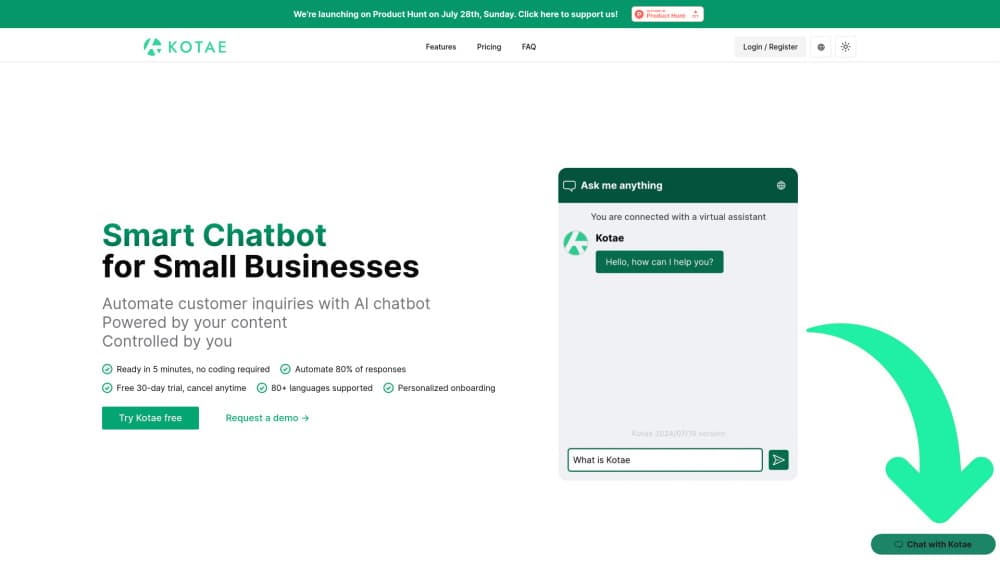
Kotae is an AI chatbot for small business teams that answers customer questions on your website, learns from your own pages and files, and passes hard cases to a human. Plans start at $19 per month.
About Kotae
What Is Kotae
Kotae is a customer support chatbot built by Tokyo Techies Corp. It lives in the corner of your website as a chat widget and answers visitor questions from material you supply: product pages, help articles, PDFs, and spreadsheets. There's nothing to install and no ticket queue to learn.
Most small operations don't have a support desk. One person answers messages between customers, and after closing time nobody replies at all. Kotae covers that gap. For a shop with no night shift, that's AI customer service at a flat monthly rate. The bot writes in your tone, replies in the languages you turn on, and keeps a full history of every conversation so you can read what people actually ask.
Limits are worth knowing before you sign up. Answers come only from the content you feed it, so thin sources produce thin replies. Every plan caps monthly answers, and escalated conversations still need someone on your side to pick them up.
Getting Started
- Open the 30-day trial at app.kotae.ai. No credit card needed.
- Add sources: paste your site URL, then upload files such as PDFs or Excel sheets.
- Set Kotae's role, personality, language, and reply style, then match the widget colors and placement to your brand.
- Test it with the questions you get every week. Fix weak answers, add the missing pages, run it again.
- Publish the widget on your site or connect it to Facebook Messenger.
Product Information
A quick look at Kotae's pricing, supported platforms, and performance.
Best for
The users, tasks, and scenarios where this tool fits best.
Users
- Owner-run shops and studios
- Small teams of two to ten
- Teams running several sites
Tasks
- Answering the same ten questions all day
- Capturing leads mid-conversation
- Covering nights and weekends
- Spotting patterns in inquiries
Scenarios
- Salons and clinics
- Hotel front desks
- Online stores
Key features
Training on Your Own Pages and Files
Kotae crawls the site you point it at and reads uploaded documents, including Excel and CSV files that trip up simpler bots. You can train it on several sites and keep adding sources later. The quality of the answer tracks the quality of the source material, so a clean help center pays off fast.
Response and Persona Control
Treat it as an AI support assistant you can brief. You decide how the bot introduces itself, how formal it sounds, and which languages it answers in. Replies can be edited, and you can rewrite the ones that miss. This matters for tone-sensitive businesses where a generic assistant voice would stand out.
Brand-Matched Widget
Colors, position, and greeting text follow your site rather than a fixed template. Visitors see a chat window that looks like part of the page. Basic customization ships on Starter; full customization needs Pro.
Escalations When the Bot Gets Stuck
When a conversation goes past what the sources cover, Kotae flags it and sends a notification. On Pro and above, you get alerted for each escalated conversation instead of finding it days later. The follow-up still happens in your own inbox or CRM, since Kotae doesn't replace a helpdesk.
Analytics on What Customers Ask
The dashboard groups inquiries by topic, which turns a pile of chats into a short list of recurring problems. Owners use it to rewrite pricing pages, add FAQ entries, or drop products that generate the same complaint every week.
Integrations, MCP, and API Access
MCP integration and API access let you wire Kotae into other tools and build custom workflows, and the Facebook Messenger chatbot channel reaches customers who never visit the site. Voice is available on the Pro + Voice plan for real-time spoken conversations.
Pros and cons
Pros
- Setup is short. A URL, a few files, and one test round get you a working bot, with no coding.
- Chatbot pricing stays low for the category, at $19 a month on Starter and $24.90 a month billed yearly on Pro.
- It reads spreadsheets, which many small businesses use as their real knowledge base.
- Escalation alerts on Pro mean stuck conversations reach a person the same day.
- MCP integration and API access leave room for custom workflows as the business grows.
Cons
- Answer caps are tight. Starter allows 1,000 answers a month, so a busy store will hit the ceiling and need Pro at $37.
- There's no free plan, only a 30-day trial. After that, the cheapest option is a paid subscription.
- Weak source documents produce weak answers. Budget time for cleaning up help pages before launch.
- Escalations notify you but don't hand off into a ticketing system, so someone still has to watch the inbox.
Frequently asked questions
It answers incoming customer questions on a website, mainly repeat questions about hours, pricing, shipping, bookings, and policies. It also logs those conversations so you can see what people ask most.
Related content
Explore related tools, skills, and articles for Kotae.
Kotae Alternatives

Knocket
Knocket (Tencent RTC team) · Productivity · Business · ChatbotKnocket is a free live chat and contact page tool that lets visitors message you from your website, app, or a shareable link, with every reply handled from Telegram or one inbox.
Agibot
Agibot · Productivity · AI Assistant · ChatbotAgibot is a personal AI agent for Mac that keeps running after you close the window, runs routines on a schedule, and works from Telegram or Slack with your own API keys.

Melete
Melete · Productivity · AI Assistant · ChatbotMelete is an AI workspace for teams where agents research, draft, and act in Slack, Notion, Linear, and GitHub. Shared memory and approval gates keep people in control.