

Labrynth AI
Labrynth · Productivity
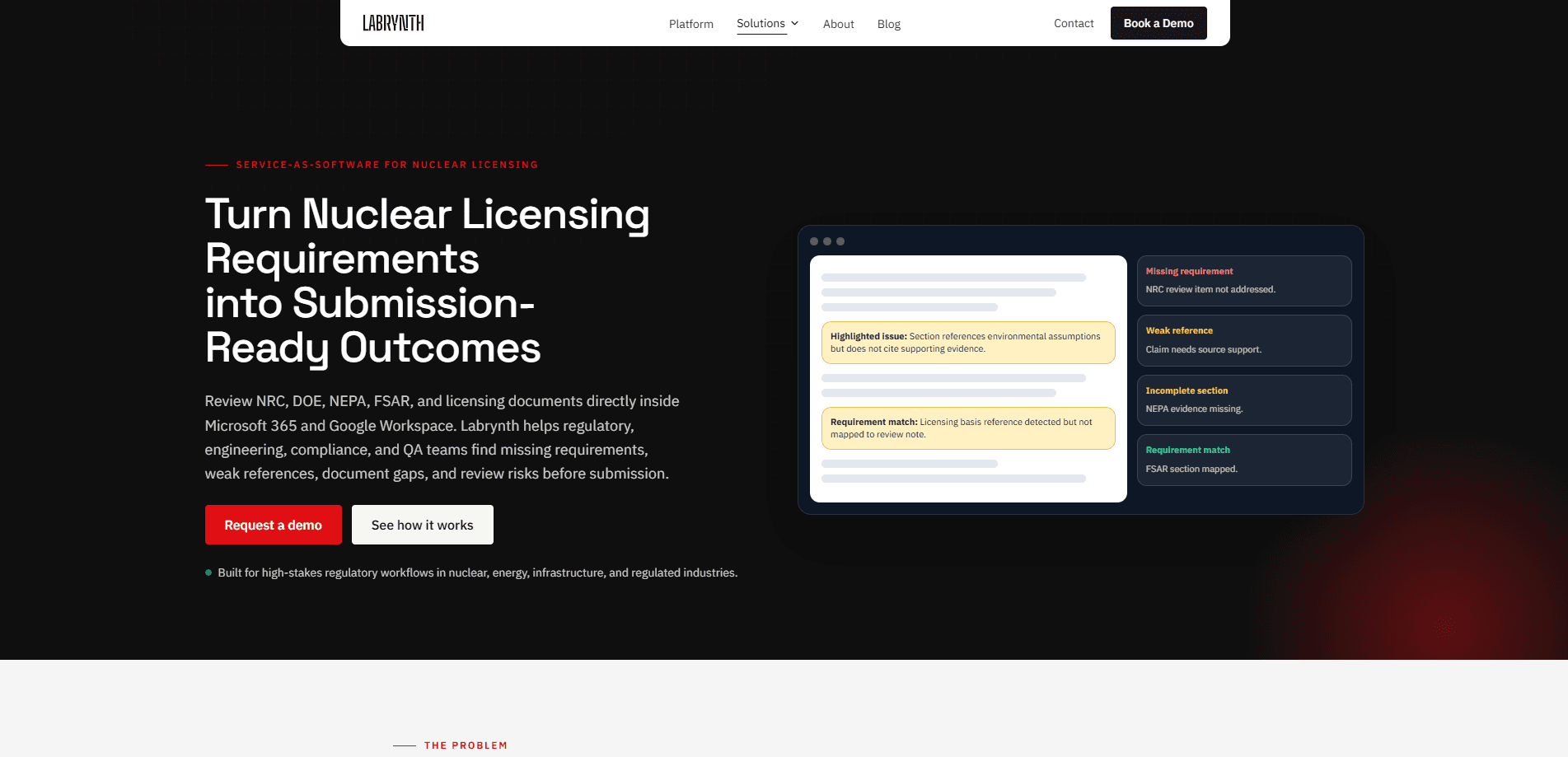
Labrynth AI is an outcome-based regulatory review platform that checks complex permitting, licensing, and compliance documents before submission. It runs inside Microsoft 365 and Google Workspace, so teams review NRC, DOE, NEPA, and FSAR materials without moving sensitive files into a public AI tool. The platform flags missing requirements, weak references, unsupported claims, and inconsistent terminology, then turns those findings into structured review notes.
About Labrynth AI
What Is Labrynth AI
Labrynth AI is a service-as-software review layer for high-stakes regulation. It sits inside the tools your team already drafts in, compares document sections against selected requirements, and highlights where evidence is missing or a citation doesn't hold up. It's built for regulated industries. Nuclear licensing is one of its named use cases, alongside energy, infrastructure, and construction.
So what's the catch? Labrynth AI is an enterprise product, not a self-serve tool. Pricing isn't published. There's no free tier, and you're expected to talk to sales before you get in. It also reviews documents rather than replacing the regulatory judgment behind a submission, so think of it as a faster first pass, not a sign-off.
Getting Started
- Talk to the Labrynth team through the demo request on the site and get your workspace provisioned.
- Connect the platform to your existing Microsoft 365 or Google Workspace environment so it can read the documents in place.
- Upload or point to the licensing, compliance, or safety document you want reviewed.
- Load the requirements set you're measuring against, such as NRC, DOE, NEPA, FSAR, or your internal criteria.
- Run the review, then work through the flagged gaps, weak references, and unsupported claims and export the structured review notes.
Product Information
A quick look at Labrynth AI's pricing, supported platforms, and performance.
Best for
The users, tasks, and scenarios where this tool fits best.
Users
- Regulatory affairs teams
- Nuclear and energy engineers
- QA and legal reviewers
Tasks
- Nuclear licensing document review
- NEPA and environmental review
- Terminology cleanup
Scenarios
- Late-stage submission prep
- Multi-team handoffs
- Rule change monitoring
Key features
Document validation inside your existing workspace
Labrynth works as a review layer for Microsoft 365 and Google Workspace rather than a standalone app. Your team keeps drafting in Word or Google Docs. The platform reads and flags passages right there. That matters. Nuclear and energy documents often can't leave a controlled environment, so keeping the review in place avoids a whole class of data-handling problems.
Requirement mapping across NRC, DOE, NEPA, and FSAR
You point the platform at the criteria you're being measured against, whether that's NRC guidance, DOE requirements, NEPA expectations, an FSAR, or internal standards. It maps document sections to those requirements. Then it shows where the coverage is thin. Instead of holding a dozen sources in your head, you get a section-by-section view of what's addressed and what isn't.
Gap and weak-reference detection
The core job is finding what's missing before a regulator does. Labrynth highlights missing or weak references, unsupported claims, and incomplete responses, and it points to the passage in question. Missing sections and soft citations are usually what triggers extra rounds of questions. Catching them early is where the time savings actually come from.
Structured review notes and exports
Findings don't stay as raw highlights. The platform turns them into structured review notes covering missing evidence, weak references, and unresolved issues, then lets you export a report. For teams with a sign-off process, that export is the artifact you attach to a review cycle. It keeps the trail intact for legal and QA.
Cross-document consistency checks
Long regulatory packages repeat the same facts in many places. They drift. Labrynth flags inconsistent terminology and claims across a document so a number or a defined term doesn't quietly contradict itself between sections. It's a small thing until a regulator asks why two sections disagree.
Built for regulated, high-stakes workflows
Nuclear licensing is one domain among several the platform targets, including energy, infrastructure, and construction. The design assumes controlled documents, multiple reviewers, and real consequences for a bad submission. That's a different world from generic compliance trackers that only watch application status and deadlines.
Pros and cons
Pros
- Runs inside Microsoft 365 and Google Workspace, so sensitive licensing documents don't have to move into a separate tool.
- Targets the specific failure modes of nuclear and energy submissions. Missing requirements. Weak references. Unsupported claims. Terminology drift.
- Outputs structured, exportable review notes that support a traceable sign-off process.
- Covers multiple regulatory domains, so the same platform can serve teams beyond a single licensing program.
Cons
- No public pricing and no free tier, so you can't evaluate cost without contacting sales, which slows down anyone trying to budget a trial.
- It's an enterprise product with no self-serve signup, meaning small teams or individuals can't just try it.
- The platform reviews documents but doesn't replace the regulatory judgment behind a filing, so it can't be treated as a final check.
- Because it depends on your Microsoft 365 or Google Workspace environment, teams outside those platforms aren't covered.
Frequently asked questions
It reviews regulatory, licensing, and compliance documents and flags problems before submission. Specifically, it finds missing requirements, weak references, unsupported claims, and inconsistent terminology. Then it produces structured review notes your team can act on.
Related content
Explore related tools, skills, and articles for Labrynth AI.
Labrynth AI Alternatives

Swms
Swms AI · Writing · Productivity · BusinessSwms is an AI safety compliance tool that turns a plain description of a job into ready-to-use safety documents. Describe your project, trade, and known hazards, and it writes a safe work method statement, job hazard analysis, safe work procedure, RAMS, or safety data sheet in seconds. It also ships with Oscar, a chat assistant that answers workplace safety questions in any language. Teams in construction, mining, transport, and warehousing use it to cut the paperwork that usually eats into a workday.

Wordly AI Translation
Wordly · Voice & Language · ProductivityWordly AI Translation is a real-time AI translation and captioning platform built for meetings, conferences, and events. It delivers live translation, captions, transcripts, and summaries in more than 60 languages, and attendees join by scanning a QR code or opening a link instead of using dedicated headsets. The platform works with Zoom, Microsoft Teams, Google Meet, and Webex, and it's designed for organizations that want multilingual access without hiring human interpreters for every session. Simple as that.

Rows
Rows (Superhuman) · Productivity · BusinessRows is an AI spreadsheet and data analysis tool that imports live data from more than 50 sources, then lets you work with it using plain language instead of SQL queries or nested formulas. You can pull numbers out of PDFs, connect ad platforms, databases, and bank accounts, and ask the AI to build reports, merge datasets, or set up models that recalculate themselves. It runs in the browser, works like a spreadsheet, and now sits under the Superhuman umbrella.