

Language Reactor
Dioco · Chatbot
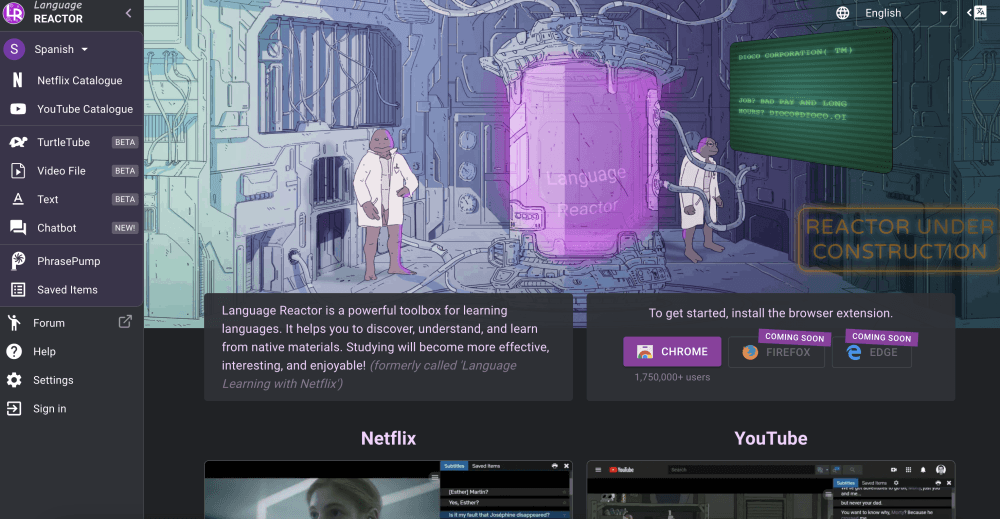
Language Reactor is a browser extension for learning languages from real content. It adds dual subtitles, a clickable dictionary, and playback controls to Netflix, YouTube, and imported pages.
About Language Reactor
What Is Language Reactor
Language Reactor is a toolbox for learning a language by watching and reading material made for native speakers. It started as a Chrome extension called Language Learning with Netflix, and the current name reflects a wider scope: today it works across Netflix, YouTube, podcasts, ebooks, and any web page you import. The developer is Dioco, and the extension has passed two million users on the Chrome Web Store.
The idea is simple. Instead of doing drills on sentences you'll never use, you study the shows and videos you already enjoy. The extension drops two subtitle tracks on screen, one in your target language and one in your native language, and lets you hover any word for an instant translation. You can pause on a single line, slow the audio down, or replay a phrase until it sticks.
The catch is pricing. The free version covers dual subtitles, the dictionary, and the playback controls, which is most of what a casual learner needs. Pro mode, a paid add-on, unlocks machine translation, saved vocabulary with flashcard export, and subtitles generated from dubbed audio tracks. Machine translation used to be free, and the developer now limits it, so heavy users are the ones most likely to feel the paywall.
Getting Started
- Install the Language Reactor extension from the Chrome Web Store, or use the web app at languagereactor.com on desktop.
- Open Netflix or YouTube and start a video. The extension lays out two subtitle tracks automatically.
- Hover over any word to see its meaning, or click it to save it for later review.
- Adjust playback speed, auto-pause, and subtitle position from the on-screen controls.
- Create a free account to keep your saved words in sync, then review them in PhrasePump or export them to Anki as flashcards.
Product Information
A quick look at Language Reactor's pricing, supported platforms, and performance.
Best for
The users, tasks, and scenarios where this tool fits best.
Users
- Intermediate learners
- Language students prepping for exams
- Casual viewers who want to pick up a language
Tasks
- Watching a show in your target language
- Looking up a word without leaving the video
- Building a personal vocabulary list
- Studying dubbed shows
Scenarios
- A nightly episode before bed
- A commute playlist
- Reading a novel or article
Key features
Dual Language Subtitles
Language Reactor shows two subtitle tracks at once, one in your target language and one in your native language. Seeing both lets you connect meaning to sound instead of guessing from context alone. You can move the tracks, resize them, or hide one when you want to challenge yourself and listen unaided.
Popup Dictionary with Lexa AI
Click any word in a subtitle and a panel appears with its translation, part of speech, and example sentences with audio. The Lexa AI dictionary goes further and explains how a word behaves in context, which helps with languages where a single term shifts meaning by grammar. The free helper answers basic questions, and Pro unlocks a more capable model.
Precise Playback Controls
You can slow the audio, pause on a single subtitle, and set the player to auto-pause after every line. Keyboard shortcuts and gestures handle rewind, forward, and repeat, so you rarely reach for the mouse. The controls matter most when a line comes too fast, since you can loop it until it's clear.
Saved Vocabulary with Smart Highlighting
Save a word once and Language Reactor recognizes its other forms, including plurals and verb conjugations, wherever they appear. This turns scattered lookups into a running list of what you actually struggle with. You can practice saved items in PhrasePump or send them to Anki as flashcards with screenshots and audio clips.
Netflix and YouTube Integration
The extension adds its layer directly onto the Netflix and YouTube players, so there's no separate app to learn. On Netflix it handles dubbed audio by generating subtitles from the speech track, a feature reserved for Pro. On YouTube it works across the site's channels and also adds a subtitle list view for jumping between lines.
Books, Websites, and Text to Speech
Outside video, you can import a web page or upload a book, and Language Reactor adds a machine translation in your language and reads the text aloud with text-to-speech. That extends the same study loop to articles and novels, where there's no subtitle track to lean on.
PhrasePump Listening Practice
PhrasePump is a listening exercise built from sentences you can mostly understand. It leans on words you've saved that are due for review and slips in new vocabulary at the edges. It's a way to move from passive watching to active recall without building your own drill list.
Pros and cons
Pros
- Works inside Netflix and YouTube, so you study the shows and videos you already want to watch.
- The free tier covers dual subtitles, the popup dictionary, and playback controls, which is enough for casual learning.
- Smart highlighting follows saved words across content and every grammatical form, so review coverage is wider than a plain word list.
- Vocabulary exports to Anki as flashcards with screenshots and audio, which fits an existing spaced repetition habit.
- Text-to-speech and import support extend the method to books and web articles, not just video.
Cons
- Machine translation and saved vocabulary sit behind Pro mode, so the most useful study tools cost money.
- Coverage depends on the platform supplying subtitles, and shows without them need the Pro speech recognition feature.
- It's desktop-first. The browser extension runs on Chrome for Windows and MacOS, and the phone and tablet experience is still being improved.
- The developer has no published API, so you can't plug its data into your own tools.
Frequently asked questions
Language Reactor is a browser extension that helps you learn languages with Netflix and YouTube, or by reading imported books and articles. It adds dual subtitles, a hover dictionary, and playback controls so you can study content made for native speakers.
Related content
Explore related tools, skills, and articles for Language Reactor.
Language Reactor Alternatives

Knocket
Knocket (Tencent RTC team) · Productivity · Business · ChatbotKnocket is a free live chat and contact page tool that lets visitors message you from your website, app, or a shareable link, with every reply handled from Telegram or one inbox.
Agibot
Agibot · Productivity · AI Assistant · ChatbotAgibot is a personal AI agent for Mac that keeps running after you close the window, runs routines on a schedule, and works from Telegram or Slack with your own API keys.

Melete
Melete · Productivity · AI Assistant · ChatbotMelete is an AI workspace for teams where agents research, draft, and act in Slack, Notion, Linear, and GitHub. Shared memory and approval gates keep people in control.