
Lappka
Lappka · Image · Marketing
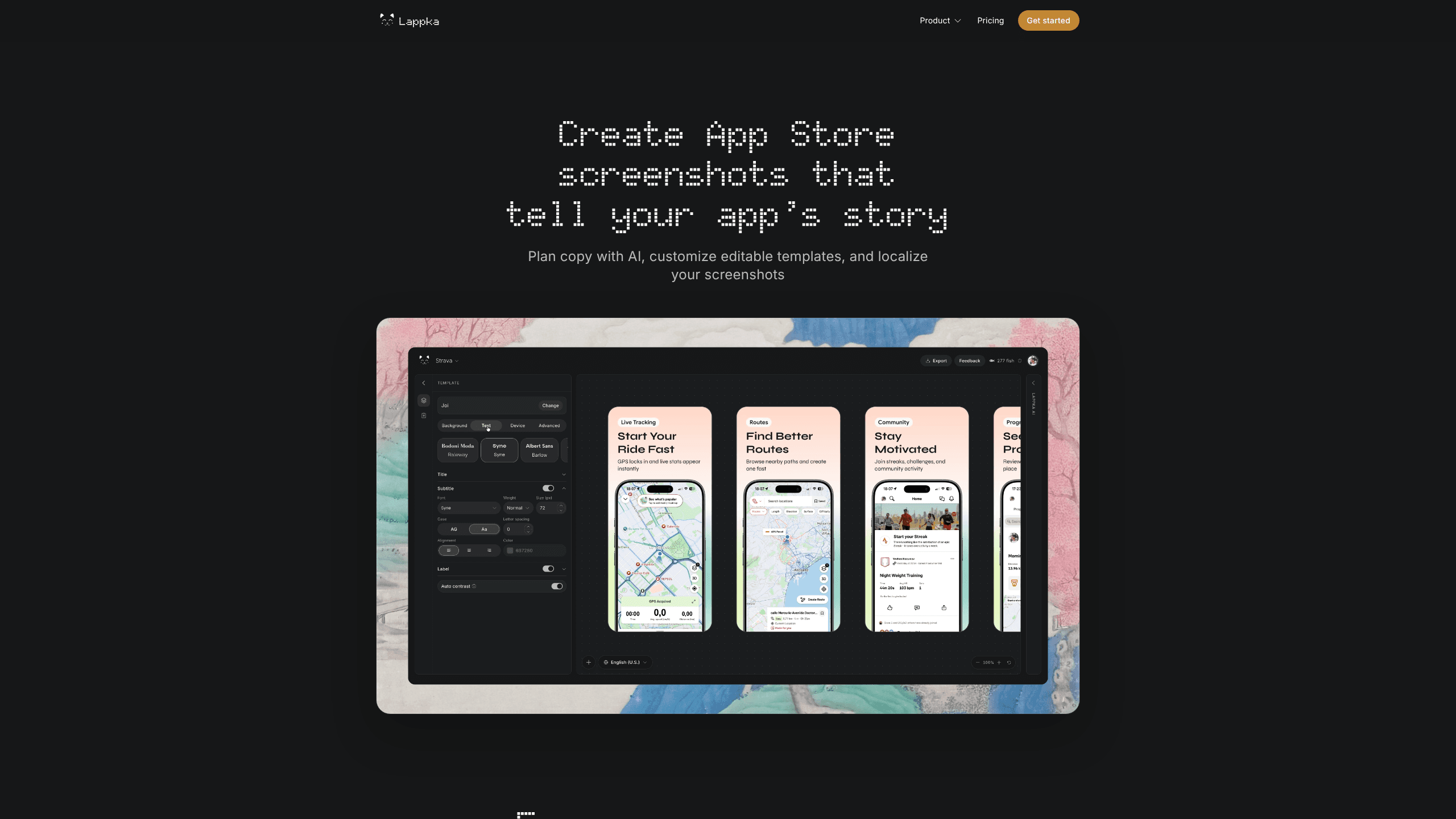
Lappka is an app screenshot maker that turns raw app screens into polished App Store and Google Play visuals. It targets indie developers, designers, and marketing teams who need store-ready images without opening a full design suite. Drop in your screens. Pick a layout. Adjust the copy. Then export.
About Lappka
What Is Lappka
Lappka is an app store screenshot generator built for one job: making the images on your store listing look like someone who cares made them. You drop in your screens, choose a layout, tune the copy, and the tool handles the rest. Store listing visuals that once took a weekend now take an afternoon.
Why does that matter? Because your screenshots are often the first thing a shopper sees, and most of them decide whether to tap download before they ever read your description. Lappka handles that part.
The pitch is speed over polish-by-hand. Instead of rebuilding a template in a design tool for every device size and every language you support, you reuse one design and push your screens out in the exact sizes the stores ask for. That matters when you ship an update and need a fresh set by the weekend.
The honest limitation: this is a focused tool, not a full design platform. If you need custom illustration work or a brand system built from scratch, you'll still be in a design app. Lappka is for teams who already have screens and just need them presented well.
Getting Started
- Open lappka.store in your browser and start a new project.
- Upload the raw screenshots from your device or simulator.
- Pick a template style and drop your brand colors and font in.
- Swap the headlines and captions so each screen tells one clear benefit.
- Export the finished set in the sizes for App Store and Google Play, then upload.
Product Information
A quick look at Lappka's pricing, supported platforms, and performance.
Best for
The users, tasks, and scenarios where this tool fits best.
Users
- Indie developers
- Product designers
- Marketing teams
Tasks
- Building a launch screenshot set
- Localizing visuals for new markets
- Refreshing an aging listing
Scenarios
- An indie dev finishing an app on a Sunday night and needing screenshots before the review queue closes.
- A small studio preparing a version update and swapping two screens without starting over.
- A marketing lead testing which headline converts better on the first screenshot.
Key features
Screen-to-Store Workflow
Lappka starts from the screens you already have. You upload them and the tool places them into frames, so you're not building mockups from zero. The point is to skip the tedious part and get to the copy and color choices that actually change how a listing performs.
Template Library
You pick from a set of layouts instead of a blank canvas. Templates give a starting rhythm for headline placement, background, and device framing, which is the difference between a listing that looks considered and one that looks thrown together by someone with no time left before the review queue closes. Swap the text and keep moving.
Caption and Headline Editing
Each screenshot gets a short headline and optional caption. Lappka gives you one obvious place to write them, so every screen carries a single benefit. Vague captions are the most common reason a decent app's listing underperforms, and this is where you fix that.
Device Framing
Your screens sit inside device frames that match what shoppers expect to see. It reads as more credible than a bare rectangle and takes zero extra work on your end.
Multi-Size Export
Stores demand specific pixel dimensions. Lappka exports the sizes you need so you're not resizing by hand or re-exporting for every device class.
Fast Iteration
Changing a headline or a background updates the whole set instead of the single image you touched, which makes A/B testing the first screenshot a realistic weekend task rather than a project. That's where most of the tap-through gain lives.
Pros and cons
Pros
- Turns existing screens into store-ready images without design software.
- Templates cut the time from blank page to finished set.
- Multi-size export removes manual resizing for App Store and Google Play.
- Headline editing keeps the focus on the copy that drives taps.
Cons
- It's a web tool, so you need a browser and a connection to work.
- Deep custom design still needs a full tool like Figma.
- Public pricing details are limited, so you'll want to check the site directly.
Frequently asked questions
It's an app store screenshot generator. You upload your app screens and it turns them into framed, captioned images sized for the App Store and Google Play listings.
Related content
Explore related tools, skills, and articles for Lappka.
Lappka Alternatives

X Ray Interpreter
X-ray Interpreter · ImageX Ray Interpreter is a web-based AI radiology tool that turns X-rays, CT scans, MRI, ultrasound, and PET images into plain-language reports. You upload a scan, get a preliminary X-ray interpretation in moments, then ask follow-up questions if something needs explaining. It works as a second opinion and a learning aid, not as a medical diagnosis.

Aieasypic
AIEasyPic · ImageAIEasyPic is an AI image generator that turns plain text prompts into finished artwork in seconds. You can also train custom models on your own photos, swap faces in existing images, and create short video clips from text, all from a browser. It suits casual creators who want quick visuals and hobbyists who want to build a personal model without touching any code.

Chargen
Chargen · ImageChargen is an AI character generator and worldbuilding toolkit built for Dungeons & Dragons and other tabletop RPGs. It turns a one-line idea into a painted character portrait, spins up NPCs, monsters, maps and encounters from the same session, and keeps every creature's details close at hand. The tabletop RPG art side runs on a credit system called Gold, while the text generators stay free for everyone.