

Lets Finally Meet!
Newbuildsoft UG (haftungsbeschränkt) · Productivity
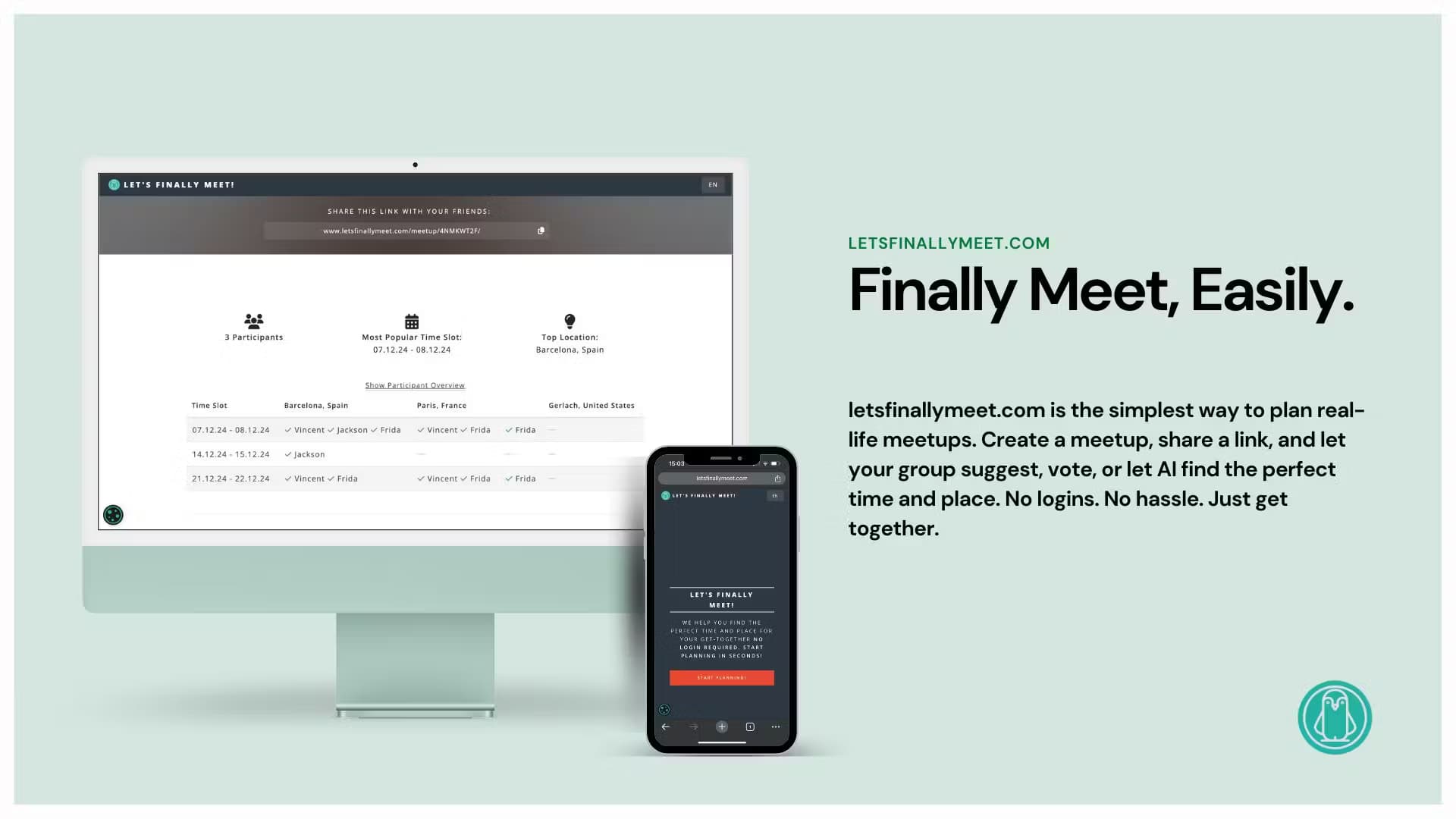
Let's Finally Meet! is a free, no-login group meetup planner. Name your event, offer a few dates, share one link, and everyone votes on the best time and place.
About Lets Finally Meet!
What Is Let's Finally Meet
Let's Finally Meet! is a web tool for planning a get-together without the back-and-forth messages. You name the meetup, pick what kind of event it is, and offer a few time options. Then you share a single link. Each person opens it, marks when they can make it, and you see where the group lines up. Nobody needs an account to join, and the organizer only needs an email address if they want email notifications.
The main problem it solves is coordination. Group chats fill up with half-answers like "maybe the 15th" and nothing gets confirmed. Here, everyone answers the same question in one place, so you can pick a slot that works for most of the group instead of chasing replies. It also handles the "where" part, not just the "when." The tool can suggest places, and participants vote on those suggestions too.
The biggest limits are scope and reach. It is built for casual gatherings such as dinners, trips, and weekend outings, not for paid bookings, recurring meetings, or calendar sync. The interface is available in English, German, and Spanish only, and there is no mobile app, so everyone plans from a browser.
Getting Started
- Open letsfinallymeet.com and enter a meetup name. You can add an optional password and generate a random name if you want.
- Choose the meetup type: Day & Time for a fixed slot like dinner, Day Trip for a single day without a fixed hour, or Multi-Day for a trip spread across several days.
- Add the dates or time options you want the group to vote on.
- Share the generated link. Participants open it, enter a name, and mark the times that work for them.
- Review the votes, confirm the winning slot, and let the tool surface a place suggestion to finish the plan.
Product Information
A quick look at Lets Finally Meet!'s pricing, supported platforms, and performance.
Best for
The users, tasks, and scenarios where this tool fits best.
Users
- Friend groups planning a dinner or night out
- Families organizing a reunion or day trip
- Small teams or clubs setting up an informal outing
Tasks
- Finding the best time for a group
- Choosing where to meet
- Planning a multi-day trip
Scenarios
- A weekend getaway with friends
- A casual dinner where the date keeps slipping
- A low-stakes community gathering
Key features
No-Login Planning
Anyone with the link can join a meetup without creating an account or downloading anything. The organizer also starts straight from the homepage. You can optionally add an email address to receive notifications, but it is not required to plan or to vote.
Three Meetup Types
The tool adapts to the event you have in mind. Day & Time suits a fixed slot such as a dinner reservation. Day Trip suits a single day with no set hour, like a hike. Multi-Day suits a trip spread over several days, such as a weekend away. Each type changes which options you offer for voting.
Time Voting With Multiple Options
Rather than fixing one date, you can put several time options forward and let the group respond to each. This turns a scattered group chat into a single shared answer sheet, so the best-supported slot is easy to see.
AI Place Suggestions
Let's Finally Meet! does not stop at the "when." It can generate location suggestions that participants then vote on. That means time and place get decided in the same place, cutting out a second round of messages about where to go.
Optional Password Protection
When you name a meetup, you can set a password. That keeps a shared link from being opened by anyone who stumbles across it, which helps for gatherings you would rather keep within a known group.
Participant Names and Availability
Each person joins with a freely chosen name, so a nickname works fine. Their availability answers and comments collect in one view for the organizer, making it clear who can attend which option.
Pros and cons
Pros
- No account is needed for the organizer or for participants, so the barrier to joining is low.
- One link replaces a long group chat, and everyone answers the same question.
- It covers both time and place, so a plan can be finished in one tool.
- Three meetup types fit dinners, day trips, and multi-day outings alike.
- An optional password adds a light privacy layer when you need one.
Cons
- The interface is only in English, German, and Spanish, so other groups may struggle.
- There is no mobile app, and planning depends on a browser link.
- No calendar sync or automated invites, so the confirmed plan has to be added by hand.
- It is aimed at casual meetups, not paid bookings, classes, or recurring meetings.
Frequently asked questions
Yes. The site presents the planner as free and no-login. There is no paid tier shown for creating meetups or voting, and no credit card is needed to start.
Related content
Explore related tools, skills, and articles for Lets Finally Meet!.
Lets Finally Meet! Alternatives

Swms
Swms AI · Writing · Productivity · BusinessSwms is an AI safety compliance tool that turns a plain description of a job into ready-to-use safety documents. Describe your project, trade, and known hazards, and it writes a safe work method statement, job hazard analysis, safe work procedure, RAMS, or safety data sheet in seconds. It also ships with Oscar, a chat assistant that answers workplace safety questions in any language. Teams in construction, mining, transport, and warehousing use it to cut the paperwork that usually eats into a workday.

Wordly AI Translation
Wordly · Voice & Language · ProductivityWordly AI Translation is a real-time AI translation and captioning platform built for meetings, conferences, and events. It delivers live translation, captions, transcripts, and summaries in more than 60 languages, and attendees join by scanning a QR code or opening a link instead of using dedicated headsets. The platform works with Zoom, Microsoft Teams, Google Meet, and Webex, and it's designed for organizations that want multilingual access without hiring human interpreters for every session. Simple as that.

Rows
Rows (Superhuman) · Productivity · BusinessRows is an AI spreadsheet and data analysis tool that imports live data from more than 50 sources, then lets you work with it using plain language instead of SQL queries or nested formulas. You can pull numbers out of PDFs, connect ad platforms, databases, and bank accounts, and ask the AI to build reports, merge datasets, or set up models that recalculate themselves. It runs in the browser, works like a spreadsheet, and now sits under the Superhuman umbrella.