

LipSync.video
LipSync.video · Video
LipSync.video is a browser based AI studio that animates photos and videos into talking clips, dubs footage into 150+ languages and builds AI avatar videos.
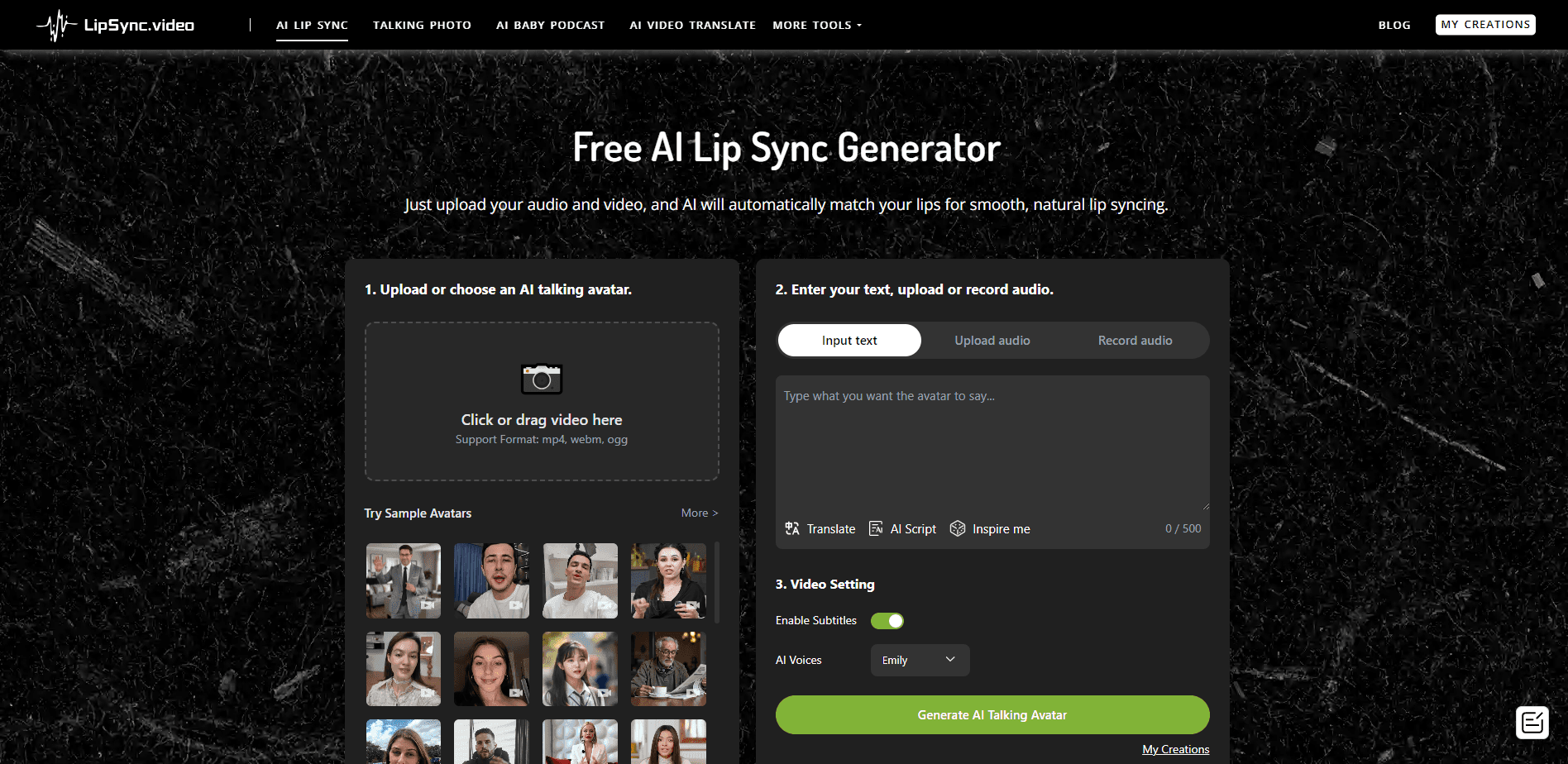
About LipSync.video
What Is LipSync.video
LipSync.video is a web studio for AI lip sync and video creation, and it bundles several tools that usually live in separate apps. You can take a still photo and give it a voice, turn a cartoon or an animal into a talking character, dub a clip into another language, or generate an ad style avatar video. Everything runs in the browser, so there is nothing to install.
The pitch is breadth. The site splits into one lip sync tool plus a talking photo generator, a singing photo maker, a talking cartoon, animal talking clips, objects that talk and an AI baby podcast. It also covers AI video dubbing. Any creator who needs video localization can produce a talking head, a dubbed interview and a singing portrait from one account and one credit balance.
The limits are the tradeoff. The best lip sync and video models, such as LipSync 2.0, Seedance and Kling, still cost credits even on the top plan, and the unlimited label only covers a fixed set of older models. Credits also expire each month on subscription plans, and a short video can still burn a full credit or more. Your results depend heavily on the source material, so a clean, front facing photo and a clear audio track matter more than anything else.
Getting Started
- Create a free account with email or a social login and collect the daily free credits
- Pick a tool, such as AI lip sync, talking photo or video dubbing, and upload a photo, video or audio file
- Choose a model, set the language or voice, and for dubbing pick Fast or Accurate mode
- Generate the clip, preview the lip sync and audio, then download the finished video
Product Information
A quick look at LipSync.video's pricing, supported platforms, and performance.
Best for
The users, tasks, and scenarios where this tool fits best.
Users
- Social media creators
- Marketers and brand teams
- Course and training creators
- Podcasters and interviewers
Tasks
- Photo to talking video
- Video dubbing
- Singing photo and character clips
- Multi-language campaigns
- Fast ad style videos
Scenarios
- A creator with only a headshot
- A marketing video for a global launch
- A long interview or webinar
- A trending audio challenge
- A daily content habit
Key features
AI Lip Sync
AI Lip Sync is the core tool, and it makes a face speak in sync with an uploaded audio track or a text script. Think of it as a lip sync video generator: you bring a photo or a video, add the voice, and the model maps the mouth movement to the sound. It handles single faces well, and results track how clear and front facing the source is. This is the feature most people start with.
Talking Photo Generator
Talking Photo Generator turns one still image into a speaking clip, so you don't need footage of the person to get a talking head. You upload a portrait, provide audio or a script, and the tool animates the face. It's the fastest route when all you have is a headshot, and a sharp, well lit photo gives a far better result than a blurry one.
Video Dubbing in 150+ Languages
Video Dubbing translates a clip into more than 150 languages and matches the new speech to the visible mouth movement. You can pick Fast mode when turnaround matters or Accurate mode when you need higher translation and lip sync precision, and you can generate several language versions in the same project. It supports multi-speaker recordings and videos up to one hour.
Singing Photo and Character Clips
Singing Photo and the character tools, such as Talking Cartoon, Talking Animals and Talking Objects, make a photo, drawing or object seem to sing or talk. These are built for short, playful posts rather than long videos. The format suits a trending audio challenge or a quick meme, and setup is simple.
AI Avatar and Ad Videos
The AI Avatar and AI Ads tools build a presenter led video without a camera or a studio. You choose an avatar, supply a script, and the studio produces a promo style clip with a consistent face on screen. It fits teams that want a consistent on-brand face across campaigns without booking a shoot. Ad videos lean on this for quick, repeatable promos.
Voice and Multi-Speaker Support
The dubbing workflow recognizes several speakers and can keep each one's voice distinct through the translated dialogue, which matters for interviews, podcasts and panels. If you leave every speaker on one voice, a two person conversation stops sounding like a conversation. This is the difference between a usable dub and a flat one.
Pros and cons
Pros
- One account covers lip sync, talking photos, dubbing, and avatar videos, so you skip juggling separate subscriptions.
- Dubbing runs in 150+ languages with matched lip movement and supports multi-speaker recordings up to one hour.
- Free daily credits let you test the core tools before you pay anything.
- Everything runs in the browser, so there's no install and it works across Windows, Mac and mobile.
- You can generate several language versions in a single dubbing project instead of re-uploading each time.
Cons
- The best models, like LipSync 2.0, Seedance and Kling, cost credits even on the top plan, so unlimited doesn't mean everything is free.
- Subscription credits expire at the end of each month and don't roll over, which punishes people who pause between projects.
- Output quality depends on the source, so a low quality photo or noisy audio leads to a weak result.
- There's no public self-serve API for developers, since custom and API access is handled through a sales conversation.
Frequently asked questions
LipSync.video is a browser based AI studio for video creation. It animates photos and videos into talking clips, dubs footage into 150+ languages so the lips match, and builds AI avatar and ad videos. It bundles several tools, including AI lip sync, talking photo, singing photo and video dubbing.
Related content
Explore related tools, skills, and articles for LipSync.video.
LipSync.video Alternatives

ngram 2.0
ngram · Video · Marketingngram 2.0 is an AI video generator for teams. It turns a prompt, a screen recording, or a product URL into a narrated explainer, product demo, or AI avatar video, and every scene stays editable.

OpenScreen 2
OpenScreen (open-source project) · Video · ProductivityOpenScreen 2 is a free, open-source screen recorder and demo video editor for Windows, macOS, and Linux, with automatic zooms, styled frames, local captions, and agent edits.

Skreno
Skreno · Video · ProductivitySkreno is a browser screen recorder that captures a tab, a window or your whole display, then attaches AI transcripts, summaries and console logs to one share link.