

Luma AI Video Generator Free Online Powered By Dream Machine
Luma AI · Video
Luma AI Video Generator turns text, images, and storyboards into short cinematic clips. It runs on the web and iOS, with Ray 3.2 keyframe control and HDR export.
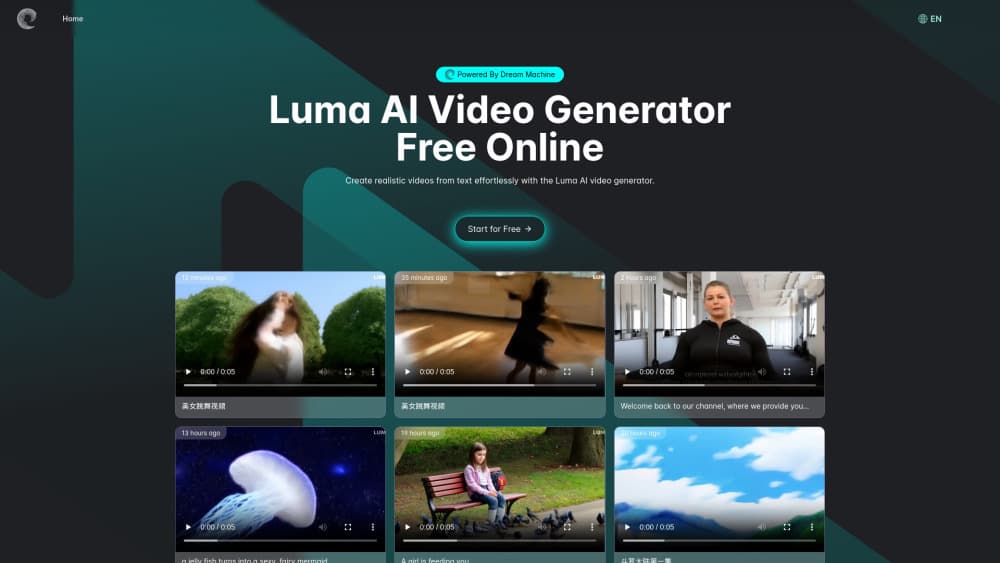
About Luma AI Video Generator Free Online Powered By Dream Machine
What Is Luma AI Video Generator
Luma AI Video Generator is the web and iOS app built around Luma Dream Machine, the video model Luma released in June 2024. In its current form it works less like a single prompt box and more like a studio desk: you open a board, describe what you want, and the agent picks a model, generates frames, and lets you adjust the result in place.
The product covers the gap between an idea and footage you can cut. You can start from a sentence, a product photo, or a rough sketch, then push the output toward a finished shot with keyframes, reframing, and reference images. Luma's own Ray 3.2 handles video, Uni-1.1 handles images, and third-party models such as Seedance 2.5, Kling 4.0, Veo 3.1, and MiniMax H3 sit in the same workspace and the same credit pool.
The constraint is the meter. There's no permanent free plan, new accounts start on trial credits, and 1080p generations cost enough credits that heavy use moves you up a tier quickly. Clips are also short. A typical generation runs 5 to 10 seconds, and even extend and video-to-video work tops out around 20 seconds, so anything longer becomes a stitching job in an editor.
Getting Started
- Sign in at lumalabs.ai with a Google account or email address.
- Create a board, then choose Brainstorm to explore directions or Create to work on a specific shot.
- Describe the scene, attach up to four reference images, and pick a model and resolution.
- Generate a draft at low resolution, then set start and end keyframes and regenerate at 1080p.
- Download the clip, or export HDR and EXR files if the shot is heading into Resolve or Nuke.
Product Information
A quick look at Luma AI Video Generator Free Online Powered By Dream Machine's pricing, supported platforms, and performance.
Best for
The users, tasks, and scenarios where this tool fits best.
Users
- Solo creators and social teams
- Agencies and in-house brand teams
- Filmmakers and editors doing previz
Tasks
- Turning a product photo into motion
- Building storyboards before a shoot
- Resizing one ad for every placement
Scenarios
- You need to test three creative directions before committing budget
- A campaign has to run in several markets
- A social post is due tomorrow and there's no time to book a shoot
Key features
Ray 3.2 With Frame-by-Frame Keyframe Control
Ray 3.2 is Luma's own frontier video model, and multi-keyframe is the reason to care. You can place up to 16 keyframes inside a single clip and direct what changes and what holds between them. That turns a prompt into something closer to blocking a shot, which matters when a client wants a specific camera move rather than a lucky result.
One Workspace for Images and Video
Boards are infinite canvases that hold images, clips, and the conversation that produced them. Brainstorm mode generates options, Create mode refines one, and both sit in the same board. The practical effect is that you stop copying prompts between tools and start iterating on the thing you already have.
Image to Video, Video to Video, Extend and Reframe
The app covers more than text to video. Image to video animates a still, video to video restyles or swaps elements in existing footage, extend lengthens a shot, and reframe changes the aspect ratio while the model rebuilds the edges. Each one is billed by the second, so a 20-second video-to-video pass costs noticeably more than a short draft.
Reference Images and Character Consistency
You can drop in up to four reference images and ask the model to hold a face, an outfit, or a product design across shots. For a recurring character or a brand asset, this is the difference between a clip you can use and a clip you have to reshoot. References also carry style, which keeps a series looking like one campaign.
Multi-Model Access in One Credit Pool
Luma, Seedance, Kling, Veo, MiniMax, and Wan models all run inside the same subscription and draw on the same credits. You can test a shot on Kling 4.0 and finish it on Ray 3.2 without opening another account. Pricing is listed per model, per resolution, and per second, so the cost gap between draft and 1080p is visible before you hit generate.
Output Built for Post and AI Video Editing
Generations come out at up to 1080p, with native HDR and 16-bit EXR export on Ray 3.2. Audio and lip sync arrive through Sync Lipsync, which covers most AI video editing tasks that used to need a separate tool. That combination is unusual at this price, and it's what lets an AI clip survive a color grade instead of falling apart next to camera footage.
Pros and cons
Pros
- One subscription covers Luma's own models and most major third-party video models.
- Multi-keyframe control gives real direction over camera and subject movement.
- HDR and 16-bit EXR exports fit professional post pipelines.
- Boards and the agent chat lower the prompting barrier for non-specialists.
- The iOS app handles capture, reference, and generation away from a desk.
Cons
- There's no permanent free plan, and 1080p is expensive: 400 credits per 5 seconds means 25 clips on the 10,000-credit Plus plan.
- Clips are short, so a 30-second sequence means stitching several generations.
- Credit costs shift by model and resolution, which makes budgeting guesswork until you learn the table.
- It's browser-first with no Android app, so mobile work means an iPhone or a laptop.
Frequently asked questions
Not on an ongoing basis. New accounts get trial credits, and after those run out you need a paid plan starting at $30 per month. There's no ad-supported or watermark-tier free version.
Related content
Explore related tools, skills, and articles for Luma AI Video Generator Free Online Powered By Dream Machine.
Luma AI Video Generator Free Online Powered By Dream Machine Alternatives

ngram 2.0
ngram · Video · Marketingngram 2.0 is an AI video generator for teams. It turns a prompt, a screen recording, or a product URL into a narrated explainer, product demo, or AI avatar video, and every scene stays editable.

OpenScreen 2
OpenScreen (open-source project) · Video · ProductivityOpenScreen 2 is a free, open-source screen recorder and demo video editor for Windows, macOS, and Linux, with automatic zooms, styled frames, local captions, and agent edits.

Skreno
Skreno · Video · ProductivitySkreno is a browser screen recorder that captures a tab, a window or your whole display, then attaches AI transcripts, summaries and console logs to one share link.