

Lummi
Blush Design Inc. (owned by Udemy) · Image
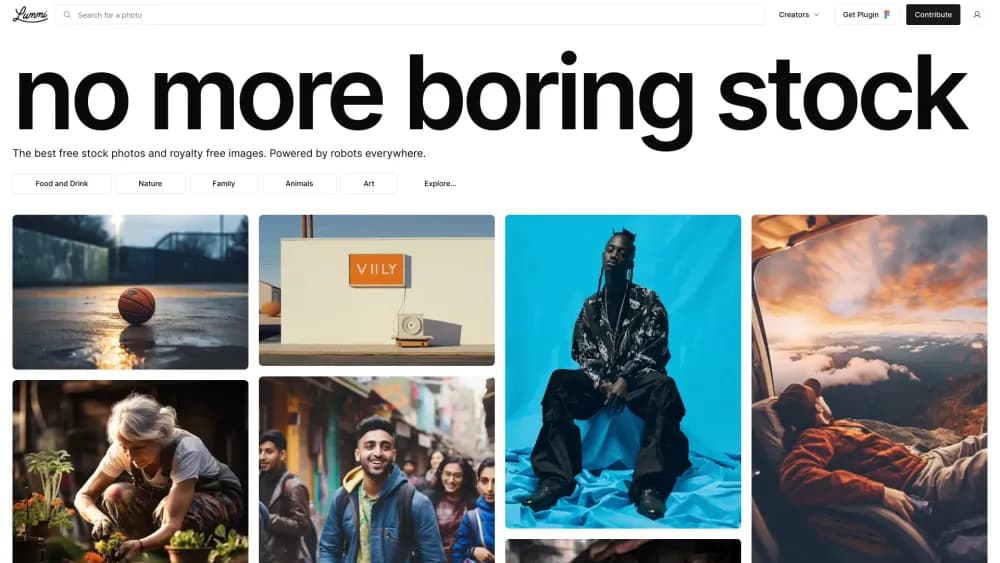
Lummi is a free AI stock photo library of photos, AI illustrations, and 3D assets with a no-attribution license, plus Pro tools to reframe, upscale, and generate images.
About Lummi
What Is Lummi
Lummi is an AI stock image library run by Blush Design Inc., the company behind the Humaaans illustration set. Instead of scanning photos from camera shoots, it publishes work from a vetted group of AI artists, then reviews each upload by hand. The result reads closer to a design portfolio than a traditional stock catalog: bold color, unusual angles, fewer people in suits shaking hands. Designers who want royalty-free AI images instead of camera-shot files often land here as a stock photo alternative to Unsplash.
The library covers three types of files. Photos, illustrations, and 3D renders sit in separate tabs, and the 3D section can hand you a .gltf file for modeling work. Everything published on the site falls under the Lummi license, which allows commercial use with no credit line. You can put an image in a client deck, a paid ad, or a book cover without asking.
The catch is what you can't do with it. You can't resell or redistribute the images as images, and you can't rebuild a competing stock service from the catalog. Free accounts also get standard resolution files. Sharp 8x upscales, background removal on every image, watermark-free access to the full collection, and AI generations sit behind the Pro plan.
Udemy bought Lummi in June 2025 and now runs it as part of its creator toolset. The site still operates on its own domain with its own pricing.
Getting Started
- Open lummi.ai and browse the Photos, Illustrations, or 3D tab. No account is needed to look around.
- Type a subject into the search bar, or open the palette icon to search by hex color. Narrow results with the Tools and Effects menu, which filters by number of people and lighting style.
- Open an image you like, then scroll to Similar images to branch out by subject or by mood.
- Download the file at the free resolution, or start a seven-day Pro trial if you need a larger export or a cutout.
- Install the Figma, Canva, Adobe Express, Webflow, or Framer plugin if you'd rather search the library inside your design tool.
Product Information
A quick look at Lummi's pricing, supported platforms, and performance.
Best for
The users, tasks, and scenarios where this tool fits best.
Users
- Designers tired of generic stock
- Social media managers working on a budget
- Startup founders building a landing page
- Developers who need image search in an app
Tasks
- Finding a header image for an article
- Resizing a photo for multiple placements
- Cutting a product or person out of a background
- Generating a visual that doesn't exist in the library
- Turning a still into a short clip
Scenarios
- A pitch deck due tomorrow
- A brand refresh for a small client
- Prototyping an app screen
Key features
Curated Library of Photos, Illustrations, and 3D
Lummi splits its catalog into three tabs, and each one behaves like its own library. The photo feed favors cinematic lighting and unusual framing, the illustration tab covers vector-style scenes and character work, and the 3D tab offers renders plus downloadable .gltf files for modeling projects. Every upload passes a human review before it goes live, which keeps the average quality higher than an open submission site. New picks land on the homepage daily.
Search With Color and Composition Filters
The search bar does more than match a keyword. A palette icon opens a color picker, and you can paste a hex code to pull images that fit an existing brand palette. The Tools and Effects menu adds filters for the number of people in the frame and for bright, dark, or neutral lighting. Open any result and a Similar images strip splits into two views, one matched by subject and one by mood, which is handy when you know the feeling you want but not the search term.
Editing Tools That Work on Any Image
Reframe stretches an image to a new aspect ratio and paints in the missing edges, with draggable focal points for control. Remove Background returns a clean cutout without a selection tool. Edit takes a text prompt for changes like hair color, a removed blemish, or an added object, and can return up to three variations. FX applies one of eight retro effects, duotone maps an image onto up to three brand colors, and the upscaler pushes a file up to 8x. A large upscale can take a few minutes. Most of these are Pro features.
AI Image Generator and Video Generator
Prompt mode sits in the search bar. Type a description, then set the image type, aspect ratio, shot type, and a preset trend if you want a specific look. A single prompt can return up to three images. The same panel generates video: pick a wide, story, or auto frame, choose 4, 6, or 8 seconds, and toggle audio. Create and Retouch run on ByteDance Seedream, and Lummi added Google's Nano Banana model in late 2025 for image work.
Plugins for Design Tools
The Figma and Webflow plugins are the fullest versions and mirror most of what the web app does, including an Insert Random button for quick filler. Canva, Adobe Express, and Framer get search and insert. For teams that live inside one of these tools, the plugin removes the download folder step entirely.
REST API for Developers
Lummi runs a REST API at api.lummi.ai/v1 with endpoints for listing and searching images, downloading an asset, fetching similar or random images, listing collections and creators, and generating an image. Responses include the asset URL, the creator profile, image type, and timestamps. Access requires an API key, which you request through a form on the developers page, so it suits product teams more than weekend scripts.
Pros and cons
Pros
- The license clears commercial work with no attribution, which removes a step from client handoffs.
- Human review keeps the catalog consistent, so a random page of results rarely looks broken or off-brand.
- Color and lighting filters match how designers actually search, especially when a palette is already locked.
- Plugins put the same library inside Figma, Webflow, Canva, Adobe Express, and Framer.
- The API covers search, download, collections, and generation, which is more than most stock sites offer.
Cons
- Free downloads come at standard resolution, so print work and large banners need the Pro plan.
- The library is smaller than a legacy stock agency, and niche topics such as specific machinery or regional locations can come up empty.
- Pro costs $15 a month billed monthly, and the 60 monthly AI credits run out fast if you generate often.
- AI-generated faces and hands still fail on close inspection in some uploads, so check a candidate at full size before you commit.
Frequently asked questions
Yes. Most of the library downloads free with an account, and the license covers personal and commercial work. Paid plans add higher resolution, premium images, editing tools, and AI generation.
Related content
Explore related tools, skills, and articles for Lummi.
Lummi Alternatives

X Ray Interpreter
X-ray Interpreter · ImageX Ray Interpreter is a web-based AI radiology tool that turns X-rays, CT scans, MRI, ultrasound, and PET images into plain-language reports. You upload a scan, get a preliminary X-ray interpretation in moments, then ask follow-up questions if something needs explaining. It works as a second opinion and a learning aid, not as a medical diagnosis.

Aieasypic
AIEasyPic · ImageAIEasyPic is an AI image generator that turns plain text prompts into finished artwork in seconds. You can also train custom models on your own photos, swap faces in existing images, and create short video clips from text, all from a browser. It suits casual creators who want quick visuals and hobbyists who want to build a personal model without touching any code.

Chargen
Chargen · ImageChargen is an AI character generator and worldbuilding toolkit built for Dungeons & Dragons and other tabletop RPGs. It turns a one-line idea into a painted character portrait, spins up NPCs, monsters, maps and encounters from the same session, and keeps every creature's details close at hand. The tabletop RPG art side runs on a credit system called Gold, while the text generators stay free for everyone.