

Magai
Magai · Productivity · Chatbot
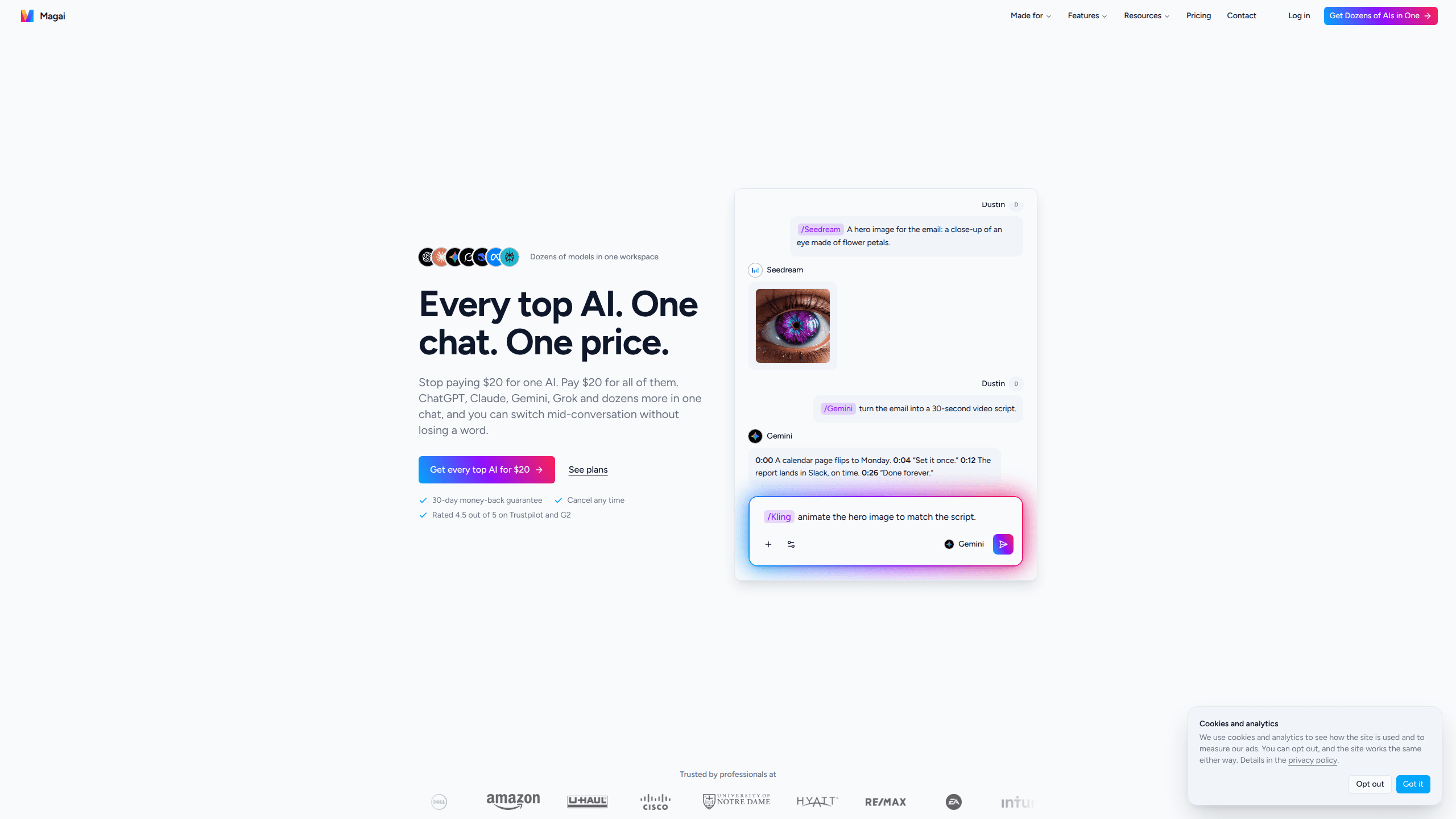
Magai is a multi-model AI aggregator that puts ChatGPT, Claude, Gemini, Grok and dozens of other models from every major lab into a single chat for one monthly price. It's built for people who juggle three or four AI subscriptions and keep re-explaining the same project to each one. You type a slash, pick a model, and the next reply comes from that model with the whole conversation in hand. The draw is straightforward: all AI models one subscription, shared memory across every model, and custom agents you can run on any of them. It's one flat AI aggregator pricing model for the whole set.
About Magai
What Is Magai
Magai is an AI chat workspace that connects to models from OpenAI, Anthropic, Google, xAI, DeepSeek, Perplexity and others, then serves them through one interface and one bill. Instead of paying roughly $20 a month for each lab separately and losing your context every time you switch tabs, you get the same models in one thread and you can swap mid-conversation without losing a word.
The problem it solves is subscription sprawl. A writer might pay for ChatGPT Plus for outlines, Claude Pro for editing, and a Gemini plan for long documents, then copy and paste the same brief three times. Magai collects those models into one place, adds a memory layer that travels with you when you switch, and charges around $20 a month for all of them.
The limitation is that Magai doesn't train or host these models itself. It depends on the labs staying open to third-party access. It also runs on a monthly usage allowance rather than per-model limits, and heavy days can burn through it. Top-ups come in $5 steps if you need more.
Getting Started
- Sign up at magai.co and choose a plan. The monthly plan starts at $20, and there's a 30-day money-back guarantee if it doesn't fit. No contract. Cancel any time.
- Open a chat and start typing in plain language. Create a workspace for each project so its history and memory stay together.
- Switch models by typing a slash and a name, like /GPT or /Claude, or open the picker and click one. The conversation carries over.
- Set up an agent by writing your instructions once, then call it by name in any chat and run it on whichever model you prefer.
- Connect the image and video tools, or schedule a task to run once or on repeat, and watch your usage in dollars rather than credits.
Product Information
A quick look at Magai's pricing, supported platforms, and performance.
Best for
The users, tasks, and scenarios where this tool fits best.
Users
- Freelance writers and marketers
- Researchers and analysts
- Small teams
Tasks
- Switching models mid-task
- Reusing instructions across models
- Scheduled and recurring work
Scenarios
- Drafting a blog post where one model outlines and another polishes the final copy.
- Comparing how two models answer the same research question without leaving the thread.
- Running a repeatable weekly report that any model can produce on a schedule.
Key features
Multi-Model Chat With Mid-Conversation Switching
The core of Magai is one chat window that any of dozens of models can answer in. Type a slash and a model's name, or open the picker, and the next reply comes from that model with the full conversation already in hand. No tabs. No pasting. No re-explaining what you just asked. That single workflow is what most people switch for.
Shared Memory Across Every Model
Memory sits above the models rather than inside one of them. Tell Magai something once and GPT, Claude and Gemini all know it, and the memory survives when a lab ships a new version of its model. You can read, search, and delete any memory, which matters if you're storing client details or personal preferences. It fixes the usual problem. Everything you told ChatGPT is a stranger to Claude.
Custom Agents You Run on Any Model
An agent is your instructions, your voice, your files, and a set of skills. None of them are tied to a specific model. Call it by name in any chat and run it on Claude today and GPT tomorrow, hand it your connected apps, or put it on a schedule. There are also pre-built agents to start from. For anyone tired of retyping the same brief, this is the feature that ends it.
Image and Video Models in the Same Plan
Magai isn't chat-only. Image and video tools, including options like Runway, Kling, Ideogram, Leonardo, and Luma, sit in the same subscription, so you can generate a picture in the thread you were already writing. That keeps visual work next to the text that inspired it. No separate tool. No separate bill.
Usage in Dollars, Not Credits
Your monthly allowance shows up as a dollar amount you can actually see, spent across every model and tool. When a big day runs it low, you top up $5 and keep going rather than waiting out a reset window. Nothing you've made gets locked away behind a usage wall. No waiting. No lost work. It's a small design choice that changes how you plan heavy work.
Scheduled and Automated Tasks
You can schedule any model to run a task once or on a repeat, across the integrations you've connected. Set it once. Magai takes it from there, which turns a multi-step routine into something that just happens. Build the workflow once, then let it run while you do something else.
Pros and cons
Pros
- Dozens of models from major labs in one chat for around $20 a month, replacing several separate subscriptions.
- Switch models mid-conversation without losing context, so you can start in one model and finish in another.
- Shared memory works across every model and survives version changes, cutting down on repeated explanations.
- Custom agents are portable across models, so your instructions and voice stay consistent.
- Usage is measured in dollars with $5 top-ups, so running low is a button, not a four-hour wait.
- A 30-day money-back guarantee lowers the risk of trying it.
Cons
- There's no free plan, so you can't test the full workspace without paying first.
- Because Magai relies on third-party model access, availability and pricing depend on the labs, and a model can change or disappear.
- Heavy usage days can exhaust the monthly allowance and require a top-up, which adds up if you lean on it daily.
Frequently asked questions
Magai is a multi-model AI workspace that puts ChatGPT, Claude, Gemini, Grok and dozens of other models in one chat. You use it to draft, edit, research, and generate images without switching between separate subscriptions or losing your conversation when you change models.
Related content
Explore related tools, skills, and articles for Magai.
Magai Alternatives

Swms
Swms AI · Writing · Productivity · BusinessSwms is an AI safety compliance tool that turns a plain description of a job into ready-to-use safety documents. Describe your project, trade, and known hazards, and it writes a safe work method statement, job hazard analysis, safe work procedure, RAMS, or safety data sheet in seconds. It also ships with Oscar, a chat assistant that answers workplace safety questions in any language. Teams in construction, mining, transport, and warehousing use it to cut the paperwork that usually eats into a workday.

Wordly AI Translation
Wordly · Voice & Language · ProductivityWordly AI Translation is a real-time AI translation and captioning platform built for meetings, conferences, and events. It delivers live translation, captions, transcripts, and summaries in more than 60 languages, and attendees join by scanning a QR code or opening a link instead of using dedicated headsets. The platform works with Zoom, Microsoft Teams, Google Meet, and Webex, and it's designed for organizations that want multilingual access without hiring human interpreters for every session. Simple as that.

Rows
Rows (Superhuman) · Productivity · BusinessRows is an AI spreadsheet and data analysis tool that imports live data from more than 50 sources, then lets you work with it using plain language instead of SQL queries or nested formulas. You can pull numbers out of PDFs, connect ad platforms, databases, and bank accounts, and ask the AI to build reports, merge datasets, or set up models that recalculate themselves. It runs in the browser, works like a spreadsheet, and now sits under the Superhuman umbrella.