

Magic
Magic (formerly Openmagic) · Video
Magic is an AI product video generator and AI product photography studio built for e-commerce brands and sellers. You upload a product photo, logo, or clip, pick from 400+ templates, and the platform returns a finished video or image at up to 4K with commercial rights included. It's the same tool that used to run under the Openmagic name, now aimed squarely at teams that need catalog visuals, paid social ads, and creator-style clips without hiring a film crew.
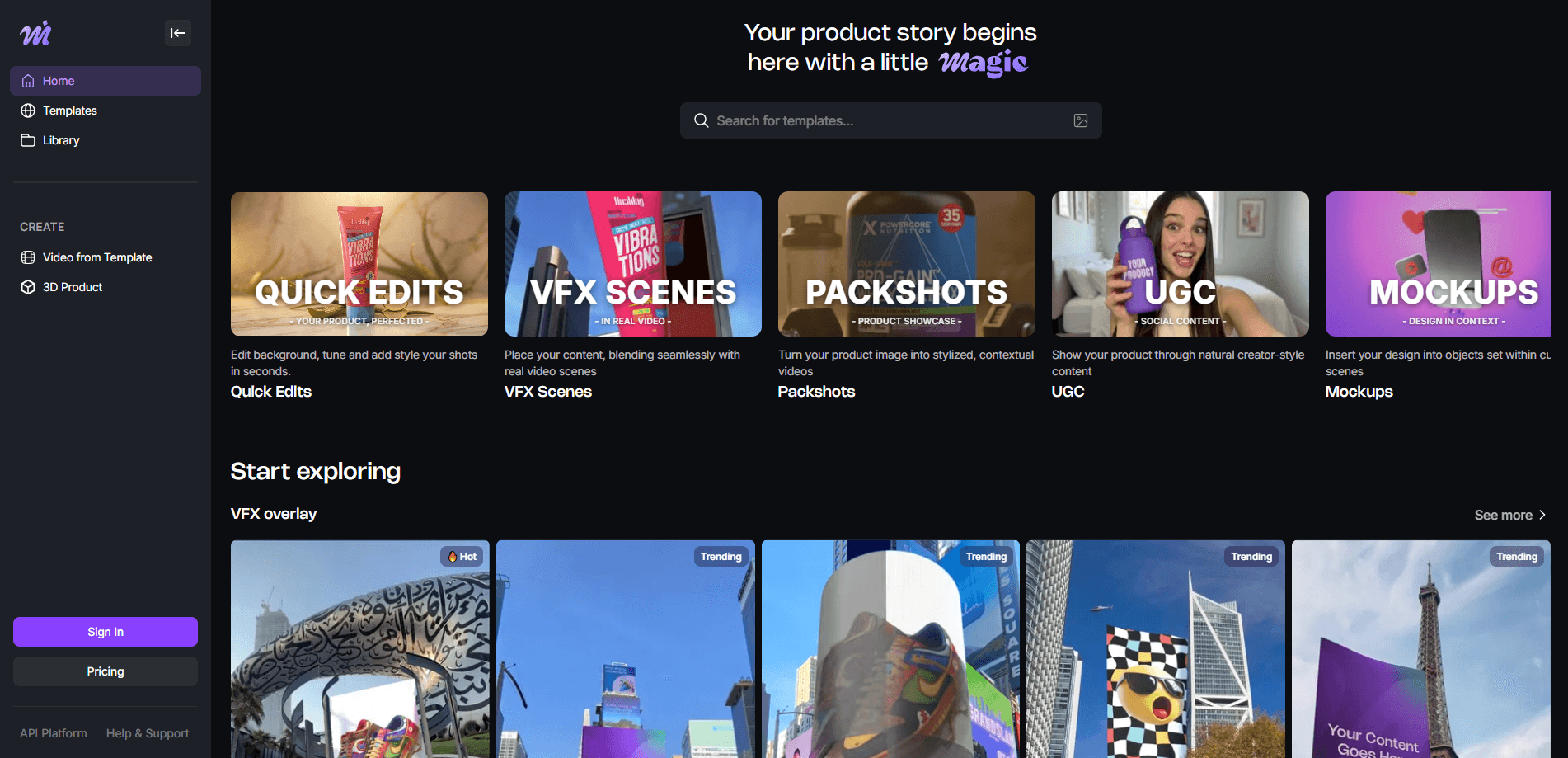
About Magic
What Is Magic
Magic is a web-based AI content studio for product marketing. Rather than shooting every SKU in a studio, you feed the platform your existing product photos and it generates polished videos and images: catalog packshots, VFX-heavy launch spots, and handheld-style UGC clips with AI spokespeople. The pitch is consistency. The same template applied to a hundred different products produces the same look, so your storefront and your ad campaigns don't drift apart.
The name has shuffled a bit. Magic was formerly known as Openmagic, and the company says it's trusted by more than 250,000 users across 50+ countries. If you saw the Openmagic brand before and wondered where it went, it didn't disappear, it just rebranded.
The main limit worth knowing up front is the credit system. Renders cost credits, not minutes, and a single video render eats a meaningful chunk of them. On the free tier that's a real constraint. There's also no fully offline or self-hosted option, so everything you make depends on the platform staying up and keeping your account in good standing.
Getting Started
- Create a free account at app.omagic.ai. No card is required, and new signups get a one-off grant of 30 credits.
- Browse the template library and pick a format that matches your goal: a catalog packshot, a VFX launch scene, or a creator-style UGC clip.
- Upload your source material. Any product photo works, and quality matters less than you'd expect.
- Generate the asset. A video render costs about 15 credits, so a handful of tries will use up the welcome grant.
- Download and publish. Outputs run up to 4K, and commercial rights come with paid plans.
Product Information
A quick look at Magic's pricing, supported platforms, and performance.
Best for
The users, tasks, and scenarios where this tool fits best.
Users
- E-commerce sellers and store owners
- Performance marketers and ad agencies
- Small in-house content teams
- App and SaaS marketers
Tasks
- Generating product video ads from a single photo
- Producing catalog images with a fixed look
- Writing UGC-style clips with AI presenters
- Making image-to-3D assets
Scenarios
- Launching a new product line on a tight deadline
- Refreshing an Etsy or Shopify listing
- Scaling a paid social campaign
- Testing ad concepts before committing budget
Key features
One-Click Template Library
The library holds 400+ production templates organized by category and format, covering fabric reveals, runway-style transitions, and lifestyle context scenes. Treat it as a product video maker with the guessing removed: you pick a template, drop in your product, and the output follows the same structure every time. That predictability is the real selling point when you're producing content at scale.
Three Content Modes
Magic splits its output into three jobs. The first places your product inside real footage for cinematic launch scenes. The second generates catalog images and video with fixed angles and fixed light. The third produces creator-style content with AI spokespeople. Picking the right mode early saves you from fighting a format that doesn't fit your goal.
Image to Video and Image to 3D
Static photos are the starting point, not the finish line. Magic animates product images into short videos, and paid plans add an image to 3D option that gives a flat shot some depth. For sellers without a photographer, that's often the difference between a placeholder listing and one that actually looks professional.
Brand-Safe Output
Templates are tuned so logos, labels, and packaging survive the generation process instead of melting into mush. If your product has distinctive packaging, that matters, since a garbled label makes the whole asset unusable. The company frames this as keeping output brand-safe by default.
Credit-Based Rendering
Every render draws from a credit balance. The free tier includes 30 credits a month at 720p, which at roughly 15 credits per video works out to about two clips. Paid tiers raise the monthly allowance and let you buy add-on credit packs, so heavier users top up rather than hit a hard wall. If you're producing dozens of clips a week, the top tiers are where the cost math starts to make sense. Run the numbers before you commit.
API and Team Controls
The Business plan adds API access, concurrent renders, and dedicated support. That's the tier for teams that want to push Magic into an existing production pipeline rather than click through the interface by hand. Custom templates are also part of the Business offering.
UGC-Style AI Presenters
Think of this mode as a UGC video generator that never needs a call sheet. It produces spoken-style product clips with AI presenters, and the same character can carry across an entire campaign. It's a practical shortcut when you want the casual feel of creator content but can't coordinate multiple shoots with real people.
Pros and cons
Pros
- Free tier lets you test the workflow before paying, with no card required.
- Output reaches 4K with commercial rights on paid plans, which covers most ad and listing needs.
- Templates keep visual consistency across large product catalogs, cutting per-SKU effort.
- API access on the Business plan means it can slot into an existing content pipeline.
- Image to 3D and UGC modes cover more than basic slideshow-style product videos.
Cons
- Credits disappear fast. At about 15 credits per render, the 30-credit free grant is roughly two videos, so free users run out almost immediately.
- The free tier is capped at 720p and watermarked, and its output is personal-use only, so it can't be used for actual commercial listings.
- There's no free plan credit purchase, which means you must upgrade to a paid tier before you can buy more credits at all.
- Everything runs in the browser with no offline or self-hosted option, so your workflow stops if the platform has issues.
- Business pricing is quote-only, making it hard to budget without contacting sales.
Frequently asked questions
Magic turns product photos, logos, and images into professional videos and images using templates. You upload source material, choose a format, and the platform generates a finished asset you can use in ads, listings, or social posts. It's aimed at e-commerce and marketing teams that need content volume without a film shoot.
Related content
Explore related tools, skills, and articles for Magic.
Magic Alternatives

Vadu AI
Vadu AI · Image · VideoVadu AI is a web-based AI video generator that turns written prompts or still images into short clips, and it can also generate images on its own. You type what you want, pick a model and style, and the platform renders the result in minutes. A free plan covers light testing, while paid tiers run from $9 to $77.40 per month based on how many credits you burn.

Mykaraoke Video
MyKaraoke Video · VideoMykaraoke Video is an online karaoke video maker and lyric video maker that turns any song into a finished, lyrics-synced video right in your browser. It handles the slow part for you. The AI pulls vocals out of the mix and locks the lyrics to the beat, then lets you customize background, fonts, and colors before exporting in 1080p MP4. If you make lyric videos for social media, party nights, or music promotion, it skips the software installs and manual timing work entirely. Want a karaoke video generator that doesn't eat your whole evening? That's the pitch here.

Finalframe
Finalframe · VideoFinalframe is a set of free, browser-based tools for grabbing exact frames out of a video clip. Its best-known feature, the Final Frame Extractor, lets you extract the last frame of any video so you can use it as the starting image for AI video tools like Luma Dream Machine, Runway, or Kling. Want to keep a clip going? That last frame is your starting point. The tool runs locally in your browser, needs no sign-up, and costs nothing. A separate paid AI video-generation app from the same team is currently offline while it's rebuilt.