

MagicRemover
MagicRemover · Image
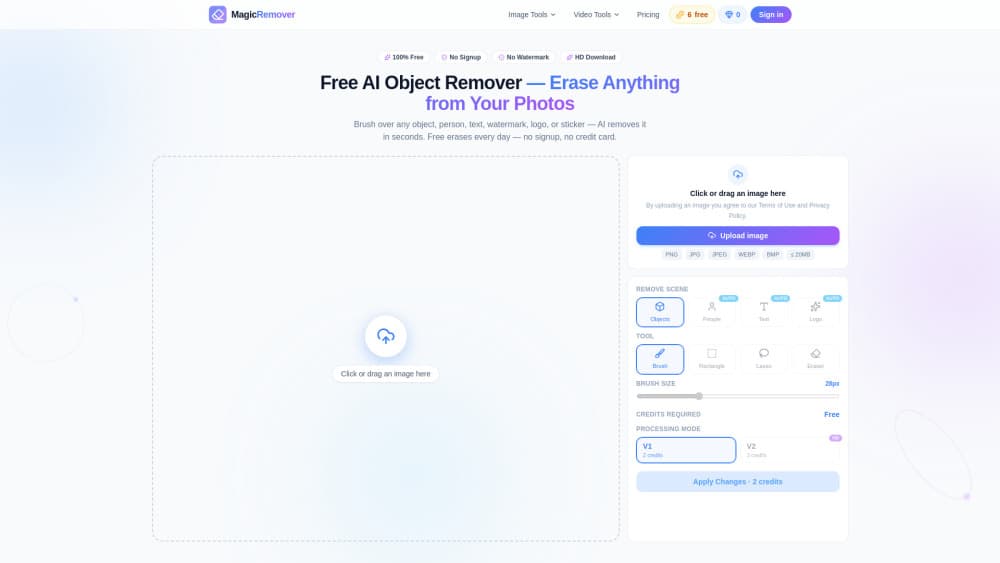
MagicRemover is a free AI object remover that erases anything you don't want in a photo: people, objects, text, watermarks, logos, and stickers. You brush over the target and the AI rebuilds the background behind it in seconds. There's no signup, no credit card, and no watermark on your download. It runs in your browser on phone and desktop, so there's nothing to install before your first edit.
About MagicRemover
What Is MagicRemover
MagicRemover is a browser-based photo cleanup tool built around one job: take something out of an image and make the hole disappear. Pick a mode, brush the area, and the model reconstructs what was hidden. It continues floor lines. It refills grass or sky. It matches the light. Why bother with a dedicated tool when a phone editor has a healing brush? Because MagicRemover rebuilds the background instead of blurring over it, and it handles people, objects, text, watermarks, logos, and stickers with the same brush-and-erase flow.
The main thing it solves is the cost of a cleanup. Erasing an object from a photo used to mean Photoshop, and it meant either clone-stamping by hand for ten minutes or paying a retoucher. MagicRemover does the texture reconstruction for you. The free tier is a real product, not a teaser: six erases a day, no signup, no watermark.
The trade-off is that quality scales with credits. The free daily edits run on the V1 engine, while the sharper V2 HD reconstruction, including full-resolution work up to 4K, spends credits. Busy texture areas and objects crossing many repeating patterns also come out best when you erase in smaller sections instead of one big stroke.
Getting Started
- Open magicremover.app in your browser. You can start without creating an account.
- Upload the image you want to clean up, or drag it onto the page.
- Pick a mode (People, Object, Text, Watermark, Logo, or Sticker) or leave it on manual erase, then brush over the target. Brush a little past the outline so the AI sees clean edges.
- Click Erase and let the model rebuild the background. For tricky spots, erase in sections and touch up the seams.
- Download the finished image. It saves without a watermark, and the original resolution is kept.
Product Information
A quick look at MagicRemover's pricing, supported platforms, and performance.
Best for
The users, tasks, and scenarios where this tool fits best.
Users
- Casual photographers
- Online sellers
- Designers and marketers
Tasks
- Remove people from a photo
- Watermark remover and logo remover
- Remove text from image
Scenarios
- Fixing vacation and landmark shots
- Preparing e-commerce listings
- Restoring old family scans
Key features
Six Specialized Erase Modes
MagicRemover splits cleanup into People, Object, Text, Watermark, Logo, and Sticker modes, plus a manual brush. Each mode points the AI at a different kind of target, so you don't have to guess which tool fits a watermark versus a photobomber. You can erase objects from photos without thinking about the mask at all. If you'd rather do it yourself, manual erase gives you full control over the mask.
AI Auto Erase
Rather than masking by hand, you pick a scene type and the AI finds and masks the target for you. It's the fastest route for common jobs like clearing a person from a group shot, and it costs 3 credits when you go past the free daily pool.
Background Reconstruction
The core of the tool is how it fills the gap. The model continues repeating patterns like tiles, fences, and grass, and matches the surrounding light so the edit doesn't leave a pasted-patch look. For people crossing complex surfaces, erasing in sections gets the cleanest result.
V2 HD Engine up to 4K
Paid AI auto erases run on the V2 engine, which handles the highest-quality reconstruction. V2 HD is priced by resolution across Fast, Balanced, and Quality presets, and Quality mode works at full size up to 4000px for detailed restoration work.
Free Daily Erases
The free plan gives you three manual and three AI auto erases every day. No signup. No credit card. No watermark on the output. Uploading, masking, and re-editing as many times as you like costs nothing; credits only spend when you erase beyond the daily pool.
Browser-Based, Nothing to Install
Everything runs in the browser. Nothing to download. Nothing to install. It works on phone and desktop, and the same brush-and-erase flow carries across every mode. Open the page and you're editing in seconds.
Credits That Fit the Workload
Credits come as monthly subscriptions or one-time packs. Subscription credits refresh monthly, while one-time pack credits never expire, so you can buy a block for a project and keep the leftovers. Manual erase costs 2 credits and AI auto erase costs 3.
Pros and cons
Pros
- Free tier is genuinely usable: six erases a day with no signup and no watermark on the download.
- Handles six target types, from people and objects to text, watermarks, logos, and stickers, in one place.
- Runs entirely in the browser on phone and desktop, with nothing to install.
- One-time credit packs never expire, so unused credits carry over between projects.
- Full-resolution output up to 4K is available when you pay for the V2 HD engine.
- Doubles as a free photo editing tool for quick everyday cleanups without an app install.
Cons
- The best reconstruction quality, including 4K work, sits behind credits; free daily edits use the older V1 engine.
- Objects spanning busy repeating patterns often need several smaller erase passes and manual seam touch-ups.
- There's no published API, so it can't be wired into an automated batch pipeline.
- Developer and company details aren't spelled out on the site, which makes it harder to gauge long-term support.
Frequently asked questions
Yes. The free plan gives you three manual and three AI auto erases every day, with no signup, no credit card, and no watermark on your downloads. You only pay when you want more erases than the daily pool allows or higher-quality V2 HD output.
Related content
Explore related tools, skills, and articles for MagicRemover.
MagicRemover Alternatives

X Ray Interpreter
X-ray Interpreter · ImageX Ray Interpreter is a web-based AI radiology tool that turns X-rays, CT scans, MRI, ultrasound, and PET images into plain-language reports. You upload a scan, get a preliminary X-ray interpretation in moments, then ask follow-up questions if something needs explaining. It works as a second opinion and a learning aid, not as a medical diagnosis.

Aieasypic
AIEasyPic · ImageAIEasyPic is an AI image generator that turns plain text prompts into finished artwork in seconds. You can also train custom models on your own photos, swap faces in existing images, and create short video clips from text, all from a browser. It suits casual creators who want quick visuals and hobbyists who want to build a personal model without touching any code.

Chargen
Chargen · ImageChargen is an AI character generator and worldbuilding toolkit built for Dungeons & Dragons and other tabletop RPGs. It turns a one-line idea into a painted character portrait, spins up NPCs, monsters, maps and encounters from the same session, and keeps every creature's details close at hand. The tabletop RPG art side runs on a credit system called Gold, while the text generators stay free for everyone.